





I've been working in IT and information security for over 10 years. And I know that the most difficult risks to prevent are those related to human error.
We develop the most reliable security methods. But just one password left publicly accessible will ruin all our efforts. And what can't you find in Jira tickets and comments, right?
Hi, my name is Sasha Rakhmanny, and I'm a developer on the information security team at Lamoda Tech. In this article, I'll share our experience searching corporate resources for sensitive data—passwords, tokens, and connection strings—using a custom ML plugin. I'll walk you through its implementation step by step and in detail, so you can build such a tool yourself, even if ML is new to you.
How passwords end up in the public domain
Once, at one of my previous jobs, we were conducting a routine penetration test. The results were devastating: the penetration tester had not only penetrated the system but also gained access to all accounts. The weak point turned out to be a password openly posted in a Jira ticket.The pen tester acted like this:
- A hacker fraudulently obtained user credentials for the company's Service Desk. The user whose credentials were used was not an IT employee.
- Using a search and regexp, I found a ticket asking a domain administrator to create a service account in Active Directory and make it a local administrator on one of the servers. In response, the administrator provided the account's username and password in the comment section.
- The pen tester connected to the server via RDP with these credentials and discovered that the administrator had not logged out.
- Using an obfuscated version of Mimikatz, he obtained the domain administrator's password. Kaspersky Anti-Virus detected nothing suspicious.
- The penetration tester dumped the password hashes of all accounts in the domain. This concluded the test.
But we couldn't technically prevent passwords from being published publicly. And mistakes here could have led to a repeat of the situation at any moment.
Several years passed, and I was already working at Lamoda in the information security department. I came across a ticket that had a problem connecting to one of the company's systems with a cleartext token.
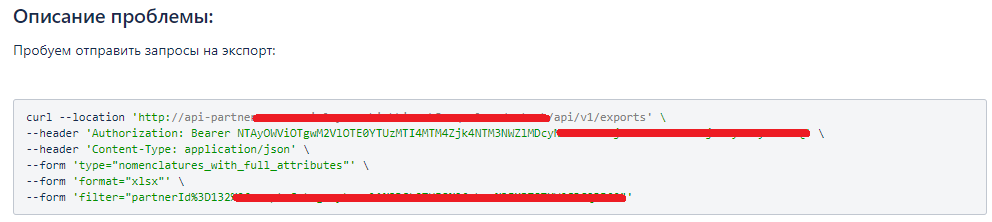
After experiencing a flashback to that pentest, I became curious: will we be able to learn about such incidents in real time?
Looking for an ML solution
Our first step was to look for a ready-made solution. However, it turned out there were no ready-made open-source plugins for Jira for this purpose. So, we decided to write our own using Machine Learning and make it more universal, allowing it to connect to various sources: Jira, Confluence, and shared drives. We wanted to create a kind of DLP solution, but for technical data.One of the significant limitations is that the model must work locally; we must not transmit any data to the outside world.
ML.NET , Microsoft's open-source library for machine learning for .NET applications, was chosen as the framework .
Why .NET and not Python? It's simple: the information security team at Lamoda Tech's tech stack is built on .NET products, and we chose what we knew and had experience with. The ML.NET framework also allows for training models without a deep dive into machine learning, thanks to model builders.
In this article, I'll walk you through the entire process, from collecting training data to publishing a finished app.
Collecting data to train the model
First, we need training data for learning. To facilitate development, training, and evaluation, we initially divided all data types into three categories: passwords, tokens, and connection strings.The source chosen was corporate Jira, with its long-standing ticket history. The workflow was as follows:
Created a set of regular expressions
The project https://github.com/mazen160/secrets-patterns-db served as a basis . We excluded systems from the list that we don't use and don't plan to use, as we won't receive training data from them. We added expressions specific to our needs: for example, variations of the word "password" in the Latin alphabet, tokens for local providers (Yandex Cloud), and regular expressions for Bearer and basic tokens.
Downloaded tickets from Jira via API using keyword search
Unfortunately, Jira's built-in JQL query language doesn't support regular expression searches. We compiled a list of keywords that might contain the data we were looking for and extracted all the tickets that matched them.
Created CSV files for each category
We split the ticket contents—descriptions and comments—into separate lines and checked each against a regular expression. We saved the results to three files: connection strings, tokens, and passwords. Data matching the regular expression was marked as True, and the rest was marked as False. Example of a CSV file:
Text | ContainsToken |
PASSWORD=abc123xyz | True |
ALLOWED_HOSTS= example.com | False |
Training models
To train and work with models, we will create a separate Net Core library, the models from which we can then use in the Web API server.The process of creating a model is quite simple.
In Visual Studio, go to the library project, select Add, then Machine Learning Model. Specify a name for the model.

The model creation wizard will then open. You can read more about ML.NET scripts here .
In our scenario, we're interested in data classification. We'll train a model to answer the question: "Does an input string contain a password (secret/token)?" In the first stage, the model acts as a binary classifier.
We specify the CSV file prepared in the previous step as the training data. In the settings, we specify that the Text column is the string data for training, and ContainsToken is the category.
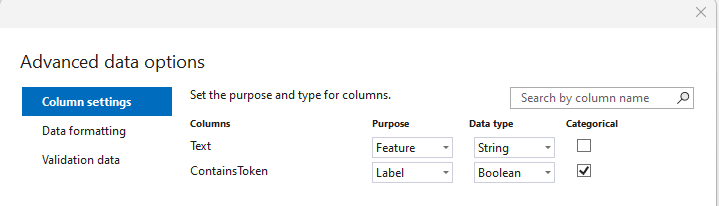
In the Validation data menu in the designer, you can choose three strategies:
- Cross-validation is a method for training and evaluating machine learning models that splits data into multiple parts and trains multiple algorithms on these parts. This method is recommended for small training data sets.
- Split—the provided data is divided into training and testing (e.g., 80/20). This algorithm is useful for large amounts of input data.
- Validation data - allows you to specify a separate file for model validation.
Example:
Next, you need to set up model training .Line for test
curl -X GET " https://api.somesite.com/api/someversion/someendpoint " \ -H "Content-Type:application/json" \ -H "Authorization: Bearer 123456789ABCDEF"
Result:
Cross validation, 5 folds Score: 4.301
Split, 80/20, Score: 3.725
Model training settings
All settings except Optimizing metric appeared in ML.NET 3, so it is better to use the latest version of the framework.Time to train — you can limit the model training time in seconds. The value depends on both the amount of test data and the processor performance. Microsoft recommends the following limits:
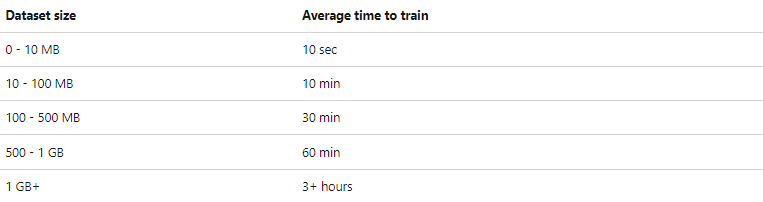
On my 5MB dataset, there was no significant difference between 10 and 60 minutes.
Advanced — Optimizing metrics are specific metrics used to evaluate the performance of a machine learning model performing a specific task.
Types of metrics:
- Accuracy is the proportion of correct predictions on a test data set. It is the ratio of the number of correct predictions to the total number of input samples.
- AUC-ROC is the area under the error curve (ROC), which shows the relationship between the proportion of true positive and false positive predictions of a model at different classification thresholds. The higher the AUC-ROC, the better the model discriminates between classes.
- AUCPR — the precision-recall curve (PR-curve) shows the relationship between precision and recall of a model at different classification thresholds.
Accuracy is the proportion of correct predictions of the model among objects that the model classified as positive.
Recall is the proportion of correct model predictions among objects that actually belong to the positive class. The area under the precision-recall curve (PR-AUC) is the average precision value obtained for each recall value.
- F1-score — The F1-score, also known as the balanced F-score or F-score, is the harmonic mean of precision and recall. The F1-score is useful when you want to find a balance between precision and recall. The mathematical formula for the F1-score is: F1 = 2 * (precision * recall) / (precision + recall).
Advanced — Trainers — training algorithm. For the first time, you can select all algorithms and check which one performs best. In ML.NET 2, TextClassificationMulti (0.9756) performed best on our data, while in ML.NET 3, LightGbmBinary (0.9961) performed best on the same data. Read more about training algorithms here: learn.microsoft.com .
Advanced — Tuners — parameter enumeration algorithms:
- Stop strategy (Stop training based on specified parameters) - time, number of models and RAM limit.
- Simple strategy — using only part of the dataset for training.
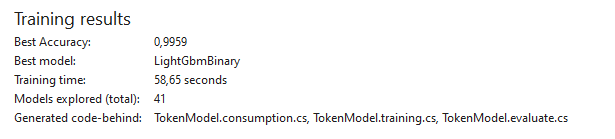
In the final step, the designer will provide sample code for using the model or prompt you to create a project with a console application or Web API. At this point, we close the designer and create similar models for other types—passwords and connection strings.
Model Performance Testing, API Server
To test the models, we'll create a WebAPI application with a single endpoint—Predict. For demonstration purposes, the PredictionEngine has been simplified at this stage.An interface was created to operate the service:
public interface IPredictor
{
Task<PredictResult> PredictAsync(string str);
}
Explain with

And the classes that implement it.
Class for checking against regular expressions:
public class RegexPredictor : IPredictor
{
private readonly RegexConfig _regexConfig;
public RegexPredictor()
{
var deserializer = new YamlDotNet.Serialization.Deserializer();
_regexConfig = deserializer.Deserialize<RegexConfig>(File.ReadAllText("rules.yml"));
}
/// <summary>
/// predict using regex
/// </summary>
/// <param name="str"></param>
/// <returns>PredictResult</returns>
public Task<PredictResult> PredictAsync(string str)
{
foreach (var item in _regexConfig.patterns)
{
Match match;
try
{
match = Regex.Match(str, item.pattern.regex, RegexOptions.IgnoreCase);
}
catch
{
match = Regex.Match(str, Regex.Escape(item.pattern.regex), RegexOptions.IgnoreCase);
}
if (match.Success)
{
return Task.FromResult(new PredictResult()
{
Name = $"Regex({item.pattern.name})",
Score = 1
});
}
}
return Task.FromResult(new PredictResult()
{
Score = -1,
Name = "Regex"
});
}
}
Explain with
Abstract class for model evaluation:
public abstract class MLPredictor
{
/// <summary>
/// Create a prediction engine from a ML.NET model
/// </summary>
/// <param name="mlNetModelPath"></param>
/// <returns>PredictionEngine</returns>
internal PredictionEngine<ModelInput, ModelOutput> CreatePredictEngine(string mlNetModelPath)
{
var mlContext = new MLContext();
ITransformer mlModel = mlContext.Model.Load(mlNetModelPath, out var _);
return mlContext.Model.CreatePredictionEngine<ModelInput, ModelOutput>(mlModel);
}
/// <summary>
/// Predict the input string
/// </summary>
/// <param name="input"></param>
/// <param name="predictEngine"></param>
/// <returns>ModelOutput</returns>
public ModelOutput Predict(ModelInput input, Lazy<PredictionEngine<ModelInput, ModelOutput>> predictEngine)
{
var predEngine = predictEngine.Value;
return predEngine.Predict(input);
}
}
Explain with
And implementation classes for each model, using the password model as an example:
public class PasswordPredictor : MLPredictor, IPredictor
{
private readonly Lazy<PredictionEngine<ModelInput, ModelOutput>> _predictEnginePassword;
public PasswordPredictor()
{
_predictEnginePassword = new Lazy<PredictionEngine<ModelInput, ModelOutput>>(() =>
CreatePredictEngine("PasswordModel.mlnet"), true);
}
/// <summary>
/// Predict the input string
/// </summary>
/// <param name="str"></param>
/// <returns></returns>
public async Task<PredictResult> PredictAsync(string str)
{
var predictResult = Predict(new ModelInput
{
Text = str
}, _predictEnginePassword);
return new PredictResult
{
Name = "Password",
Score = predictResult.Score
};
}
}
Explain with
General class for outputting the best result:
public class CombinePredictor : IPredictor
{
private readonly List<IPredictor> _predictors;
public CombinePredictor(List<IPredictor> predictors)
{
_predictors = predictors;
}
/// <summary>
/// Run all predictors and return the result with highest confidence
/// </summary>
/// <param name="str"></param>
/// <returns>PredictResult</returns>
public async Task<PredictResult> PredictAsync(string str)
{
var tasks = _predictors.Select(p => p.PredictAsync(str));
var results = await Task.WhenAll(tasks);
var max = results.Max(r => r.Score);
var result = results.First(r => r.Score == max);
return Task.FromResult(result);
}
}
Explain with
And a class to return the result:
/// <summary>
/// Predict Result model
/// </summary>
public class PredictResult
{
/// <summary>
/// Name of the predictor
/// </summary>
public string? Name { get; set; }
/// <summary>
/// Score of the prediction
/// </summary>
public float Score { get; set; }
/// <summary>
/// Is credential?
/// </summary>
public bool IsTrue => Score > 0;
}
Explain with
Standard models from ML.NET :
public class ModelInput
{
[LoadColumn(0)]
[ColumnName(@"Text")]
public string Text { get; set; }
[LoadColumn(1)]
[ColumnName(@"ContainsToken")]
public bool ContainsToken { get; set; }
}
public class ModelOutput
{
[ColumnName(@"Text")]
public float[] Text { get; set; }
[ColumnName(@"ContainsToken")]
public bool ContainsToken { get; set; }
[ColumnName(@"Features")]
public float[] Features { get; set; }
[ColumnName(@"PredictedLabel")]
public bool PredictedLabel { get; set; }
[ColumnName(@"Score")]
public float Score { get; set; }
[ColumnName(@"Probability")]
public float Probability { get; set; }
}
Explain with
After that, we need to register our model services and create an API endpoint, for which we'll modify Program.cs:
using WebApplication1.Services;
var builder = WebApplication.CreateBuilder(args);
builder.Services.AddEndpointsApiExplorer();
builder.Services.AddSwaggerGen();
builder.Services.AddSingleton<RegexPredictor, RegexPredictor>();
builder.Services.AddSingleton<PasswordPredictor, PasswordPredictor>();
builder.Services.AddSingleton<TokenPredictor, TokenPredictor>();
var app = builder.Build();
app.UseSwagger();
app.UseSwaggerUI();
app.MapGet("/predictCred", async (RegexPredictor regexPredictor, PasswordPredictor passwordPredictor, TokenPredictor tokenPredictor, string str) =>
{
var predictors = new List<IPredictor>
{
regexPredictor,
passwordPredictor,
tokenPredictor
};
var combinePredictor = new CombinePredictor(predictors);
var result = await combinePredictor.PredictAsync(str);
return result;
}).WithName("Predict string");
app.Run();
Explain with
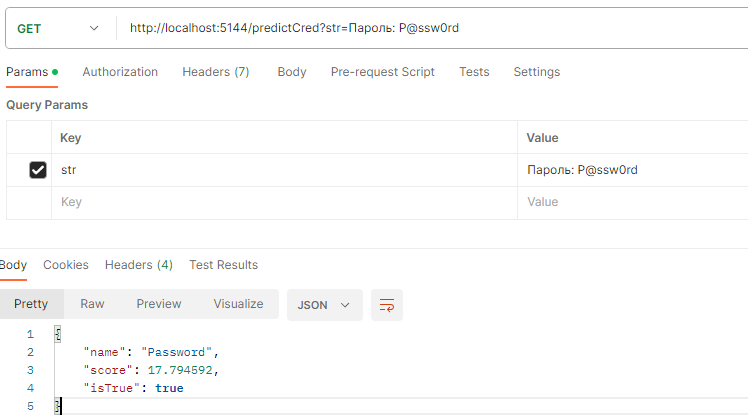
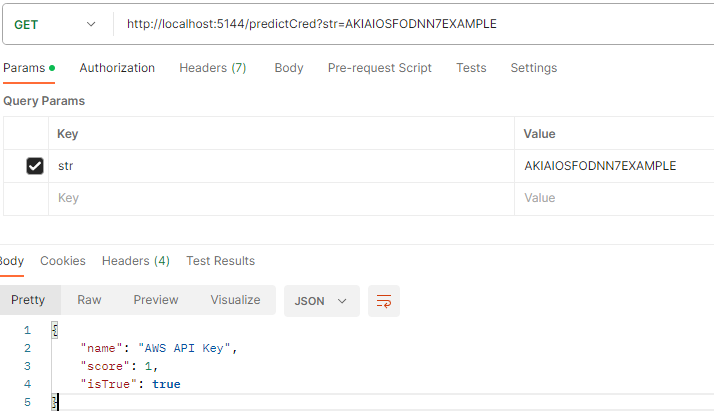
Once everything is ready, you can run it and check its operation:

Interpretation of the result
Regular expression testing returns the following result:- -1 if no expression matches,
- 1, if at least one matched.
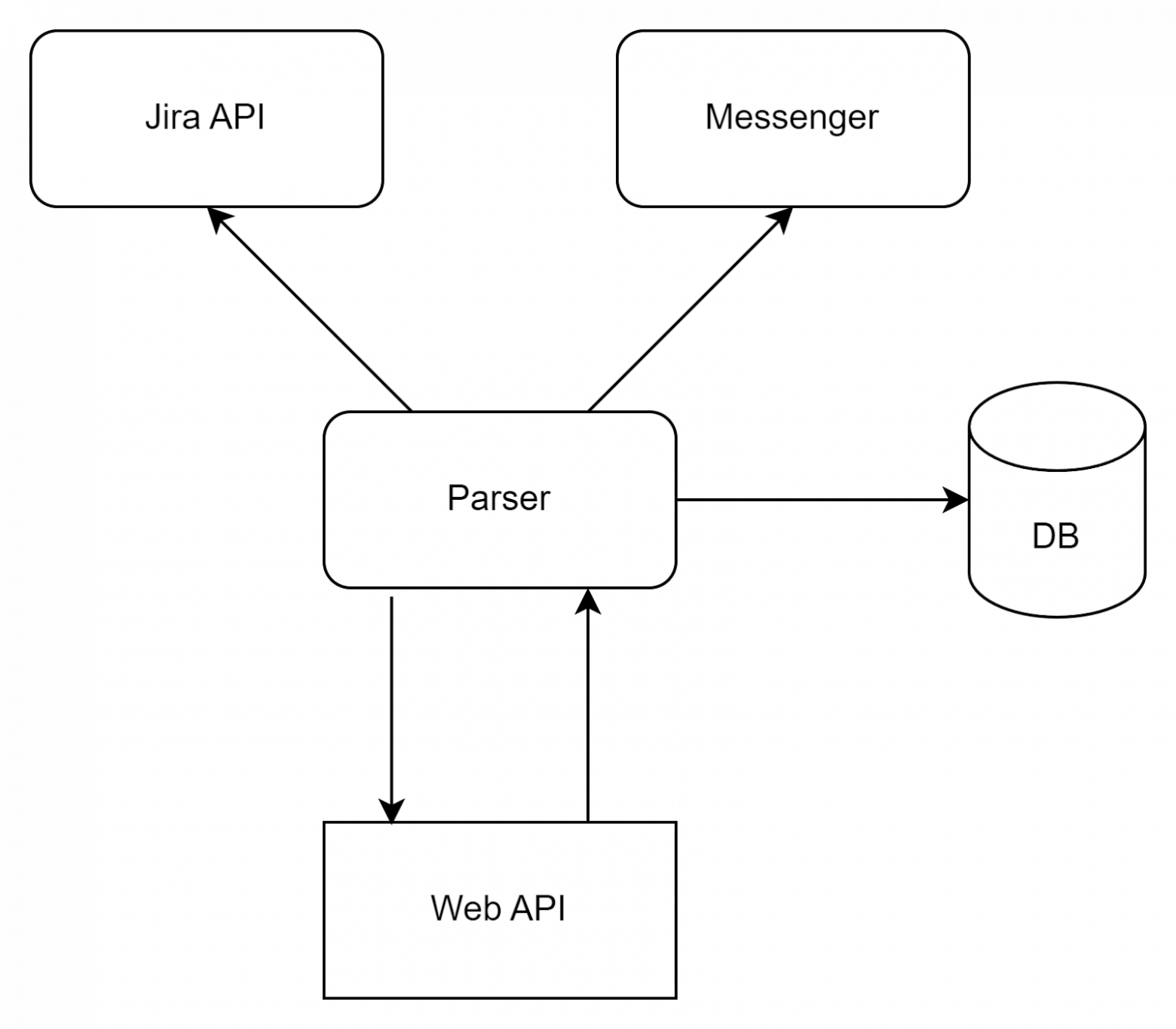
At this stage, you can connect a parser to the API, which will scan resources and check for sensitive data. In the first stage, we used Jira: the service requested new and modified tickets via API within 5 minutes. If the details were found, it notified us via corporate messenger. We recorded the MD5 hash of the string and ticket in which the details were found in the database (to prevent repeated notifications).
Additional training of the models
After deploying our service, we may encounter a certain number of false positives or false negatives from the model. To minimize these, we need to further train the model.To do this, we need to store queries, results, and evaluation time (for statistics). To do this, we'll extend the model by adding a Duration property:
/// <summary>
/// Predict Result model
/// </summary>
public class PredictResult
{
/// <summary>
/// Name of the predictor
/// </summary>
public string? Name { get; set; }
/// <summary>
/// Score of the prediction
/// </summary>
public float Score { get; set; }
/// <summary>
/// Is credential?
/// </summary>
public bool IsTrue => Score > 0;
/// <summary>
/// Duration of the prediction
/// </summary>
public int Duration { get; set; }
}
Explain with
Let's add a timer to each class:
public class PasswordPredictor : MLPredictor, IPredictor
{
private readonly Lazy<PredictionEngine<ModelInput, ModelOutput>> _predictEnginePassword;
private readonly Stopwatch _timer = new Stopwatch();
public PasswordPredictor()
{
_predictEnginePassword = new Lazy<PredictionEngine<ModelInput, ModelOutput>>(() =>
CreatePredictEngine("PasswordModel.mlnet"), true);
}
/// <summary>
/// Predict the input string
/// </summary>
/// <param name="str"></param>
/// <returns></returns>
public async Task<PredictResult> PredictAsync(string str)
{
_timer.Reset();
_timer.Start();
var predictResult = Predict(new ModelInput
{
Text = str
}, _predictEnginePassword);
_timer.Stop();
return new PredictResult
{
Name = "Password",
Score = predictResult.Score,
Duration = (int)_timer.ElapsedMilliseconds
};
}
}
Explain with
Let's create a service for dumping to a CSV file:
/// <summary>
/// Dumper
/// </summary>
public class Dumper
{
private const string FileName = "result.csv";
/// <summary>
/// Dump prediction result
/// </summary>
/// <param name="baseString"></param>
/// <param name="results"></param>
/// <returns></returns>
internal static void Dump(string baseString,IEnumerable<PredictResult> results)
{
var sb = new StringBuilder();
sb.Append($"{baseString};");
foreach (var result in results)
{
sb.Append($"{result.Name};{result.Score};{result.IsTrue};{result.Duration};");
}
sb.AppendLine();
File.AppendAllText(FileName, sb.ToString(), Encoding.UTF8);
}
}
Explain with
And we add the dumper to the main class:
public class CombinePredictor : IPredictor
{
private readonly List<IPredictor> _predictors;
private readonly Stopwatch _timer = new Stopwatch();
public CombinePredictor(List<IPredictor> predictors)
{
_predictors = predictors;
}
/// <summary>
/// Run all predictors and return the result with highest confidence
/// </summary>
/// <param name="str"></param>
/// <returns>PredictResult</returns>
public async Task<PredictResult> PredictAsync(string str)
{
_timer.Reset();
_timer.Start();
var tasks = _predictors.Select(p => p.PredictAsync(str));
var results = await Task.WhenAll(tasks);
var max = results.Max(r => r.Score);
var result = results.First(r => r.Score == max);
_timer.Stop();
result.Duration = (int)_timer.ElapsedMilliseconds;
Dumper.Dump(str, results);
return Task.FromResult(result);
}
}
Explain with
In the current implementation, the dumper stores all results, which may be redundant. It can later be modified to store only positive or negative results.
Next, we need to run a large amount of data through the service for statistical analysis of discrepancies. For this purpose, we selected a ticket array for the last six months (200,000 tickets and tens of millions of rows), but we are only interested in discrepancies between regular expressions and machine learning.
To do this, the created CSV file must be analyzed for false positives. Let's create a class:
public class Result
{
[Index(0)]
public string Str { get; set; }
[Index(1)]
public string NameRegex { get; set; }
[Index(2)]
public bool IsTrueRegex { get; set; }
[Index(3)]
public float ScoreRegex { get; set; }
[Index(4)]
public int DurationRegex { get; set; }
[Index(5)]
public string NamePassword { get; set; }
[Index(6)]
public bool IsTruePassword { get; set; }
[Index(7)]
public float ScorePassword { get; set; }
[Index(8)]
public int DurationPassword { get; set; }
[Index(9)]
public string NameToken { get; set; }
[Index(10)]
public bool IsTrueToken { get; set; }
[Index(11)]
public float ScoreToken { get; set; }
[Index(12)]
public int Duration { get; set; }
public override string ToString()
{
return
$"{Str} {NameRegex} {IsTrueRegex}, Password: {IsTruePassword}({ScorePassword}), Token: {IsTrueToken}({ScoreToken})";
}
}
Explain with
And a new console application:
var config = new CsvConfiguration(CultureInfo.CurrentCulture)
{
HasHeaderRecord = false,
Delimiter = ";",
BadDataFound = null
};
var reader = new StreamReader(@"result.csv");
var csv = new CsvReader(reader, config);
var records = csv.GetRecords<Result>().ToList();
foreach (var record in records)
{
if (record.IsTrueRegex && (!record.IsTruePassword && !record.IsTrueToken) || (!record.IsTrueRegex && (record.IsTruePassword || record.IsTrueToken)))
{
Console.WriteLine(record.ToString());
}
}
Explain with
Based on these differences, it's necessary to conduct an analysis, supplement the training data, and retrain the model. Several such iterations are required, using different data for comparison. For example, we conducted eight iterations over eight years of tickets.
After several additional training runs, we should obtain output models that predict at least as well as regular expressions. Ideally, these models would even perform better, as the text might contain, for example, extra spaces or typos in the word "password," which regular expressions wouldn't detect, but ML, albeit with a lower score, would.
We consolidate the models into one
Once we've prepared the optimal training data, it's time to create a unified model. To do this, we need to combine all the training data into a single file. The label in this file will not be True/False, but rather the data type: Password, Secret, Token, ConnectionString, or Clean.Note: It's necessary to handle situations where token strings were marked as False in the password model training data. When collating the data into a single file, it's best to run regular expressions through it for validation, otherwise the model will be less accurate.
After flattening the data into a file, we create a new model. Similar to the second step, we select Data Classification, but in Column Settings, specify that the ContainsToken field is of type String.

Training such a model takes much longer than a binary classifier. I recommend setting it to at least 30 minutes to evaluate as many models as possible. This may also result in a slight decrease in analysis results.
After successfully training the model, we add the server API to the project in the same way as others, changing the ModelInput models:
public class ModelInput
{
[LoadColumn(0)]
[ColumnName(@"Text")]
public string Text { get; set; }
[LoadColumn(1)]
[ColumnName(@"ContainsToken")]
public string ContainsToken { get; set; }
}
ModelOutput
public class ModelOutput
{
[ColumnName(@"Text")]
public float[] Text { get; set; }
[ColumnName(@"ContainsToken")]
public uint ContainsToken { get; set; }
[ColumnName(@"Features")]
public float[] Features { get; set; }
[ColumnName(@"PredictedLabel")]
public string PredictedLabel { get; set; }
[ColumnName(@"Score")]
public float[] Score { get; set; }
}
Explain with
We will also add logic to Predict Result, since now the model will return the Clean label with a positive value.
public class PredictResult
{
/// <summary>
/// Name of the predictor
/// </summary>
public string? Name { get; set; }
/// <summary>
/// Score of the prediction
/// </summary>
public float Score { get; set; }
/// <summary>
/// Is credential?
/// </summary>
public bool IsTrue
{
get
{
if (Name != null && !Name.Contains("Clean") && Score > 0)
{
return true;
}
else if (Name != null && Name.Contains("Clean") )
{
return false;
}
return Score > 0;
}
}
/// <summary>
/// Duration of the prediction
/// </summary>
public int Duration { get; set; }
}
Explain with
And let's add the main model class:
public class GeneralPredictor : MLPredictor, IPredictor
{
private readonly Lazy<PredictionEngine<ModelInput, ModelOutput>> _predictEngineToken;
private readonly Stopwatch _timer = new Stopwatch();
public GeneralPredictor()
{
_predictEngineToken = new Lazy<PredictionEngine<ModelInput, ModelOutput>>(() =>
CreatePredictEngine("GeneralModel.mlnet"), true);
}
public async Task<PredictResult> PredictAsync(string str)
{
_timer.Reset();
_timer.Start();
var predictResult = Predict(new ModelInput
{
Text = str
}, _predictEngineToken);
_timer.Stop();
return new PredictResult
{
Name = $"ML {predictResult.PredictedLabel}",
Score = predictResult.Score.Max(),
Duration = (int)_timer.ElapsedMilliseconds
};
}
}
Explain with
After running and testing the model, several iterations of further training are needed to obtain the best results. We performed four iterations until the model's prediction results were no longer different from those of regular expressions. This means that the model has reached a certain level of stability, and further training does not significantly improve its results.
Scaling
In the previous step, we had a web API server capable of parsing the incoming string using regular expressions and machine analysis. However, the current implementation is not thread-safe. If Predict is called simultaneously, an exception will be thrown in the second and subsequent threads.To work with multithreading, you need to include the Microsoft.Extensions.ML library and modify Program.cs to add AddPredictionEnginePool. PredictionEnginePool allows you to create and reuse PredictionEngine instances:
var builder = WebApplication.CreateBuilder(args);
builder.Services.AddEndpointsApiExplorer();
builder.Services.AddSwaggerGen();
builder.Services.AddSingleton<RegexPredictor, RegexPredictor>();
builder.Services.AddScoped<GeneralPredictor, GeneralPredictor>();
builder.Services.AddPredictionEnginePool<ModelInput, ModelOutput>()
.FromFile(filePath: "GeneralModel.mlnet", watchForChanges: true);
var app = builder.Build();
app.UseSwagger();
app.UseSwaggerUI();
app.MapGet("/predictCred", async (RegexPredictor regexPredictor, GeneralPredictor generalPredictor, string str) =>
{
var predictors = new List<IPredictor>
{
regexPredictor,
generalPredictor
};
var combinePredictor = new CombinePredictor(predictors);
var result = await combinePredictor.PredictAsync(str);
return result;
}).WithName("Predict string");
app.Run();
Explain with
We will also change the GeneralPredictor class by adding PredictionEnginePool to the constructor.
public class GeneralPredictor : MLPredictor, IPredictor
{
private PredictionEnginePool<ModelInput, ModelOutput> _predictionEnginePool;
private readonly Stopwatch _timer = new Stopwatch();
public GeneralPredictor(PredictionEnginePool<ModelInput, ModelOutput> predictionEnginePool)
{
_predictionEnginePool = predictionEnginePool;
}
public async Task<PredictResult> PredictAsync(string str)
{
_timer.Reset();
_timer.Start();
var predictResult = Predict(new ModelInput
{
Text = str
}, _predictionEnginePool);
_timer.Stop();
return new PredictResult
{
Name = $"ML {predictResult.PredictedLabel}",
Score = predictResult.Score.Max(),
Duration = (int)_timer.ElapsedMilliseconds
};
}
}
Explain with
And in the base class MLPredictor we change the Predict method:
public abstract class MLPredictor
{
/// <summary>
/// Predict the input string
/// </summary>
/// <param name="input"></param>
/// <param name="predictEnginePool"></param>
/// <returns>ModelOutput</returns>
public ModelOutput Predict(ModelInput input, PredictionEnginePool<ModelInput, ModelOutput> predictEnginePool)
{
return predictEnginePool.Predict(input);
}
}
Explain with
Comparing with regular expressions
The two technologies for searching critical information have their pros and cons. Regular expressions offer high speed and ease of rule modification, while machine learning offers greater variability. | Regular expressions | ML |
Speed | Depending on the number of rules, on average 15ms when all regular expressions are not matched. | Depends on whether there's a free PredictionEnginePool or whether a new one needs to be created. 140 ms when creating, 20 ms when using the current one. |
Accuracy | High accuracy with a large number of rules, but does not match typos | Dependent on training data. Matches with typos, for example: Password: P@ssw0rd |
Difficulty of change | You need to add a new line to rules.yaml | Need to add training data, train the model |
False positive values | Example of a false positive line: Password: I'll send it to you in a private message | Depending on the training data. |
Development plans
Over the course of six months of running our scanner on real data, we discovered numerous interesting findings. We found passwords, basic and bearer keys, a PostgreSQL connection string, several FTP connection strings, and credentials stored in environment variables. This once again demonstrates the importance of carefully monitoring security when working with sensitive information and training employees in the basics of cybersecurity.We still have room to grow. Our plans for the near future include:
- Connecting additional sources of information – corporate Wiki, shared file shares.
- Adding new types of information: passport data, SNILS, etc.


