




Hi, I'm Tony Albrecht, an engineer at Riot. I love profiling and optimization. In this article, I'll cover the basics of profiling and analyze a sample of C++ code while profiling it on a Windows machine. We'll start with the basics and gradually delve into the CPU's guts. When we find optimization opportunities, we'll implement changes, and in the next article, we'll look at real-world examples from the League of Legends codebase. Let's get started!
First, let's look at the code we're going to profile. Our program is a simple, small OpenGL renderer, an object-oriented, hierarchical scene tree. I've cleverly named the main object "Object"—everything in the scene inherits from one of these base classes. In our code, only Node, Cube, and Modifier inherit from Object.
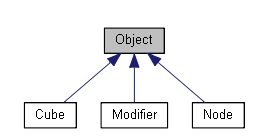
A Cube is an Object that renders itself on the screen as a cube. A Modifier is an Object that "lives" in the scene tree and, when Updated, transforms Objects added to it. A Node is an Object that can contain other Objects.
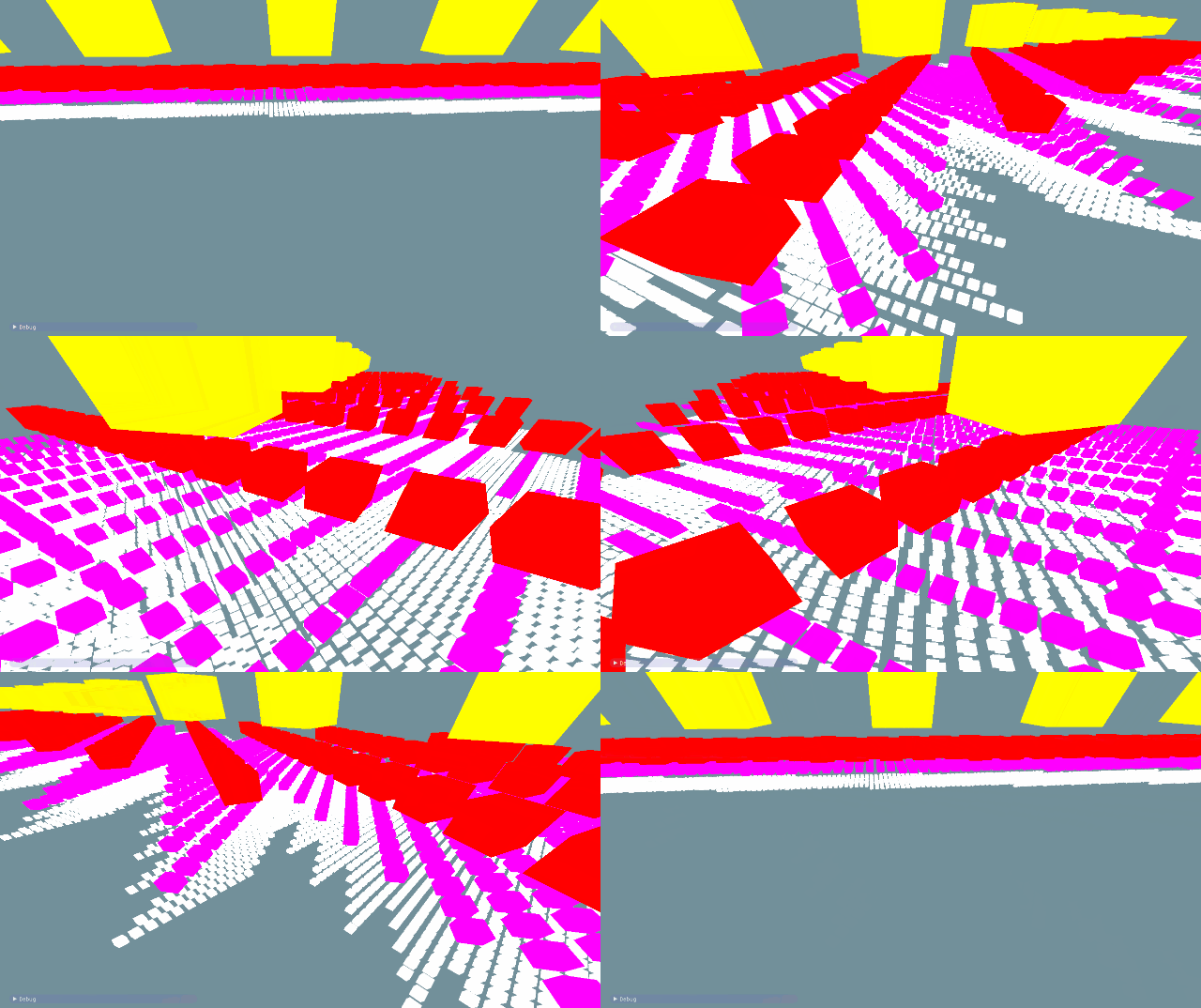
The system is designed so you can create a hierarchy of objects by adding cubes to nodes, and nodes to other nodes. If you transform a node (using a modifier), all objects contained within the node will also be transformed. Using this simple system, I created a tree of cubes rotating around each other.
I agree that the proposed code isn't the best implementation of a scene tree, but that's okay: it's needed specifically for subsequent optimization. Essentially, it's a direct port of a PlayStation3® example I wrote in 2009 for performance analysis in Pitfalls of Object-Oriented Programming . We can partially compare our article today with that nine-year-old article and see if the lessons we learned for the PS3 are applicable to modern hardware platforms.
But let's get back to our cubes. The GIF above shows about 55,000 rotating cubes. Note that I'm not profiling the scene rendering, only the animation and culling during rendering. The libraries used to create this example are Dear Imgui and Vectormath by Bullet , both free. For profiling, I used AMD Code XL and a simple instrumented profiler I quickly threw together for this article.
First, I want to discuss performance measurement. Frames per second (FPS) is often used as a metric in games. While it's a good performance indicator, it's useless when analyzing parts of a frame or comparing improvements from different optimizations. Say, "The game now runs 20 FPS faster!" – how much faster is that?
It depends on the situation. If we were running at 60 FPS (or 1000/60 = 16.666 milliseconds per frame) and now we're running at 80 FPS (1000/80 = 12.5 ms per frame), then our improvement is 16.666 ms – 12.5 ms = 4.166 ms per frame. That's a good increase.
But if we were at 20 FPS and now have 40 FPS, the improvement is now (1000/20 – 1000/40) = 50 ms – 25 ms = 25 ms per frame! That's a massive performance boost that can transform a game from "unplayable" to "playable." The problem with FPS is that it's relative, so we'll always use milliseconds. Always.
There are several types of profilers, each with its own advantages and disadvantages.
Instrumented profilers require the programmer to manually mark the code fragment whose performance needs to be measured. These profilers record and store the start and end times of the profiled fragment, using unique markers. For example:
void Node::Update()
{
FT_PROFILE_FN
for(Object* obj : mObjects)
{
obj->Update();
}
}
In this case, FT_PROFILE_FNit creates an object that records the time of its creation and then the time of its destruction when it goes out of scope. These times, along with the function name, are stored in an array for subsequent analysis and visualization. With some effort, visualization can be implemented in code or, a little more easily, in a tool like Chrome tracing .
Performance profiling is great for visually displaying code performance and identifying spikes. By presenting application performance characteristics as a hierarchy, you can quickly see which functions are the slowest overall, which call the most other functions, which have the most variability in execution time, and so on.
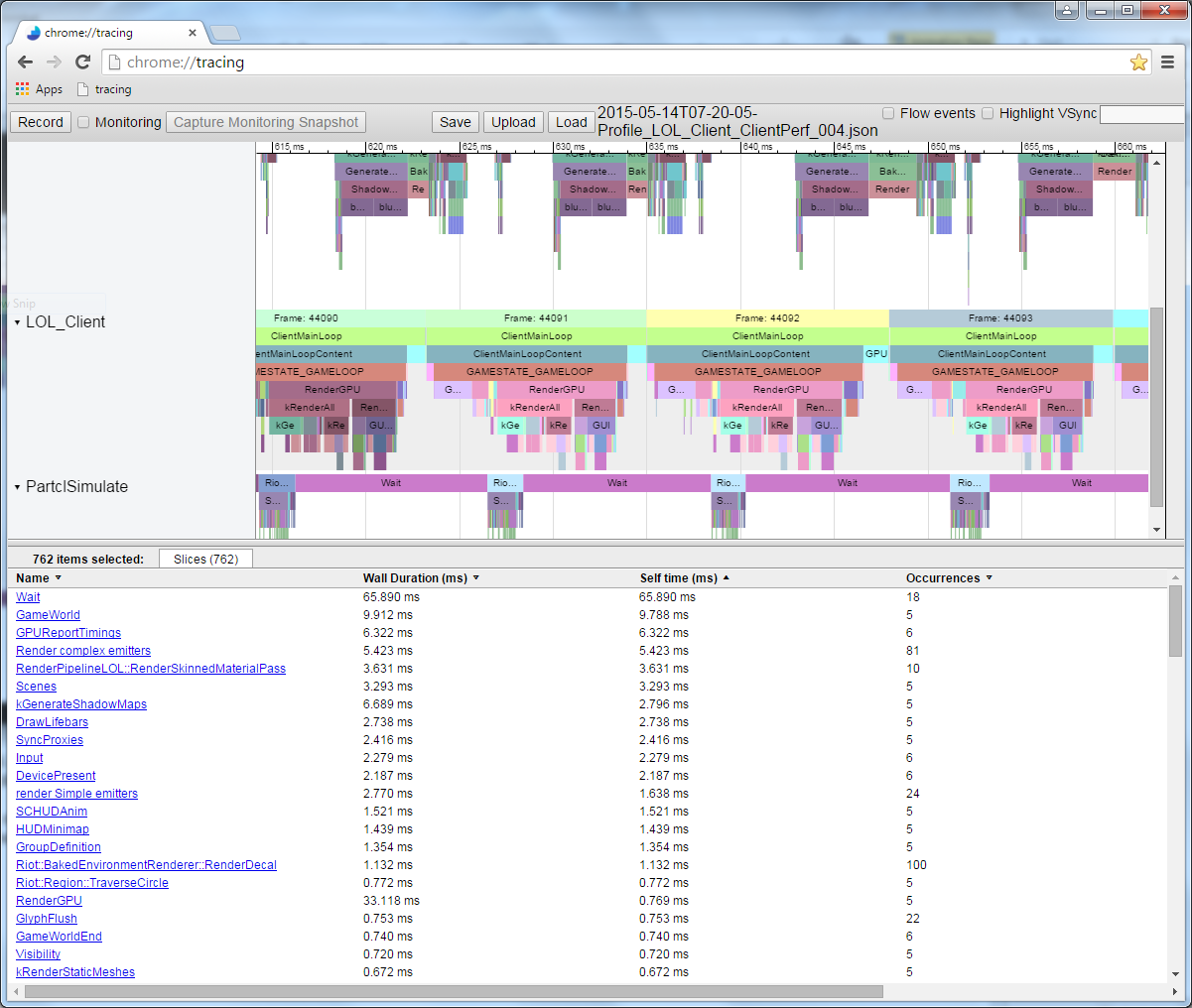
In this illustration, each colored bar corresponds to a function. Bars located directly below other bars represent functions called by functions "upstream." The bar's length is proportional to the function's execution time.
While performance profiling provides valuable visual information, it does have its drawbacks. It slows down program execution: the more you measure, the slower the program becomes. Therefore, when writing a performance profiling tool, try to minimize its impact on your application's performance. Missing a slow function will create a large gap in your profile. You also won't get information about the speed of each line of code: it's easy enough to mark scopes, but the overhead of performance profiling usually negates the contribution of individual lines, making measuring them useless.
Sampling profilers query the execution state of the process you want to profile. They periodically save a program counter (PC), which shows which instruction is currently executing, and they also save a stack trace, which allows you to see which functions the function containing the current instruction called. All this information is useful because the function or lines with the most samples will likely be the slowest function or lines. The longer a sampling profiler runs, the more instruction and stack trace samples it collects, improving the results.
Sampling profilers allow you to collect very low-level performance characteristics of your program and don't require manual intervention, as with instrumented profilers. Furthermore, they automatically cover the entire execution state of your program. These profilers have two main drawbacks: they're not very useful for identifying spikes on a per-frame basis, and they don't allow you to determine when a particular function was called relative to other functions. This means we get less information about hierarchical calls than a good instrumented profiler.
These profilers provide specific information about processes. They're typically tied to hardware components like the CPU or GPU, which can generate specific events when something of interest occurs, such as a cache miss or a branch misprediction. Hardware manufacturers build in the ability to measure these events to help us identify the causes of poor performance; therefore, understanding these profiles requires knowledge of the underlying hardware.
On a much more general level, profilers designed for specific games can count, for example, the number of minions on screen or the number of visible particles in the character's field of view. Such profilers are also very useful, helping to identify high-level errors in game logic.
Profiling an application without a benchmark is pointless, so when optimizing, it's essential to have a reliable test case at hand. This isn't as simple as it sounds. Modern computers aren't running just your application, but dozens, if not hundreds, of other processes simultaneously, constantly switching between them. This means other processes can slow down the process you're profiling due to competition for device access (for example, several processes attempting to read from disk) or for CPU/GPU resources. So, to get a good starting point, you need to run your code through several profiling runs before you even begin the task. If the results from these runs vary significantly, you'll need to investigate the cause and eliminate or at least reduce the variability.
Once you've achieved the smallest possible variability in results, keep in mind that small improvements (smaller than the existing variability) will be difficult to measure because they can get lost in the system's "noise." Let's say a specific scene in a game renders in the range of 14-18 ms per frame, with an average of 16 ms. You spend two weeks optimizing a function, repurpose it, and get 15.5 ms per frame. Is it faster? To find out for sure, you'll need to run the game many times, profiling the scene, calculating the average, and plotting a trend graph. In the application described here, we measure hundreds of frames and average the results to get a reasonably reliable value.
Furthermore, many games run in multiple threads, the order of which is determined by your hardware and OS, which can lead to non-deterministic behavior or, at a minimum, varying execution times. Be aware of the impact of these factors.
With that in mind, I've put together a small test scenario for profiling and optimization. It's simple to understand, yet complex enough to yield significant performance improvements. Note that for simplicity, I disabled rendering during profiling, so we only see CPU-related computational costs.
Below is the code we'll be optimizing. Keep in mind that this example is only a taste of profiling. You'll inevitably encounter unexpected challenges when profiling your own code, and I hope this article helps you create your own diagnostic framework.
{
FT_PROFILE("Update");
mRootNode->Update();
}
{
FT_PROFILE("GetWBS");
BoundingSphere totalVolume = mRootNode->GetWorldBoundingSphere(Matrix4::identity());
}
{
FT_PROFILE("cull");
uint8_t clipFlags = 63;
mRootNode->Cull(clipFlags);
}
{
FT_PROFILE("Node Render");
mRootNode->Render(mvp);
}
I added monitoring macros to various scopes FT_PROFILE()to measure the execution time of different sections of code. We'll discuss the purpose of each fragment in more detail below.
When I ran the code and recorded the measured profile data, I got the following image in Chrome://tracing:

This is a profile of a single frame. Here we see the relative duration of each function call. Note that you can also see the execution order. If I measured the functions called by these function calls, they would appear under the parent function labels. For example, I measured Node::Update()and obtained the following recursive call structure:
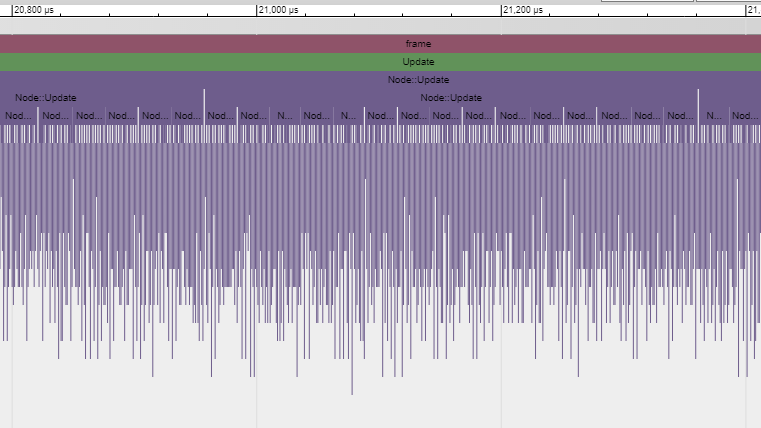
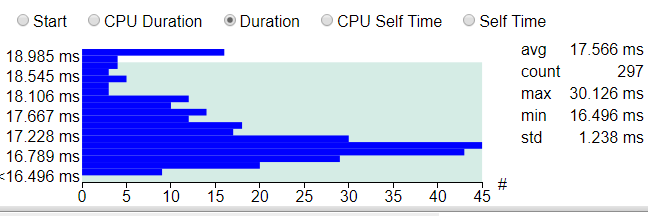
The execution time of a single frame of this code varies by a couple of milliseconds when measured, so we take the arithmetic mean of at least several hundred frames and compare it to the original benchmark. In this case, 297 frames were measured, the average value is 17.5 ms. Some frames took up to 19 ms to execute, while others took just under 16.5 ms, even though each of them performs essentially the same task. This is the implicit variability of frames. Multiple runs and comparisons consistently yield a value around 17.5 ms, so this value can be considered a reliable starting point.
If you disable control marks in the code and run it through the AMD CodeXL sampling profiler , you get the following picture:
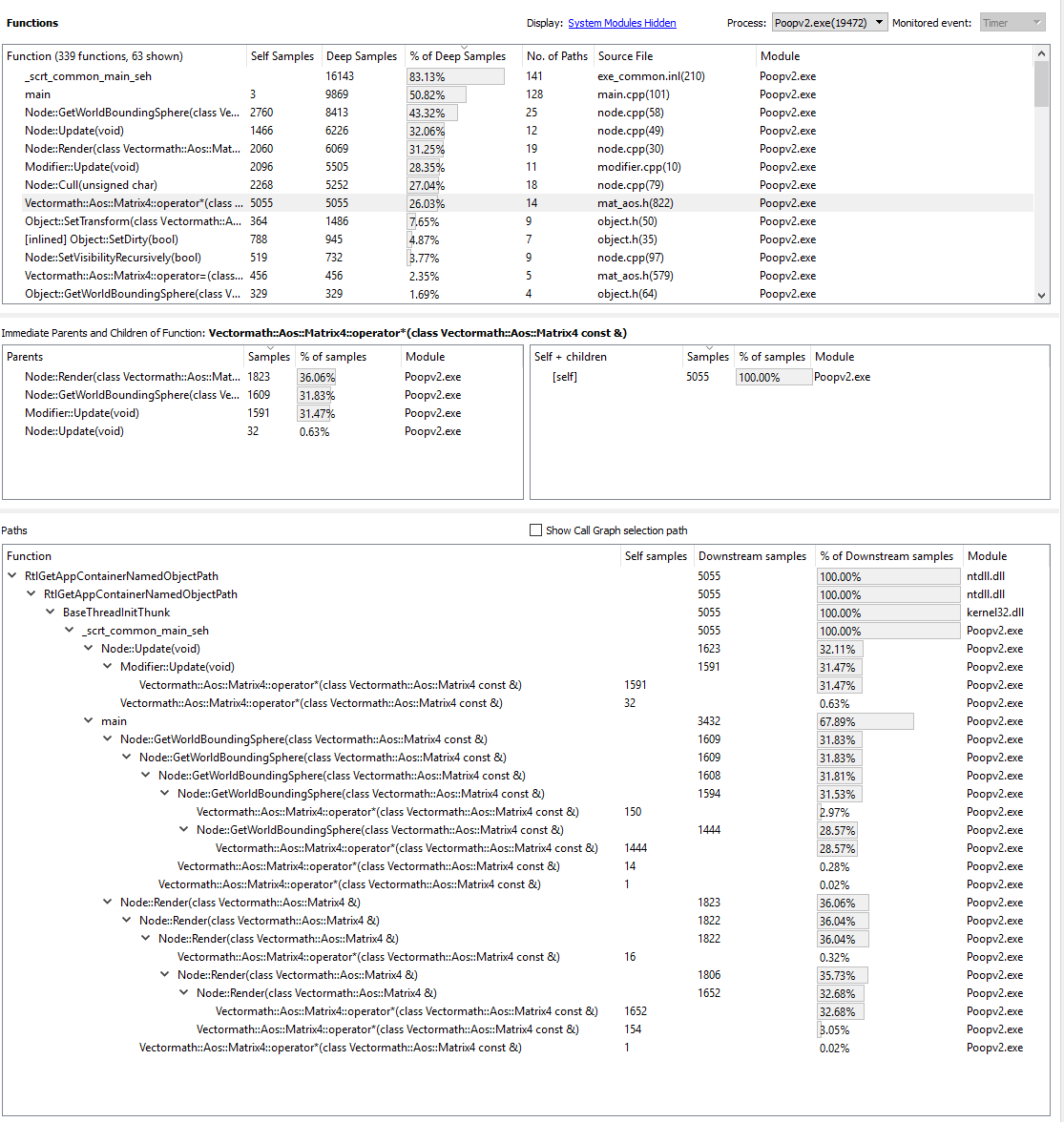
If we analyze the five most “in-demand” functions, we get:

It looks like the slowest function is matrix multiplication. This makes sense, since all those rotations require a ton of computation. If you look closely at the stack hierarchy in the couple of illustrations above, you'll notice that the matrix multiplication operator is called by Modifier::Update(), Node::Update(), GetWorldBoundingSphere()and Node::Render(). It's called so frequently and from so many places, making it a good candidate for optimization.
Matrix:
If you use a sampling profiler to analyze the code responsible for the multiplication, you can determine the "cost" of executing each line.

Unfortunately, the length of the matrix multiplication code is only one line (for efficiency's sake), so this result doesn't tell us much. Or is it actually quite a bit?
If you look at the assembler, you can see the prologue and epilogue of a function.
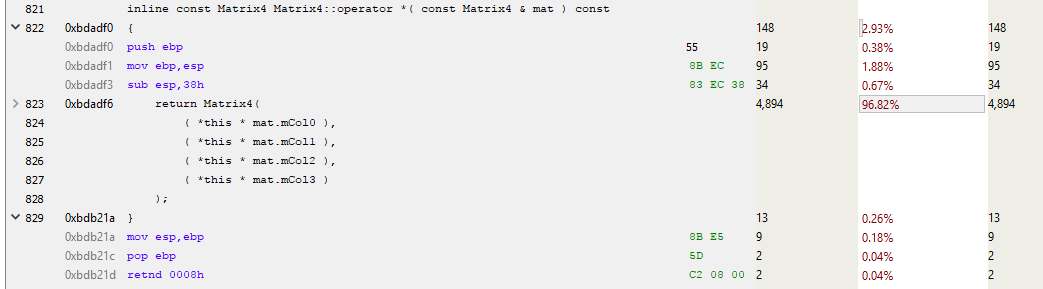
This is the cost of an internal function call instruction. The prologue establishes new stack space (ESP is the current stack pointer, EBP is the base pointer for the current stack frame), and the epilogue performs cleanup and return. Each time a function is called that is not inlined and uses some stack space (i.e., has a local variable), all of these instructions can be inserted and called.
Let's unfold the rest of the function and see what matrix multiplication actually does.
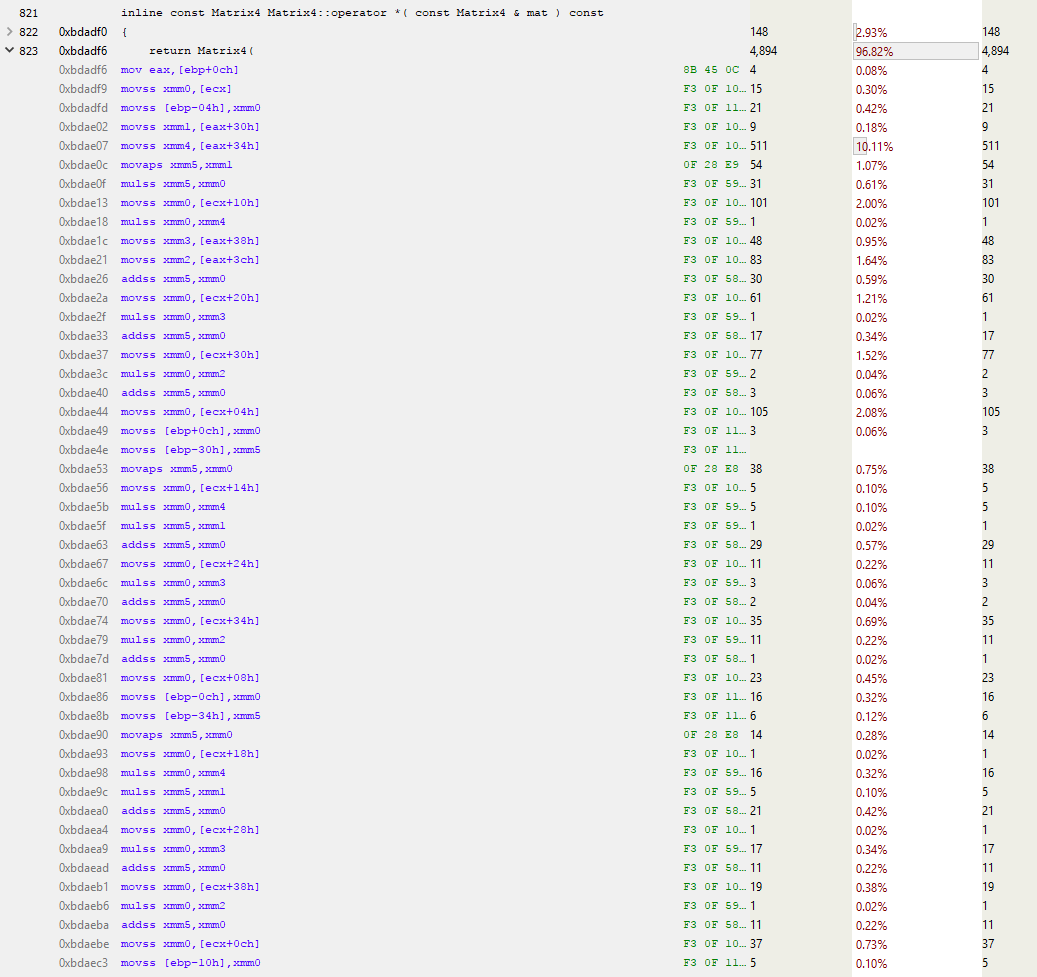
Wow, that's a ton of code! And that's just the first page. The full function is over a kilobyte of code with 250-300 instructions! Let's analyze the beginning of the function.

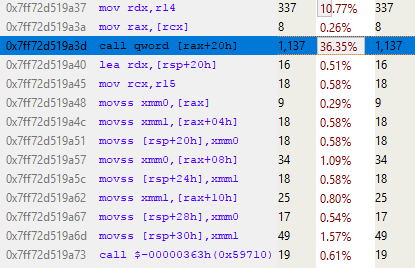
The line above the blue one takes up about 10% of the total execution time. Why is it so much slower than its neighbors? This MOVSS instruction takes a floating-point value from memory at eax+34h and places it in the xmm4 register. The line above does the same with the xmm1 register, but much faster. Why?
It's all about a cache miss.
Let's take a closer look. Instruction sampling is applicable in a wide variety of situations. Modern processors execute multiple instructions at any given time, and many instructions can be retired within a single clock cycle. Even event-based sampling can attribute events to the wrong instruction. So, some logic must be used when analyzing assembly language sampling. In our example, the most sampled instruction may not be the slowest. We can only say with some certainty that something related to that line is slow. And since the processor executes a series of MOVs to and from memory, we can assume that these MOVs are the culprit behind the poor performance. To confirm this, we can run a profile with event-based sampling enabled for cache misses and observe the results. But for now, let's trust our instincts and run the profile under the cache miss hypothesis.
An L3 cache miss takes over 100 cycles (in some cases, several hundred cycles), and an L2 cache miss takes about 40 cycles, although this varies greatly depending on the processor. For example, x86 instructions take from 1 to approximately 100 cycles, with most taking less than 20 cycles (some division instructions are quite slow on some hardware). On my Core i7, multiplication, addition, and even division instructions took several cycles. Instructions are pipelined, so multiple instructions are processed simultaneously. This means that a single L3 cache miss—a direct load from memory—can take the time of hundreds of instructions. Simply put, reading from memory is a very slow process.
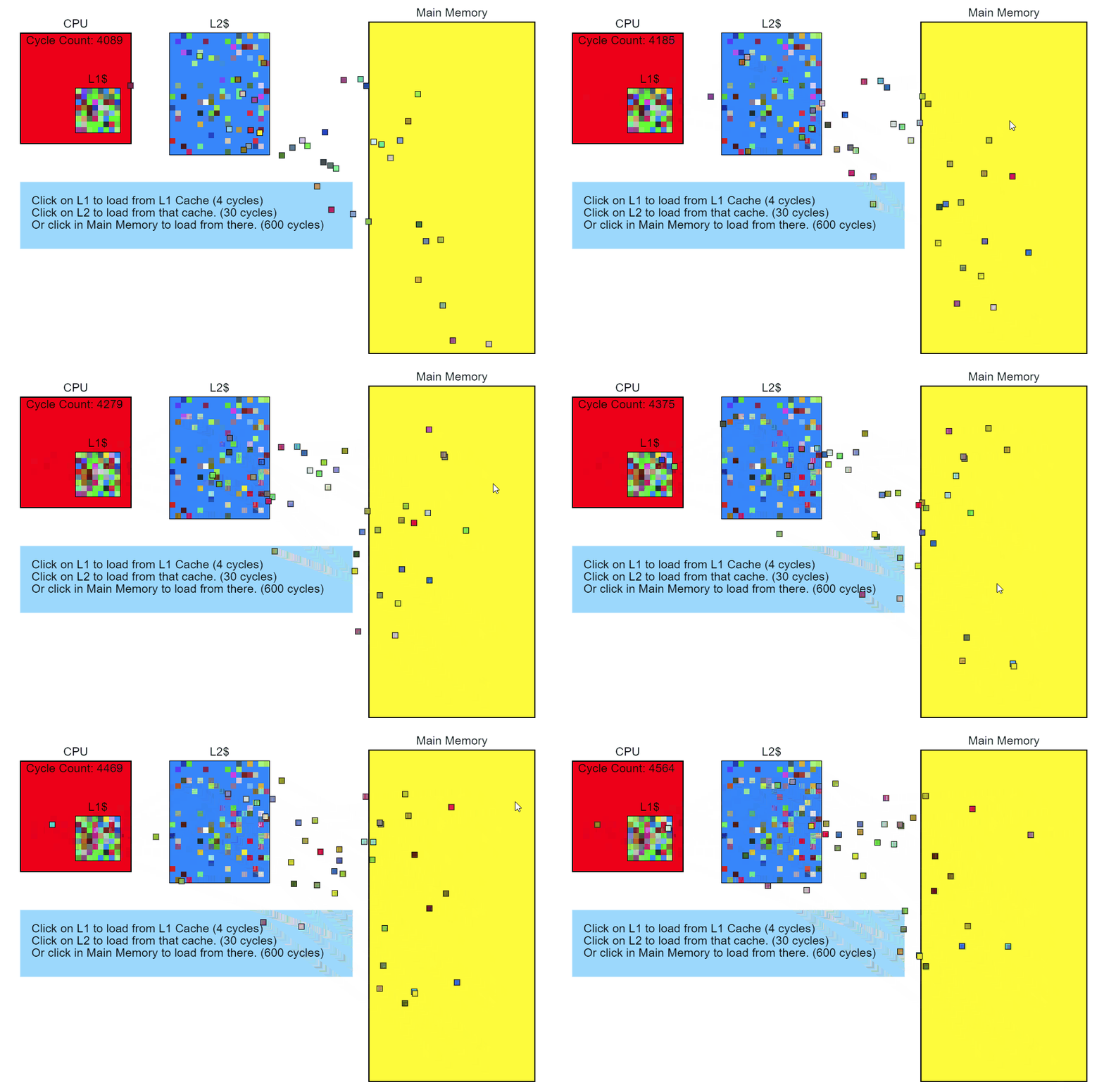
So, we see that memory access is slowing down our code. Let's step back and see what in the code is causing this access. The performance profiler shows that Node::Update()it's executing slowly, and the sampling profiler's stack trace report clearly shows that this function Modifier::Update()is particularly slow. This is where we'll start optimizing.
void Modifier::Update()
{
for(Object* obj : mObjects)
{
Matrix4 mat = obj->GetTransform();
mat = mTransform*mat;
obj->SetTransform(mat);
}
}
Modifier::Update()Iterates through the vector of pointers to Objects, takes their transform matrix, multiplies it by the mTransformModifier matrix, and then applies that transformation to the Objects. In the code above, the transformation is copied from the object to the stack, multiplied, and then copied back.
GetTransform()simply returns a copy mTransform, SetTransform()copies it into mTransforma new matrix and sets the state mDirtyof this object:
void SetDirty(bool dirty)
{
if (dirty && (dirty != mDirty))
{
if (mParent)
mParent->SetDirty(dirty);
}
mDirty = dirty;
}
void SetTransform(Matrix4& transform)
{
mTransform = transform;
SetDirty(true);
}
inline const Matrix4 GetTransform() const { return mTransform; }
The internal data layer of this Object looks like this:
protected:
Matrix4 mTransform;
Matrix4 mWorldTransform;
BoundingSphere mBoundingSphere;
BoundingSphere mWorldBoundingSphere;
bool m_IsVisible = true;
const char* mName;
bool mDirty = true;
Object* mParent;
};
For clarity, I've colored the entries in the Node object's memory:
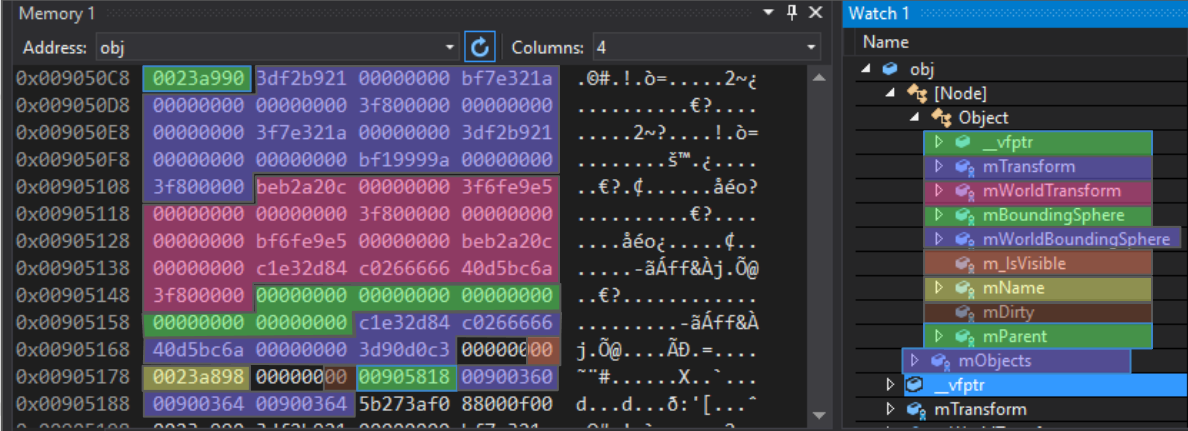
The first entry is a virtual table pointer. This is part of the C++ inheritance implementation: a pointer to an array of function pointers that act as virtual functions for this particular polymorphic object. Different virtual tables exist for Object, Node, Modifier, and any class inheriting from a base class.
Following this 4-byte pointer is a 64-byte array of floating-point numbers. Following the matrix mTransformis the matrix mWorldTransform, and then two bounding spheres. Note that the next entry, m_IsVisible, is single-byte, taking up 4 full bytes. This is normal, since the next entry is a pointer, which must have at least 4-byte alignment. If m_IsVisibleanother Boolean value were put after it, it would be packed into the available 3 bytes. Next comes the pointer mName(with 4-byte alignment), then the Boolean mDirty(also loosely packed), then a pointer to the parent Object. All of this is Object-specific data. The subsequent vector mObjectsis a Node vector and takes up 12 bytes on this platform, although it may be a different size on other platforms.
If we look at the code Modifier::Update(), we can see what could be causing the cache miss.
void Modifier::Update()
{
for(Object* obj : mObjects)
{
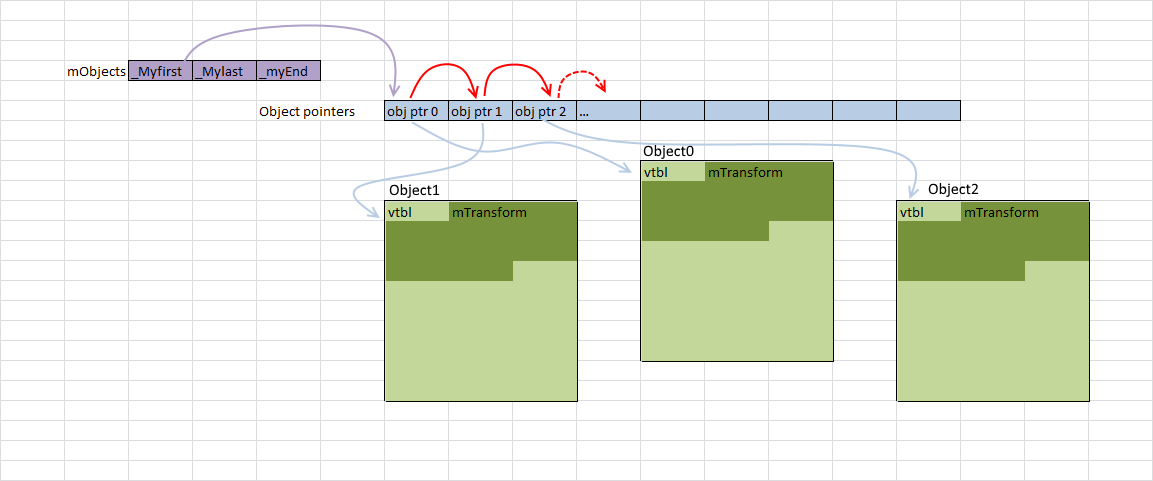
First, let's note: a vector mObjectsis an array of pointers to Objects that are dynamically allocated in memory. Iterating over this vector works well with the cache (red arrows in the illustration below), since the pointers follow one another. There are a few misses, but they point to something that's probably not cache-friendly. And since each Object is allocated in memory with a new pointer, we can only say that our interference is somewhere in memory.
When we get a pointer to an Object, we call GetTransform():
Matrix4 mat = obj->GetTransform();
This inline function simply returns a copy mTransformof Object, so the previous line is equivalent to this:
Matrix4 mat = obj->mTransform;
As you can see in the diagram, the Objects referenced by the pointers in the array mObjectsare scattered across memory. Every time we add a new Object and call GetTransform(), it will almost certainly result in a cache miss when loading it into mTransformthe stack and pushing it onto it. On the hardware I'm using, a cache line is 64 bytes, so if we're lucky and the object starts 4 bytes before a 64-byte boundary, it mTransformwill be loaded into the cache in one go. But more likely, the load mTransformwill result in two cache misses. Modifier::Update()It's clear from the sampling profile that the matrix alignment is random.
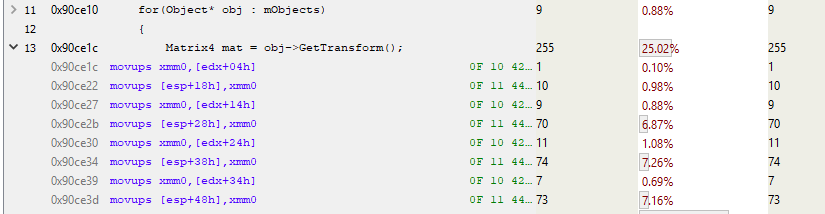
In this fragment, edxis the location of the Object. And as we know, mTransformit starts 4 bytes before the start of the object. So this code copies mTransformto the stack (MOVUPS copies 4 unaligned floating-point values to a register). Note the 7% of accesses to the three MOVUPS instructions. This suggests that cache misses also occur with MOVs. I don't know why the first MOVUPS to the stack doesn't take as long as the others. I think the "cost" is simply carried over to subsequent MOVUPSs due to the peculiarities of instruction pipelining. But in any case, we have evidence of the high cost of memory access, so we'll work with that.
void Modifier::Update()
{
for(Object* obj : mObjects)
{
Matrix4 mat = obj->GetTransform();
mat = mTransform*mat;
obj->SetTransform(mat);
}
}
After the matrix multiplication, we call Object::SetTransform(), which takes the multiplication result (freshly pushed onto the stack) and copies it into the Object instance. The copying is fast because the transformation is already cached, but SetDirty()it's slow because it reads the flag mDirty, which is likely not in the cache. So, to test and possibly determine this one byte, the processor has to read the surrounding 63 bytes.
If you made it this far, well done! I know it can be difficult at first, especially if you're not familiar with assembly language. But I highly recommend taking the time to see what compilers do with the code they write. You can use Compiler Explorer for this .
We've gathered a wealth of evidence that the main cause of performance issues in our code example is memory access pointers. Next, we'll minimize memory access costs and then measure performance again to see if we've achieved any improvement. That's what we'll do next.
Code review
First, let's look at the code we're going to profile. Our program is a simple, small OpenGL renderer, an object-oriented, hierarchical scene tree. I've cleverly named the main object "Object"—everything in the scene inherits from one of these base classes. In our code, only Node, Cube, and Modifier inherit from Object.
A Cube is an Object that renders itself on the screen as a cube. A Modifier is an Object that "lives" in the scene tree and, when Updated, transforms Objects added to it. A Node is an Object that can contain other Objects.
The system is designed so you can create a hierarchy of objects by adding cubes to nodes, and nodes to other nodes. If you transform a node (using a modifier), all objects contained within the node will also be transformed. Using this simple system, I created a tree of cubes rotating around each other.
I agree that the proposed code isn't the best implementation of a scene tree, but that's okay: it's needed specifically for subsequent optimization. Essentially, it's a direct port of a PlayStation3® example I wrote in 2009 for performance analysis in Pitfalls of Object-Oriented Programming . We can partially compare our article today with that nine-year-old article and see if the lessons we learned for the PS3 are applicable to modern hardware platforms.
But let's get back to our cubes. The GIF above shows about 55,000 rotating cubes. Note that I'm not profiling the scene rendering, only the animation and culling during rendering. The libraries used to create this example are Dear Imgui and Vectormath by Bullet , both free. For profiling, I used AMD Code XL and a simple instrumented profiler I quickly threw together for this article.
Before we get down to business
Units of measurement
First, I want to discuss performance measurement. Frames per second (FPS) is often used as a metric in games. While it's a good performance indicator, it's useless when analyzing parts of a frame or comparing improvements from different optimizations. Say, "The game now runs 20 FPS faster!" – how much faster is that?
It depends on the situation. If we were running at 60 FPS (or 1000/60 = 16.666 milliseconds per frame) and now we're running at 80 FPS (1000/80 = 12.5 ms per frame), then our improvement is 16.666 ms – 12.5 ms = 4.166 ms per frame. That's a good increase.
But if we were at 20 FPS and now have 40 FPS, the improvement is now (1000/20 – 1000/40) = 50 ms – 25 ms = 25 ms per frame! That's a massive performance boost that can transform a game from "unplayable" to "playable." The problem with FPS is that it's relative, so we'll always use milliseconds. Always.
Taking measurements
There are several types of profilers, each with its own advantages and disadvantages.
Control and measuring profilers
Instrumented profilers require the programmer to manually mark the code fragment whose performance needs to be measured. These profilers record and store the start and end times of the profiled fragment, using unique markers. For example:
void Node::Update()
{
FT_PROFILE_FN
for(Object* obj : mObjects)
{
obj->Update();
}
}
In this case, FT_PROFILE_FNit creates an object that records the time of its creation and then the time of its destruction when it goes out of scope. These times, along with the function name, are stored in an array for subsequent analysis and visualization. With some effort, visualization can be implemented in code or, a little more easily, in a tool like Chrome tracing .
Performance profiling is great for visually displaying code performance and identifying spikes. By presenting application performance characteristics as a hierarchy, you can quickly see which functions are the slowest overall, which call the most other functions, which have the most variability in execution time, and so on.
In this illustration, each colored bar corresponds to a function. Bars located directly below other bars represent functions called by functions "upstream." The bar's length is proportional to the function's execution time.
While performance profiling provides valuable visual information, it does have its drawbacks. It slows down program execution: the more you measure, the slower the program becomes. Therefore, when writing a performance profiling tool, try to minimize its impact on your application's performance. Missing a slow function will create a large gap in your profile. You also won't get information about the speed of each line of code: it's easy enough to mark scopes, but the overhead of performance profiling usually negates the contribution of individual lines, making measuring them useless.
Sampling profilers
Sampling profilers query the execution state of the process you want to profile. They periodically save a program counter (PC), which shows which instruction is currently executing, and they also save a stack trace, which allows you to see which functions the function containing the current instruction called. All this information is useful because the function or lines with the most samples will likely be the slowest function or lines. The longer a sampling profiler runs, the more instruction and stack trace samples it collects, improving the results.
Sampling profilers allow you to collect very low-level performance characteristics of your program and don't require manual intervention, as with instrumented profilers. Furthermore, they automatically cover the entire execution state of your program. These profilers have two main drawbacks: they're not very useful for identifying spikes on a per-frame basis, and they don't allow you to determine when a particular function was called relative to other functions. This means we get less information about hierarchical calls than a good instrumented profiler.
Specialized profilers
These profilers provide specific information about processes. They're typically tied to hardware components like the CPU or GPU, which can generate specific events when something of interest occurs, such as a cache miss or a branch misprediction. Hardware manufacturers build in the ability to measure these events to help us identify the causes of poor performance; therefore, understanding these profiles requires knowledge of the underlying hardware.
Game-specific profilers
On a much more general level, profilers designed for specific games can count, for example, the number of minions on screen or the number of visible particles in the character's field of view. Such profilers are also very useful, helping to identify high-level errors in game logic.
Profiling
Profiling an application without a benchmark is pointless, so when optimizing, it's essential to have a reliable test case at hand. This isn't as simple as it sounds. Modern computers aren't running just your application, but dozens, if not hundreds, of other processes simultaneously, constantly switching between them. This means other processes can slow down the process you're profiling due to competition for device access (for example, several processes attempting to read from disk) or for CPU/GPU resources. So, to get a good starting point, you need to run your code through several profiling runs before you even begin the task. If the results from these runs vary significantly, you'll need to investigate the cause and eliminate or at least reduce the variability.
Once you've achieved the smallest possible variability in results, keep in mind that small improvements (smaller than the existing variability) will be difficult to measure because they can get lost in the system's "noise." Let's say a specific scene in a game renders in the range of 14-18 ms per frame, with an average of 16 ms. You spend two weeks optimizing a function, repurpose it, and get 15.5 ms per frame. Is it faster? To find out for sure, you'll need to run the game many times, profiling the scene, calculating the average, and plotting a trend graph. In the application described here, we measure hundreds of frames and average the results to get a reasonably reliable value.
Furthermore, many games run in multiple threads, the order of which is determined by your hardware and OS, which can lead to non-deterministic behavior or, at a minimum, varying execution times. Be aware of the impact of these factors.
With that in mind, I've put together a small test scenario for profiling and optimization. It's simple to understand, yet complex enough to yield significant performance improvements. Note that for simplicity, I disabled rendering during profiling, so we only see CPU-related computational costs.
Profiling the code
Below is the code we'll be optimizing. Keep in mind that this example is only a taste of profiling. You'll inevitably encounter unexpected challenges when profiling your own code, and I hope this article helps you create your own diagnostic framework.
{
FT_PROFILE("Update");
mRootNode->Update();
}
{
FT_PROFILE("GetWBS");
BoundingSphere totalVolume = mRootNode->GetWorldBoundingSphere(Matrix4::identity());
}
{
FT_PROFILE("cull");
uint8_t clipFlags = 63;
mRootNode->Cull(clipFlags);
}
{
FT_PROFILE("Node Render");
mRootNode->Render(mvp);
}
I added monitoring macros to various scopes FT_PROFILE()to measure the execution time of different sections of code. We'll discuss the purpose of each fragment in more detail below.
When I ran the code and recorded the measured profile data, I got the following image in Chrome://tracing:
This is a profile of a single frame. Here we see the relative duration of each function call. Note that you can also see the execution order. If I measured the functions called by these function calls, they would appear under the parent function labels. For example, I measured Node::Update()and obtained the following recursive call structure:
The execution time of a single frame of this code varies by a couple of milliseconds when measured, so we take the arithmetic mean of at least several hundred frames and compare it to the original benchmark. In this case, 297 frames were measured, the average value is 17.5 ms. Some frames took up to 19 ms to execute, while others took just under 16.5 ms, even though each of them performs essentially the same task. This is the implicit variability of frames. Multiple runs and comparisons consistently yield a value around 17.5 ms, so this value can be considered a reliable starting point.
If you disable control marks in the code and run it through the AMD CodeXL sampling profiler , you get the following picture:
If we analyze the five most “in-demand” functions, we get:
It looks like the slowest function is matrix multiplication. This makes sense, since all those rotations require a ton of computation. If you look closely at the stack hierarchy in the couple of illustrations above, you'll notice that the matrix multiplication operator is called by Modifier::Update(), Node::Update(), GetWorldBoundingSphere()and Node::Render(). It's called so frequently and from so many places, making it a good candidate for optimization.
Matrix: perator*
If you use a sampling profiler to analyze the code responsible for the multiplication, you can determine the "cost" of executing each line.
Unfortunately, the length of the matrix multiplication code is only one line (for efficiency's sake), so this result doesn't tell us much. Or is it actually quite a bit?
If you look at the assembler, you can see the prologue and epilogue of a function.
This is the cost of an internal function call instruction. The prologue establishes new stack space (ESP is the current stack pointer, EBP is the base pointer for the current stack frame), and the epilogue performs cleanup and return. Each time a function is called that is not inlined and uses some stack space (i.e., has a local variable), all of these instructions can be inserted and called.
Let's unfold the rest of the function and see what matrix multiplication actually does.
Wow, that's a ton of code! And that's just the first page. The full function is over a kilobyte of code with 250-300 instructions! Let's analyze the beginning of the function.
The line above the blue one takes up about 10% of the total execution time. Why is it so much slower than its neighbors? This MOVSS instruction takes a floating-point value from memory at eax+34h and places it in the xmm4 register. The line above does the same with the xmm1 register, but much faster. Why?
It's all about a cache miss.
Let's take a closer look. Instruction sampling is applicable in a wide variety of situations. Modern processors execute multiple instructions at any given time, and many instructions can be retired within a single clock cycle. Even event-based sampling can attribute events to the wrong instruction. So, some logic must be used when analyzing assembly language sampling. In our example, the most sampled instruction may not be the slowest. We can only say with some certainty that something related to that line is slow. And since the processor executes a series of MOVs to and from memory, we can assume that these MOVs are the culprit behind the poor performance. To confirm this, we can run a profile with event-based sampling enabled for cache misses and observe the results. But for now, let's trust our instincts and run the profile under the cache miss hypothesis.
An L3 cache miss takes over 100 cycles (in some cases, several hundred cycles), and an L2 cache miss takes about 40 cycles, although this varies greatly depending on the processor. For example, x86 instructions take from 1 to approximately 100 cycles, with most taking less than 20 cycles (some division instructions are quite slow on some hardware). On my Core i7, multiplication, addition, and even division instructions took several cycles. Instructions are pipelined, so multiple instructions are processed simultaneously. This means that a single L3 cache miss—a direct load from memory—can take the time of hundreds of instructions. Simply put, reading from memory is a very slow process.
Modifier::Update()
So, we see that memory access is slowing down our code. Let's step back and see what in the code is causing this access. The performance profiler shows that Node::Update()it's executing slowly, and the sampling profiler's stack trace report clearly shows that this function Modifier::Update()is particularly slow. This is where we'll start optimizing.
void Modifier::Update()
{
for(Object* obj : mObjects)
{
Matrix4 mat = obj->GetTransform();
mat = mTransform*mat;
obj->SetTransform(mat);
}
}
Modifier::Update()Iterates through the vector of pointers to Objects, takes their transform matrix, multiplies it by the mTransformModifier matrix, and then applies that transformation to the Objects. In the code above, the transformation is copied from the object to the stack, multiplied, and then copied back.
GetTransform()simply returns a copy mTransform, SetTransform()copies it into mTransforma new matrix and sets the state mDirtyof this object:
void SetDirty(bool dirty)
{
if (dirty && (dirty != mDirty))
{
if (mParent)
mParent->SetDirty(dirty);
}
mDirty = dirty;
}
void SetTransform(Matrix4& transform)
{
mTransform = transform;
SetDirty(true);
}
inline const Matrix4 GetTransform() const { return mTransform; }
The internal data layer of this Object looks like this:
protected:
Matrix4 mTransform;
Matrix4 mWorldTransform;
BoundingSphere mBoundingSphere;
BoundingSphere mWorldBoundingSphere;
bool m_IsVisible = true;
const char* mName;
bool mDirty = true;
Object* mParent;
};
For clarity, I've colored the entries in the Node object's memory:
The first entry is a virtual table pointer. This is part of the C++ inheritance implementation: a pointer to an array of function pointers that act as virtual functions for this particular polymorphic object. Different virtual tables exist for Object, Node, Modifier, and any class inheriting from a base class.
Following this 4-byte pointer is a 64-byte array of floating-point numbers. Following the matrix mTransformis the matrix mWorldTransform, and then two bounding spheres. Note that the next entry, m_IsVisible, is single-byte, taking up 4 full bytes. This is normal, since the next entry is a pointer, which must have at least 4-byte alignment. If m_IsVisibleanother Boolean value were put after it, it would be packed into the available 3 bytes. Next comes the pointer mName(with 4-byte alignment), then the Boolean mDirty(also loosely packed), then a pointer to the parent Object. All of this is Object-specific data. The subsequent vector mObjectsis a Node vector and takes up 12 bytes on this platform, although it may be a different size on other platforms.
If we look at the code Modifier::Update(), we can see what could be causing the cache miss.
void Modifier::Update()
{
for(Object* obj : mObjects)
{
First, let's note: a vector mObjectsis an array of pointers to Objects that are dynamically allocated in memory. Iterating over this vector works well with the cache (red arrows in the illustration below), since the pointers follow one another. There are a few misses, but they point to something that's probably not cache-friendly. And since each Object is allocated in memory with a new pointer, we can only say that our interference is somewhere in memory.
When we get a pointer to an Object, we call GetTransform():
Matrix4 mat = obj->GetTransform();
This inline function simply returns a copy mTransformof Object, so the previous line is equivalent to this:
Matrix4 mat = obj->mTransform;
As you can see in the diagram, the Objects referenced by the pointers in the array mObjectsare scattered across memory. Every time we add a new Object and call GetTransform(), it will almost certainly result in a cache miss when loading it into mTransformthe stack and pushing it onto it. On the hardware I'm using, a cache line is 64 bytes, so if we're lucky and the object starts 4 bytes before a 64-byte boundary, it mTransformwill be loaded into the cache in one go. But more likely, the load mTransformwill result in two cache misses. Modifier::Update()It's clear from the sampling profile that the matrix alignment is random.
In this fragment, edxis the location of the Object. And as we know, mTransformit starts 4 bytes before the start of the object. So this code copies mTransformto the stack (MOVUPS copies 4 unaligned floating-point values to a register). Note the 7% of accesses to the three MOVUPS instructions. This suggests that cache misses also occur with MOVs. I don't know why the first MOVUPS to the stack doesn't take as long as the others. I think the "cost" is simply carried over to subsequent MOVUPSs due to the peculiarities of instruction pipelining. But in any case, we have evidence of the high cost of memory access, so we'll work with that.
void Modifier::Update()
{
for(Object* obj : mObjects)
{
Matrix4 mat = obj->GetTransform();
mat = mTransform*mat;
obj->SetTransform(mat);
}
}
After the matrix multiplication, we call Object::SetTransform(), which takes the multiplication result (freshly pushed onto the stack) and copies it into the Object instance. The copying is fast because the transformation is already cached, but SetDirty()it's slow because it reads the flag mDirty, which is likely not in the cache. So, to test and possibly determine this one byte, the processor has to read the surrounding 63 bytes.
Conclusion
If you made it this far, well done! I know it can be difficult at first, especially if you're not familiar with assembly language. But I highly recommend taking the time to see what compilers do with the code they write. You can use Compiler Explorer for this .
We've gathered a wealth of evidence that the main cause of performance issues in our code example is memory access pointers. Next, we'll minimize memory access costs and then measure performance again to see if we've achieved any improvement. That's what we'll do next.

