




At the moment, there are quite a lot of different network scanners in various operating systems, which will not only make a network map for you, but also show what network resources are available on each of the found machines, their network names. But why not make your own scanner in Python, which will make a network map, although without network resources at this stage, but, nevertheless, it will work quite quickly and as a practice it is very useful.

What will you need?
In order to create a fast network scanner, with the possibility of its further expansion, we need to install scapy . This is a multifunctional library that allows you to send, analyze and forge network packets, as well as scan or attack networks. Its installation is quite simple. You need to write the command in the terminal:
However, this is not the only, but recommended, option for installing this library. Here is a small table with commands for installing packages of different layouts. For our purposes, the recommended installation will be quite sufficient.

If your operating system is different from Linux, and in this case we mean Windows, then you will need to install the Npcap packet capture library . If you are using Windows XP, although this is unlikely today, then you will need to use the WinPcap library . You can install Npcap by downloading it https://npcap.com/
At this point, the preparatory stage can be completed. Let's now import scapy into our script.
As you can see, in addition to the scapy library , the script will need to import several more modules that are part of the standard python libraries. In this case, the platform library will be needed to determine the operating system. Since this script will work both in Windows and Linux. The socket library is used to obtain the local IP address of the computer, and subprocess is used to execute the command and thereby obtain the IP address of the router used in the system by default.
Getting a local IP address
Let's start creating a network scanner. First, we need a function that gets the local IP address of the machine. Let's create it and call it, for example: local_ipv4(). This function establishes a connection to the address 10.255.255.255, and then returns the socket address and port using getsockname . In this case, we don't need the port, but the address is quite useful. Therefore, we take it from the tuple and return it from the function. If an error occurs and the connection fails, the address 127.0.0.1 is returned. Which, in principle, will correspond to reality, since in this case there will be no network connection, and only localhost will be used .
Supplement: the function of getting a local address can be done a little differently, but only if you have Linux OS . You need to additionally install the getmac and netifaces libraries.
Add to import:
Then the function will look like this:
Obtaining the IP address of the default gateway used in the system
The next step is to get the IP address of the gateway that is used by default in the system. To do this, we use subprocess.check_output , which runs a specific command in the terminal and returns its output. We will use similar commands for both Linux and Windows. For Linux, this is " route -n ", but with Windows, everything is a little more complicated, since when executing a command, a bunch of parameters are returned that are not particularly needed in this case. Therefore, you will need to search through all this information and output the filtered result.
Let's make the first function for Windows. Let's create get_gateway_win(). It doesn't receive any data as input, and returns the gateway address as output. Using subprocess.check_output, the command is executed, after which the result is brought to the desired form and returned from the function.
And for Linux, we will create the function get_gateway_linx(). The principle of obtaining the gateway address is the same here and the output is the desired gateway address.
Network Scan
Now it's time to start scanning the network. Let's create a function get_ip_mac_nework(ip), which will receive the initial address for scanning with the subnet mask at the input, and return a list of dictionaries with the received values of ip and mac addresses. Let's make request using the scapy.srp a broadcast ARP function to get responses from all computers that are on the same network with us. To send a request, you need to form a packet that will consist of a broadcast address and an ARP packet, which specifies the address and subnet mask. The timeout parameter indicates that there should be a one-second pause between requests, and the verbose parameter allows you not to display the results of the request in the terminal.
With this query we can get two lists. With queries that were answered and with queries that were not answered. Since we don't need unanswered queries, we take only those that were answered. Therefore, we explicitly indicate that we are taking element 0.
Next, in the loop, we will run through the contents of the list with requests and get the required values from it, which we will add to the list returned from the function as a dictionary.
Print scan results
Well, all that's left is to display the results on the screen. In this case, the print_ip_mac(mac_ip_list) function will be responsible for this, which receives the previously generated list with dictionaries as input. Everything is simple here. We run through the list in a loop and get certain values from the dictionaries under the required index. Then we display them on the screen.
Print function code:
Start network scan
To start scanning the network, as well as to obtain IP addresses, we will use the main() function. First, we will obtain the local IP, then, depending on the gateway IP system. We will form a network address with a mask from the obtained local IP address and start the network scanning function. After that, we will display the IP addresses and scanning results on the screen.
The main() function code:
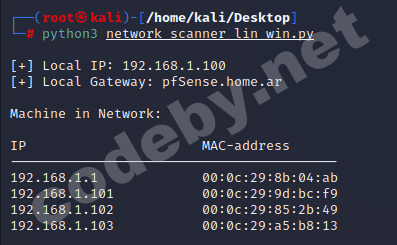
And that's it, in this case. The network scanner is ready, all that's left is to look at the results of its work. We launch it and see that there is a firewall in our local network. And those who understand even found out that it is pfSense , as well as three machines whose IP and MAC addresses were successfully obtained.
Scanner results:
Well, yes, do not forget that this way you will only be able to scan the local network.
Thank you for your attention. I hope this information was useful to someone.
What will you need?
In order to create a fast network scanner, with the possibility of its further expansion, we need to install scapy . This is a multifunctional library that allows you to send, analyze and forge network packets, as well as scan or attack networks. Its installation is quite simple. You need to write the command in the terminal:
Code:
pip install --pre scapyHowever, this is not the only, but recommended, option for installing this library. Here is a small table with commands for installing packages of different layouts. For our purposes, the recommended installation will be quite sufficient.
If your operating system is different from Linux, and in this case we mean Windows, then you will need to install the Npcap packet capture library . If you are using Windows XP, although this is unlikely today, then you will need to use the WinPcap library . You can install Npcap by downloading it https://npcap.com/
At this point, the preparatory stage can be completed. Let's now import scapy into our script.
Python:
from platform import system
from socket import socket, AF_INET, SOCK_DGRAM
from subprocess import check_output
import os

import scapy.all as sc
As you can see, in addition to the scapy library , the script will need to import several more modules that are part of the standard python libraries. In this case, the platform library will be needed to determine the operating system. Since this script will work both in Windows and Linux. The socket library is used to obtain the local IP address of the computer, and subprocess is used to execute the command and thereby obtain the IP address of the router used in the system by default.
Getting a local IP address
Let's start creating a network scanner. First, we need a function that gets the local IP address of the machine. Let's create it and call it, for example: local_ipv4(). This function establishes a connection to the address 10.255.255.255, and then returns the socket address and port using getsockname . In this case, we don't need the port, but the address is quite useful. Therefore, we take it from the tuple and return it from the function. If an error occurs and the connection fails, the address 127.0.0.1 is returned. Which, in principle, will correspond to reality, since in this case there will be no network connection, and only localhost will be used .
Python:
def local_ipv4():
    st = socket(AF_INET, SOCK_DGRAM)
    try:
        st.connect(('10.255.255.255', 1))
        ip_l = st.getsockname()[0]
    except Exception:
        ip_l = '127.0.0.1'
    finally:
        st.close()
    return ip_l
Supplement: the function of getting a local address can be done a little differently, but only if you have Linux OS . You need to additionally install the getmac and netifaces libraries.
Bash:
pip install getmac netifacesAdd to import:
Python:
from getmac.getmac import _get_default_iface_linux
from netifaces import ifaddresses, AF_INET
Then the function will look like this:
Python:
def local_ipv4():
    try:
        return ifaddresses(_get_default_iface_linux()).setdefault(AF_INET)[0]['addr']
    except TypeError:
        return '127.0.0.1'
Obtaining the IP address of the default gateway used in the system
The next step is to get the IP address of the gateway that is used by default in the system. To do this, we use subprocess.check_output , which runs a specific command in the terminal and returns its output. We will use similar commands for both Linux and Windows. For Linux, this is " route -n ", but with Windows, everything is a little more complicated, since when executing a command, a bunch of parameters are returned that are not particularly needed in this case. Therefore, you will need to search through all this information and output the filtered result.
Let's make the first function for Windows. Let's create get_gateway_win(). It doesn't receive any data as input, and returns the gateway address as output. Using subprocess.check_output, the command is executed, after which the result is brought to the desired form and returned from the function.
Python:
def get_gateway_win():
# get the default gateway address for the current network interface
    com = f'route PRINT 0* | findstr {local_ipv4()}'.split()
    return check_output(com, shell=True).decode('cp866').split()[2]
And for Linux, we will create the function get_gateway_linx(). The principle of obtaining the gateway address is the same here and the output is the desired gateway address.
Python:
def get_gateway_linx():
    com = 'route -n'.split()
    ip_route = str(subprocess.check_output(com, shell=True)).split("\\n")[2].split()[1].strip()
    if ip_route.isdigit():
        return ip_route
    else:
        sock = socket.gethostbyname(ip_route)
        return sock
Network Scan
Now it's time to start scanning the network. Let's create a function get_ip_mac_nework(ip), which will receive the initial address for scanning with the subnet mask at the input, and return a list of dictionaries with the received values of ip and mac addresses. Let's make request using the scapy.srp a broadcast ARP function to get responses from all computers that are on the same network with us. To send a request, you need to form a packet that will consist of a broadcast address and an ARP packet, which specifies the address and subnet mask. The timeout parameter indicates that there should be a one-second pause between requests, and the verbose parameter allows you not to display the results of the request in the terminal.
answered_list = sc.srp(sc.Ether(dst='ff:ff:ff:ff:ff:ff') / sc.ARP(pdst=ip), timeout=1, verbose=False)[0]
With this query we can get two lists. With queries that were answered and with queries that were not answered. Since we don't need unanswered queries, we take only those that were answered. Therefore, we explicitly indicate that we are taking element 0.
Next, in the loop, we will run through the contents of the list with requests and get the required values from it, which we will add to the list returned from the function as a dictionary.
Python:
def get_ip_mac_nework(ip):
    answered_list = sc.srp(sc.Ether(dst='ff:ff:ff:ff:ff:ff') / sc.ARP(pdst=ip), timeout=1, verbose=False)[0]
    clients_list = []
    for element in answered_list:
        clients_list.append({'ip': element[1].psrc, 'mac': element[1].hwsrc})
    return clients_list
Print scan results
Well, all that's left is to display the results on the screen. In this case, the print_ip_mac(mac_ip_list) function will be responsible for this, which receives the previously generated list with dictionaries as input. Everything is simple here. We run through the list in a loop and get certain values from the dictionaries under the required index. Then we display them on the screen.
Print function code:
Python:
def print_ip_mac(mac_ip_list):
    print(f"\nMachine in Network:\n\nIP\t\t\t\t\tMAC-address\n{'-' * 41}")
    for client in mac_ip_list:
        print(f'{client["ip"]}\t\t{client["mac"]}')
Start network scan
To start scanning the network, as well as to obtain IP addresses, we will use the main() function. First, we will obtain the local IP, then, depending on the gateway IP system. We will form a network address with a mask from the obtained local IP address and start the network scanning function. After that, we will display the IP addresses and scanning results on the screen.
The main() function code:
Python:
def main():
    local_ip = local_ipv4()
    if system() == "Windows":
        gateway = get_gateway_win()
    elif system() == 'Linux':
        if not os.getuid() == 0:
            print('\n[+] Запустите скрипт с правами суперпользователя!\n')
            return
        gateway = get_gateway_linx()
    ip_mac_network = get_ip_mac_nework(f'{local_ip.split(".")[0]}.{local_ip.split(".")[1]}.{local_ip.split(".")[2]}.1/24')
    print(f'\n[+] Local IP: {local_ip}\n[+] Local Gateway: {gateway}')
    print_ip_mac(ip_mac_network)
And that's it, in this case. The network scanner is ready, all that's left is to look at the results of its work. We launch it and see that there is a firewall in our local network. And those who understand even found out that it is pfSense , as well as three machines whose IP and MAC addresses were successfully obtained.
Scanner results:
Python:
from platform import system
from socket import socket, AF_INET, SOCK_DGRAM, gethostbyname
from subprocess import check_output
import os

import scapy.all as sc


def local_ipv4():
    st = socket(AF_INET, SOCK_DGRAM)
    try:
        st.connect(('10.255.255.255', 1))
        ip_l = st.getsockname()[0]
    except Exception:
        ip_l = '127.0.0.1'
    finally:
        st.close()
    return ip_l


def get_gateway_win():
    com = f'route PRINT 0* | findstr {local_ipv4()}'.split()
    return check_output(com, shell=True).decode('cp866').split()[2]


# получение ip адреса шлюза используемого по умолчанию в Linux
def get_gateway_linx():
    ip_route = str(check_output('route -n | grep UG', shell=True).decode()).split()[1].strip()
    return ip_route


def get_ip_mac_nework(ip):
    answered_list = sc.srp(sc.Ether(dst='ff:ff:ff:ff:ff:ff') / sc.ARP(pdst=ip), timeout=1, verbose=False)[0]
    clients_list = []
    for element in answered_list:
        clients_list.append({'ip': element[1].psrc, 'mac': element[1].hwsrc})
    return clients_list


def print_ip_mac(mac_ip_list):
    print(f"\nMachine in Network:\n\nIP\t\t\t\t\tMAC-address\n{'-' * 41}")
    for client in mac_ip_list:
        print(f'{client["ip"]}\t\t{client["mac"]}')


def main():
    local_ip = local_ipv4()
    if system() == "Windows":
        gateway = get_gateway_win()
    elif system() == 'Linux':
        if not os.getuid() == 0:
            print('\n[+] Запустите скрипт с правами суперпользователя!\n')
            return
        gateway = get_gateway_linx()
    ip_mac_network = get_ip_mac_nework(f'{local_ip.split(".")[0]}.{local_ip.split(".")[1]}.{local_ip.split(".")[2]}.1/24')
    print(f'\n[+] Local IP: {local_ip}\n[+] Local Gateway: {gateway}')
    print_ip_mac(ip_mac_network)


if __name__ == "__main__":
    main()
Well, yes, do not forget that this way you will only be able to scan the local network.
Thank you for your attention. I hope this information was useful to someone.

