




JavaScript Optimization: How to Speed Up Website Scripts
All more or less complex websites and other web projects must include JavaScript. Correct scripting affects not only the functionality of specific page features but also the overall website speed. Search engines and users are much more lenient towards projects whose pages load quickly, even with a poor internet connection. This can be achieved by optimizing the JavaScript on your website or app.How to optimize JavaScript on your website
Using JavaScript makes website pages more dynamic and functional. However, the more functionality and dynamics a project includes, the more scripts need to be written and included, which can create a significant load. A good developer is always looking for opportunities to optimize the JS scripts on their project pages.Optimization can be achieved in a variety of ways, from running scripts through specialized services that minify code to thinking about script minification from the start. The tips below can be used individually or combined for greater effectiveness. It's recommended to use at least half of them to significantly optimize the JavaScript code on your project pages.
Declare multiple variables on one line
Many developers define each new variable on a separate line, requiring a repeating keyword, such as "let," to define a new variable. Defining new variables on a separate line makes the code more readable for developers, but it also increases the number of characters and script processing time. For a small project, this isn't noticeable, but for a larger one, it can cause a noticeable performance penalty.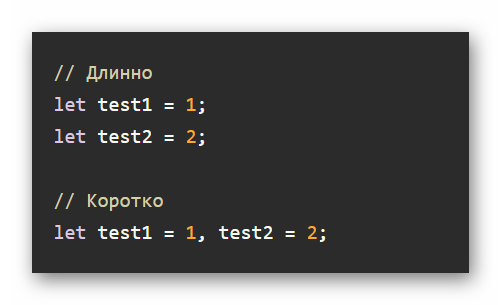
An example of shorthand for variables in JS
JavaScript allows you to write multiple variables on a single line. Take advantage of this feature. It's a good idea to start writing variables "correctly" from the very beginning of a project. This will save you development time and improve website performance. Of course, all variables don't have to be written on a single line. You can separate them by category, for example, one line could contain variables responsible for one component, another for a second, and so on. This type of code is easier for developers to read and creates slightly less overhead.
Assign values to multiple variables correctly
This tip follows on from the previous one. Many developers, even experienced ones, even write variable names on one line, but assign the value to different variables, like this:let var1, var2, var3;
var1 = 1;
var2 = 2;
var3 = 3;
This is, of course, slightly better than defining each variable on a separate line, but it's still not ideal. You can shorten it by using arrays. Writing variables and values together on a single line also helps optimize your JS code a bit. The example above could be written like this:
let [var1, var2, var3] = [1, 2, 3];
You can work with objects in a similar way, but use curly brackets instead of square brackets.

An example of shorthand for writing objects in JS
Using alternative if-else constructs
The if statement and related constructs are often used to define checks and logical operations. In such cases, they can often be shortened by writing just a couple of operators instead of keywords. Their use also allows you to write conditions in one or two lines, instead of the complex constructs required when writing using standard if-else statements.For example, this is how you can set up a check for Null and undefined for a variable in just one line:
if (test1 !== null || test1 !== undefined || test1 !== '')
However, this is not an ideal option - newer versions of JavaScript automatically perform such a check of variables before executing a particular function, so the whole construction could be written like this:
if (test1)
In the given example, the if statement will automatically perform the check and convert the variable to a logical value.
Use logical operators instead of if
Using the logical operators || and && allows you to write code for checking a particular logical condition much more concisely . Sometimes a large construct can be written in just one line, which allows for significant code optimization in large volumes.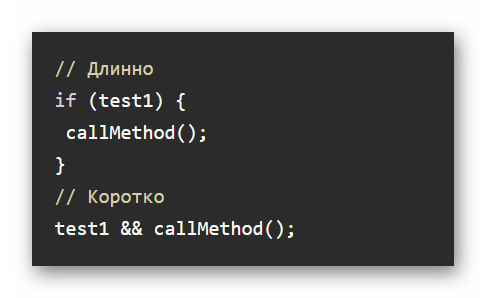
Using logical operators instead of if in JS
You can also use ternary operators instead of standard checks, which allows you to write large checks in one or two lines.
Shortening the for loop
The standard for loop has a cumbersome default structure, which can and should be optimized. This has become much easier thanks to improvements in recent versions of JavaScript. For example, you can use the following notation:for (let i of testData)
In some cases, the forEach functional method can be used instead of the standard for loop. It also allows for shorter notations and is easier to read. However, this notation still has some limitations. For example, iterating over an array using the forEach method cannot be interrupted with the break statement.
Simplify mathematical operations
To convert strings to numbers, you can use the addition operator, as in this example:let var1 = +'123';
let var2 = +'12.3';
Some mathematical operations can be optimized:
- ** - raising a number to a power. Example of notation: 2**3 - raising the number 2 to the power 3;
- ~~ - rounding of numbers. It's worth noting that in this case, rounding occurs downwards; for example, ~~1.9 would be 1, not 2.
It's also possible to optimize some numbers with a large number of trailing zeros. For example, the number 1,000,000 can be written as 1e6.
Assigning values to objects
You can avoid assigning values to objects if the property name matches the variable name. This avoids unnecessary duplication and reduces coding time.General tips for optimizing JavaScript code
The tips above focused specifically on the coding process. Individually, they're unlikely to yield significant optimization, so you should try combining several of the tips presented to achieve the best results. The following recommendations are more general in nature , but they can also greatly help optimize your website's JavaScript.Think about caching mechanisms
JS scripts are often used to access specific website elements. If the developer initially provides the ability to store website data in the user's browser cache, this will reduce the number of requests and also reduce the time required to complete operations. Caching can be implemented in two ways:- JavaScript-API Cache - works thanks to the API and related online services, it is easy to configure, but there is some dependence of the project on the operation of third-party services located remotely;
- HTTP caching works by using only the user's browser, or more precisely, its cache. It's a bit more difficult to set up, but this method is more reliable.
Clean up the code
This advice applies not only to the optimization discussed in the tips section above, but also to detailed planning of website functionality, analyzing user activity in the future, and optimizing certain features. If a website has functionality that is outdated or rarely used by users, it's best to completely remove it from the project's JavaScript code. Even unused code creates a load, which reduces page responsiveness.It's also recommended to optimize frequently used operations. For example, the registration process can be simplified by allowing users to log in using an existing social media account instead of filling out a lengthy form and verifying it. This will "kill two birds with one stone" —optimize the code and make the website more user-friendly .
Also, don't forget to keep up with technological developments. JavaScript itself improves from time to time, and libraries for it improve even faster, with new ones appearing. Over time, you may need to refine your website's code using new solutions. These are usually aimed at optimization. However, you should be selective about these new features, as some of them, instead of optimizing the code, can actually make it even heavier.
Provide lazy loading for non-essential scripts
Loading all of the JavaScript code at once is unlikely to be necessary for a web page to function correctly. Consider lazy loading your scripts. They shouldn't load along with the page, but only when the user performs an action on the page, such as clicking a button. If the script loaded along with the page and the user didn't click the button, nothing would happen, and the page would take a little longer to load. If the script is loaded only after the user's action on the page, the user may have to wait an extra second or two for the action to complete. This is still much better than having to wait those few seconds for the page to fully load.By taking a comprehensive approach to lazy loading page content, you can avoid the browser downloading and compiling a large amount of JavaScript code at the very beginning of the process. This will help your website pages load faster. Google and Yandex also prioritize highly optimized projects in their search rankings; even the average user is unlikely to notice.
Typically, developers implement a mechanism whereby the page itself and its core functionality are loaded first, followed by all JavaScript code, without any user interaction. The code can configure the delay after which scripts are loaded when lazy loading. Google recommends setting a delay of 50 ms. By this time, the main page content has typically loaded, but the user hasn't yet had a chance to perform any actions. The only potential drawback is that some animations may lag if they are placed on the main loading screen.
Fix possible memory leaks
If a project has a memory leak, the browser will request more memory from the user's computer, creating additional load. The website may perform very poorly on devices with limited RAM. This issue typically occurs on pages containing an interactive element for viewing videos or images, such as a slider or a custom video player.You can analyze your website for memory leaks using the built-in developer tools in Google Chrome. This can be done in the Performance tab. This will give the developer information on where exactly the memory leak is occurring and allow them to take action to fix it. It's highly recommended to check for potential memory leaks before the final launch of a project and eliminate or at least minimize them.
Limit the use of global variables
Global variables will exist for the entire duration of the script, increasing its load on the page. They're convenient when you need to set a variable that's used constantly in the code, but they shouldn't be overused. It's better to make most variables local, which are removed from memory after a specific section of the script is executed. This will avoid unnecessary load.However, local variables should also be used correctly. If the value of one local variable is repeated too often in the code, it's wiser to redefine it into a single global variable rather than constantly defining local variables with the same value.
Monitor performance
Some optimization issues can only be discovered after the website launches. Use specialized tools for these purposes. It's a good idea to establish user feedback so they can quickly report any issues they discover. Sometimes script optimization flaws are only visible under certain user loads.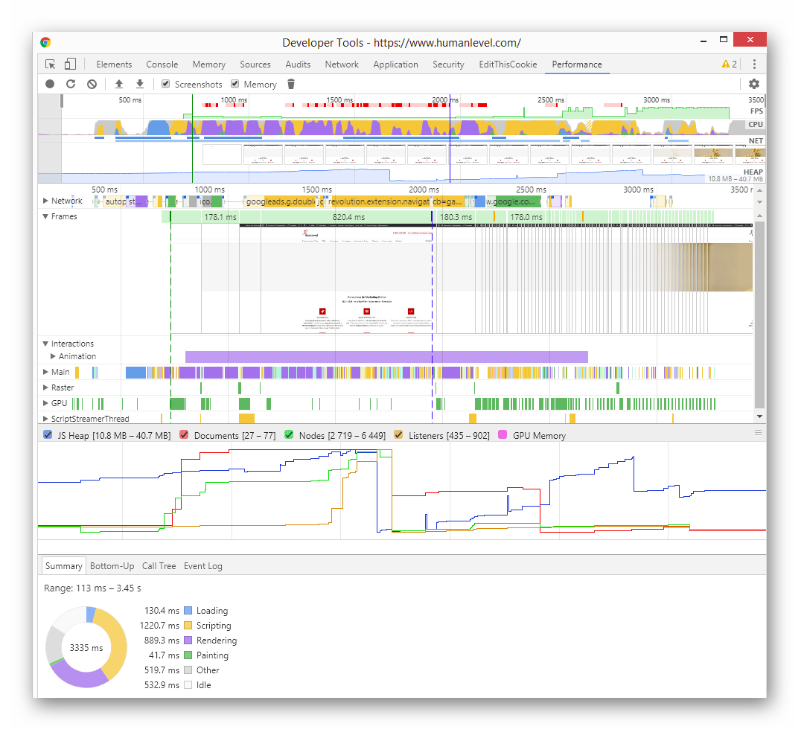
JS Performance Monitoring
However, for a more accurate analysis of the performance of JavaScript scripts on a project, it is recommended to use third-party services. Lighthouse and Google PageSpeed have proven themselves to be effective. They will help you identify performance bottlenecks.
