




Part One (You are here)
Part Two, Websocket Part Three, gRPC Hello! My name is Sergey, I've been in testing for over 11 years, and during that time I've tried many different approaches in QA—I started as a simple tester, then built and developed various testing and automation departments, and now I work at QIWI.
In this series of posts, I want to talk about testing three popular so-called non-REST backends. The most important thing to start with is to define some terminology. Let's agree that wherever I mention REST in this text, I'm talking specifically about the REST HTTP backend. Many of you have probably worked with it and are generally quite familiar with it.
But there are three other, non-REST backends. It's also useful to learn how to work with them: firstly, for general development, and secondly, you'll know how to approach testing them in case your team decides to work with one of them.

Below is a breakdown of testing the first of these three, GraphQL. I created all the examples in the post using Postman, which is popular and accessible enough that you could quickly replicate everything if you wanted.
A little background. I'll be comparing GraphQL testing to HTTP, so first, a quick introduction. What is HTTP? It's the Hypertext Transfer Protocol, which involves two things: sending requests and receiving responses. The simplest HTTP request consists of a start line, a request type, a request header, and a body. The body transfers data (usually in JSON form), while the headers are purely informational, so we won't dwell on them.
Now let's work with the request type.
First, let's look at the request body through the lens of CRUD. These are the four main operations on information:
So, we've created a request and sent it. What do we get in response? In response, we receive information about the string we requested, the headers in the response, the body containing the data (if any), and the response code.
Response codes are divided into 5 groups:
Now let's talk about GraphQL.
Let's say you have a REST service that provides specific information about players, matches, teams, and other sports data. I'm sure you've all seen a REST HTTP service with this format.

This format has two disadvantages.
The first is called overfetching , which is a situation where an endpoint returns a huge amount of information in its response that you might not need. Let's say you needed a single property value, but the service returned everything you needed and didn't need. For example, we only wanted to return the team name. But the endpoint is designed to return game history, ratings, and everything else related to the team.
The second drawback is the opposite situation, underfetching, when the endpoint returns insufficient information, forcing you to make multiple requests to gather a complete picture of the data. This increases the load on the service.
To solve these problems, GraphQL offers a single entry point, a single endpoint, through which you can query any data you need, as long as it is related in the schema.
A schema is an SDL, or schema definition language, a language that can describe data and return it to a service, establishing relationships between that data in a specific way.
For example, imagine a bookstore service. It provides information about the books in its database, their titles, authors, and information about them. You can look up an author's name and, for example, find out what books they've written.
To describe it in SDL, just a few lines are enough.

The query keyword specifies that the service can return information about books, and we get an array of the book type . Or it can return information about authors, and we get an array of the author type. The book type contains the book title and a link to the author. And the author type contains their name and a list of the books they've written.
So, we've just defined what data we can query through the GraphQL Endpoint and how it's related.
Let's see what a request for such a book service would look like.

With this query, we want to get information about books, and here we're only interested in the book titles. We also want information about authors—just their names.
After executing such a request, the service will send us the following JSON object.

It contains the data keyword , and inside it will be the books we requested. As we recall, the service returns an array of the book type , but for each array of these objects, we only requested the title .
Therefore, the service returned an array of books, listing only their names. The same applies to the author—it returned an array of authors, each with their names as objects.
In general, we got what we asked for.
When starting out with GraphQL, a common question arises: where can I even see what I can query from such a service? After all, there's only one method, but there can be any amount of data.
There are three answers here.
First , look at the schema itself (SDL). It immediately shows what you can request from the service, what type, and so on. If it's simple enough, you'll be able to read it quickly and won't have any problems.
The second is for those who prefer a document-oriented format. GraphQL has plugins that allow it to use a schema to generate very detailed documentation, similar to Swagger, containing all the comprehensive information.
The third is the autofetch mechanism, which is automatically implemented in POSTMAN.
Let's get practical and work with the service https://rickandmortyapi.com/ . It's a very interesting thing—the project's authors have created a service that provides a variety of information about the animated series "Rick and Morty." It uses not only REST endpoints but also GraphQL, which is what we're interested in.
So, to make a GraphQL request, go to Postman, New — GraphQL request.
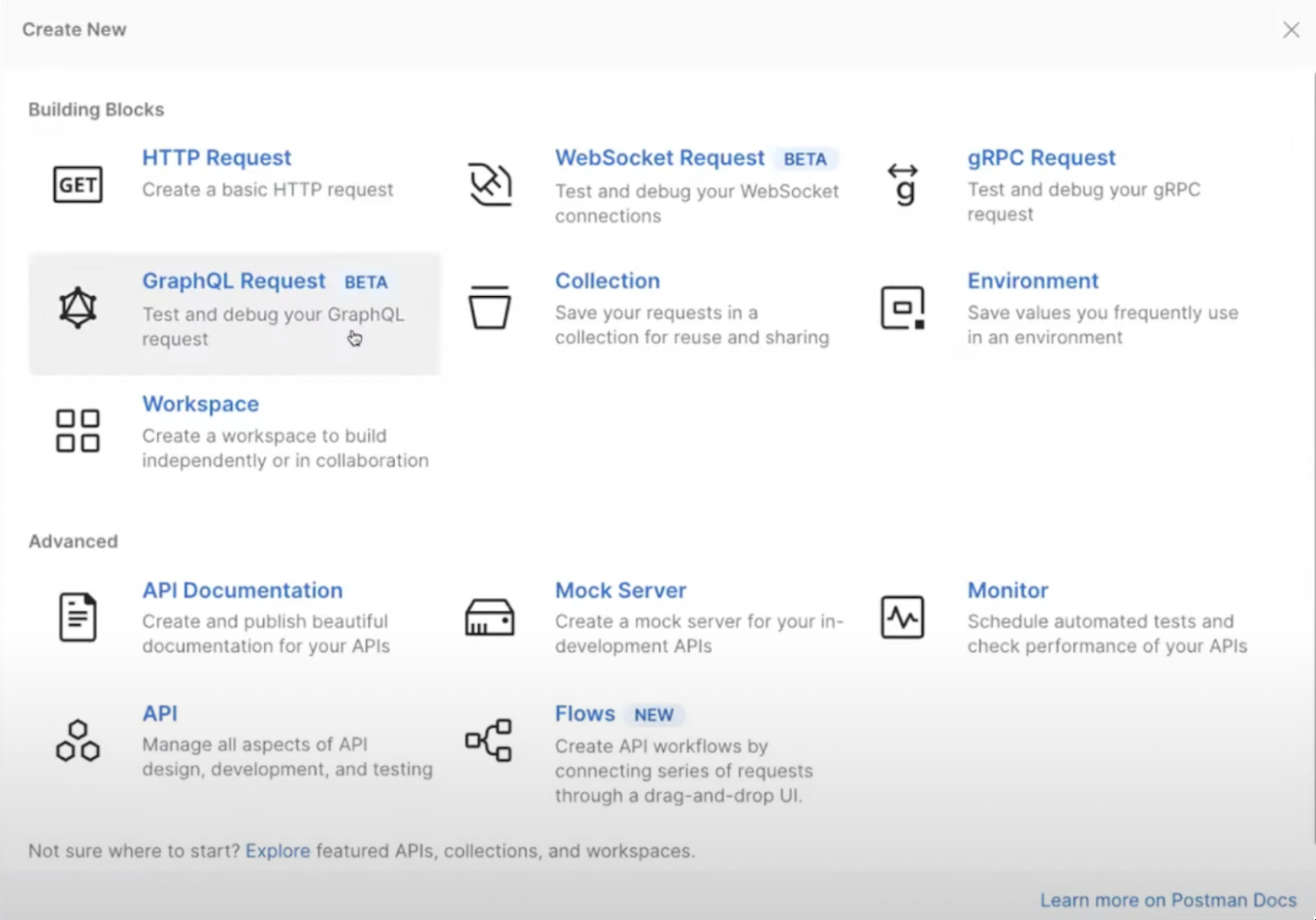
Enter https://rickandmortyapi.com/graphql into the address bar . Postman will automatically display the following information:

This is the same auto fetch mechanism. It turns out that Postman went to the GraphQL URL and asked it to return the type and relationship system to provide us with information.
Now we can easily formulate a query. For example, here's how to query for information about a character. To do this, we need to define the query keyword and identify all the objects and their properties we want to retrieve. For example, let's query all characters, and for each character, we want to get their name and picture.
Let's send a request and indicate in the body:
query {
characters {
results {
name,
image
}
}
}
Explain with
Answer
We get the data object , which contains the characters object , and inside it are the results in the form of an array with objects consisting of a name and a picture.
In the same way, you can request anything - the name of any character, his image, a list of episodes in which he appears, with the titles of these episodes, in general, whatever you want.
Queries can be parameterized, for example, if you're thinking about using automated tests and ingesting other data in the future. GraphQL allows you to do this like this:
Pay attention to the variables field .

This field is used to define the variables you need. For example, let's create a variable called testid and pass in the number two.
{
"test_id": 2
}
Explain with
We will pass this testid as a parameter separated by a dollar sign (it is worth noting here that this is not my liberty, but a possibility defined by the SDL developers of this resource).
query {
character(id: $test_id) {
name,
image,
episode {
name
}
}
}
Explain with
Postman will immediately highlight the data in red—it doesn't immediately understand what type it is and how to use it.

To explain, we need to give this function a name. Let's say getSomeInfo , which retrieves some information. We also need to define the type of parameters used here—let's specify that the testid we pass here will have an identifier (the exclamation point indicates that the parameter is required).
query getSomeInfo($test_id: ID!) {
character(id: $test_id) {
name,
image,
episode {
name
}
}
}
Explain with
Let's execute the request and get the answer.
Answer
Now let's further leverage the power of GraphQL and do the following: query data from two different endpoints simultaneously. If you look at the service's REST documentation, you'll see that to retrieve characters and episodes, we'd have to make two separate requests. Here, we'll do it in one.
Let's request information about which episodes Morty played in, and at the same time, let's request information from the first episode about which characters played in it, and see if the data matches or not.
Let's make the following request:
query {
characters(filter: {name: "Morty Smith"}) {
results {
name,
episode {
name
}
}
}
episodes(filter: {name: "Pilot"}) {
results {
characters {
name
}
}
}
}
Explain with
Answer
We see that Morty played in an episode called “Pilot.”
"data": {
"characters": {
"results": [
{
"name": "Morty Smith",
"episode": [
{
"name": "Pilot"
},
Explain with
And we immediately see that he is among the characters in the episode “Pilot”.
"episodes": {
"results": [
{
"characters": [
{
"name": "Rick Sanchez"
},
{
"name": "Morty Smith"
},
Explain with
As a result, we made a request to two different endpoints in a single query and retrieved the information. This is a very useful feature of GraphQL.
Now I'll tell you a little about the features of GraphQL that will be of interest to testers.

For this purpose, GraphQL has two keywords: query and mutation. For all read requests, GraphQL requires you to specify the keyword query, a service parameter. If you want to modify something (create, update, delete), you must specify the keyword mutation. This allows you to combine create and read operations in a single request.
It is a very, very flexible language.
Secondly, the response code is almost always 200 . The reason is the same Of course, there are 500 errors if your service is down, but in that case, we simply haven't reached the handlers in GraphQL, and 400 errors when the syntax is incorrect. But in reality, GraphQL will most often simply return 200. Therefore, testing error codes here, as in REST HTTP, makes no sense.
Thirdly, when I was starting to figure all this out back then, I thought, "How am I going to test all this?" Every possible combination? The answer is simple: don't test everything. Test only based on the business feature. That is, if you have a backend that responds to a specific client request, make sure it responds exactly to that request, and not to every possible iteration of parameters it could theoretically return. Exhaustive testing isn't necessary here.
Fourth. I mentioned that you can query multiple endpoints. This is useful for checking roles and access. Let's say you have a school portal with three roles: teacher, student, and administrator. The student has access to certain sections of the portal, while the teacher has slightly more functionality. The administrator can access everything.
So, if you were testing REST HTTP, you'd run multiple requests to different endpoints, first as a student, then as a teacher, then as an admin. You'd see where errors returned and where they didn't.
In GraphQL, you can make a single query , for example, for a student. Request data from all available sections of the site. For those sections the student has access to, they'll get the data. For those they don't, they'll get an error, such as "unauthorized access" or "you don't have permission."
This way, you can quickly get a lot of useful information in a single, well-formatted query. And you can even check the format for errors ;-).
Cons of GraphQL
First of all, there's the downside to its advantage. If you suddenly need to retrieve this overfetched information—that is, all the available information—it won't work. You'll have to explicitly specify what you want. GraphQL requires you to specify a specific query. Yes, if you want to see all the information about an object, and the object has 500 properties, you'll have to query those 500 properties.
Secondly, the role and error model. You can perform multiple checks in a single request, retrieving data from multiple sources. For example, you can request a bunch of information under certain permissions and check which ones are accessible and which are not. All in one request. Very convenient.
Third, test the user flow. GraphQL is flexible and cool, yes. But let's say you're creating a user. How does that happen under the hood? You've collected the information and shoved it across different databases, tables, whatever.
Then you log into your personal account to read user information, and you need to retrieve that information. This information is collected from these databases, from tables, and a complex join is performed. Then, from there, this selection is somehow collected, aggregated, and returned to you. And there are many places where bugs can occur.
So, the first part of the series is complete, we've figured out GraphQL, in the next post we'll look at WebSocket.
Part Two, Websocket Part Three, gRPC Hello! My name is Sergey, I've been in testing for over 11 years, and during that time I've tried many different approaches in QA—I started as a simple tester, then built and developed various testing and automation departments, and now I work at QIWI.
In this series of posts, I want to talk about testing three popular so-called non-REST backends. The most important thing to start with is to define some terminology. Let's agree that wherever I mention REST in this text, I'm talking specifically about the REST HTTP backend. Many of you have probably worked with it and are generally quite familiar with it.
But there are three other, non-REST backends. It's also useful to learn how to work with them: firstly, for general development, and secondly, you'll know how to approach testing them in case your team decides to work with one of them.
Below is a breakdown of testing the first of these three, GraphQL. I created all the examples in the post using Postman, which is popular and accessible enough that you could quickly replicate everything if you wanted.
A little background. I'll be comparing GraphQL testing to HTTP, so first, a quick introduction. What is HTTP? It's the Hypertext Transfer Protocol, which involves two things: sending requests and receiving responses. The simplest HTTP request consists of a start line, a request type, a request header, and a body. The body transfers data (usually in JSON form), while the headers are purely informational, so we won't dwell on them.
Now let's work with the request type.
First, let's look at the request body through the lens of CRUD. These are the four main operations on information:
- Create (creation)
- Reading
- Update
- D elete (deletion)
- To create it, use POST or PUT.
- To read - GET.
- For an update, use PUT or PATCH.
For a delete, use DELETE.
So, we've created a request and sent it. What do we get in response? In response, we receive information about the string we requested, the headers in the response, the body containing the data (if any), and the response code.
Response codes are divided into 5 groups:
- 100 - informational
- 200 - successful
- 300 — redirects
- 400 - Client Errors
- 500 — server errors.
Now let's talk about GraphQL.
What is GraphQL?
It's a query language for your API and a server-side environment for executing queries using the type system you define for your data. There are two key points to highlight here. First, it's a query language. Second, it uses a type system. Everything revolves around these two features.Let's say you have a REST service that provides specific information about players, matches, teams, and other sports data. I'm sure you've all seen a REST HTTP service with this format.
This format has two disadvantages.
The first is called overfetching , which is a situation where an endpoint returns a huge amount of information in its response that you might not need. Let's say you needed a single property value, but the service returned everything you needed and didn't need. For example, we only wanted to return the team name. But the endpoint is designed to return game history, ratings, and everything else related to the team.
The second drawback is the opposite situation, underfetching, when the endpoint returns insufficient information, forcing you to make multiple requests to gather a complete picture of the data. This increases the load on the service.
To solve these problems, GraphQL offers a single entry point, a single endpoint, through which you can query any data you need, as long as it is related in the schema.
A schema is an SDL, or schema definition language, a language that can describe data and return it to a service, establishing relationships between that data in a specific way.
For example, imagine a bookstore service. It provides information about the books in its database, their titles, authors, and information about them. You can look up an author's name and, for example, find out what books they've written.
To describe it in SDL, just a few lines are enough.
The query keyword specifies that the service can return information about books, and we get an array of the book type . Or it can return information about authors, and we get an array of the author type. The book type contains the book title and a link to the author. And the author type contains their name and a list of the books they've written.
So, we've just defined what data we can query through the GraphQL Endpoint and how it's related.
Let's see what a request for such a book service would look like.
With this query, we want to get information about books, and here we're only interested in the book titles. We also want information about authors—just their names.
After executing such a request, the service will send us the following JSON object.
It contains the data keyword , and inside it will be the books we requested. As we recall, the service returns an array of the book type , but for each array of these objects, we only requested the title .
Therefore, the service returned an array of books, listing only their names. The same applies to the author—it returned an array of authors, each with their names as objects.
In general, we got what we asked for.
When starting out with GraphQL, a common question arises: where can I even see what I can query from such a service? After all, there's only one method, but there can be any amount of data.
There are three answers here.
First , look at the schema itself (SDL). It immediately shows what you can request from the service, what type, and so on. If it's simple enough, you'll be able to read it quickly and won't have any problems.
The second is for those who prefer a document-oriented format. GraphQL has plugins that allow it to use a schema to generate very detailed documentation, similar to Swagger, containing all the comprehensive information.
The third is the autofetch mechanism, which is automatically implemented in POSTMAN.
Let's get practical and work with the service https://rickandmortyapi.com/ . It's a very interesting thing—the project's authors have created a service that provides a variety of information about the animated series "Rick and Morty." It uses not only REST endpoints but also GraphQL, which is what we're interested in.
So, to make a GraphQL request, go to Postman, New — GraphQL request.
Enter https://rickandmortyapi.com/graphql into the address bar . Postman will automatically display the following information:
This is the same auto fetch mechanism. It turns out that Postman went to the GraphQL URL and asked it to return the type and relationship system to provide us with information.
Now we can easily formulate a query. For example, here's how to query for information about a character. To do this, we need to define the query keyword and identify all the objects and their properties we want to retrieve. For example, let's query all characters, and for each character, we want to get their name and picture.
Let's send a request and indicate in the body:
query {
characters {
results {
name,
image
}
}
}
Explain with
Answer
We get the data object , which contains the characters object , and inside it are the results in the form of an array with objects consisting of a name and a picture.
In the same way, you can request anything - the name of any character, his image, a list of episodes in which he appears, with the titles of these episodes, in general, whatever you want.
Queries can be parameterized, for example, if you're thinking about using automated tests and ingesting other data in the future. GraphQL allows you to do this like this:
Pay attention to the variables field .
This field is used to define the variables you need. For example, let's create a variable called testid and pass in the number two.
{
"test_id": 2
}
Explain with
We will pass this testid as a parameter separated by a dollar sign (it is worth noting here that this is not my liberty, but a possibility defined by the SDL developers of this resource).
query {
character(id: $test_id) {
name,
image,
episode {
name
}
}
}
Explain with
Postman will immediately highlight the data in red—it doesn't immediately understand what type it is and how to use it.
To explain, we need to give this function a name. Let's say getSomeInfo , which retrieves some information. We also need to define the type of parameters used here—let's specify that the testid we pass here will have an identifier (the exclamation point indicates that the parameter is required).
query getSomeInfo($test_id: ID!) {
character(id: $test_id) {
name,
image,
episode {
name
}
}
}
Explain with
Let's execute the request and get the answer.
Answer
Now let's further leverage the power of GraphQL and do the following: query data from two different endpoints simultaneously. If you look at the service's REST documentation, you'll see that to retrieve characters and episodes, we'd have to make two separate requests. Here, we'll do it in one.
Let's request information about which episodes Morty played in, and at the same time, let's request information from the first episode about which characters played in it, and see if the data matches or not.
Let's make the following request:
query {
characters(filter: {name: "Morty Smith"}) {
results {
name,
episode {
name
}
}
}
episodes(filter: {name: "Pilot"}) {
results {
characters {
name
}
}
}
}
Explain with
Answer
We see that Morty played in an episode called “Pilot.”
"data": {
"characters": {
"results": [
{
"name": "Morty Smith",
"episode": [
{
"name": "Pilot"
},
Explain with
And we immediately see that he is among the characters in the episode “Pilot”.
"episodes": {
"results": [
{
"characters": [
{
"name": "Rick Sanchez"
},
{
"name": "Morty Smith"
},
Explain with
As a result, we made a request to two different endpoints in a single query and retrieved the information. This is a very useful feature of GraphQL.
Now I'll tell you a little about the features of GraphQL that will be of interest to testers.
Things to remember
First, since GraphQL is a language and not a protocol, all requests are POST ( because it's important for us to have a body in the request ). Even if you send a put, patch, or delete—it doesn't matter—it will skip all of them and ignore the type. So, the question arises: how does our CRUD acronym work here?
For this purpose, GraphQL has two keywords: query and mutation. For all read requests, GraphQL requires you to specify the keyword query, a service parameter. If you want to modify something (create, update, delete), you must specify the keyword mutation. This allows you to combine create and read operations in a single request.
It is a very, very flexible language.
Secondly, the response code is almost always 200 . The reason is the same
Of course, there are 500 errors if your service is down, but in that case, we simply haven't reached the handlers in GraphQL, and 400 errors when the syntax is incorrect. But in reality, GraphQL will most often simply return 200. Therefore, testing error codes here, as in REST HTTP, makes no sense.Thirdly, when I was starting to figure all this out back then, I thought, "How am I going to test all this?" Every possible combination? The answer is simple: don't test everything. Test only based on the business feature. That is, if you have a backend that responds to a specific client request, make sure it responds exactly to that request, and not to every possible iteration of parameters it could theoretically return. Exhaustive testing isn't necessary here.
Fourth. I mentioned that you can query multiple endpoints. This is useful for checking roles and access. Let's say you have a school portal with three roles: teacher, student, and administrator. The student has access to certain sections of the portal, while the teacher has slightly more functionality. The administrator can access everything.
So, if you were testing REST HTTP, you'd run multiple requests to different endpoints, first as a student, then as a teacher, then as an admin. You'd see where errors returned and where they didn't.
In GraphQL, you can make a single query , for example, for a student. Request data from all available sections of the site. For those sections the student has access to, they'll get the data. For those they don't, they'll get an error, such as "unauthorized access" or "you don't have permission."
This way, you can quickly get a lot of useful information in a single, well-formatted query. And you can even check the format for errors ;-).
Cons of GraphQL
First of all, there's the downside to its advantage. If you suddenly need to retrieve this overfetched information—that is, all the available information—it won't work. You'll have to explicitly specify what you want. GraphQL requires you to specify a specific query. Yes, if you want to see all the information about an object, and the object has 500 properties, you'll have to query those 500 properties.
So, let's sum it up briefly
GraphQL — what are we testing?
First, you need to check the format of the returned data. It returns JSON with a specific structure. This structure is parsed by clients or someone else. Therefore, this structure format needs to be checked—you never know, maybe something has changed, which could be a surprise. Don't forget about the data inside, either. It's a good idea to check that, too, because it might return irrelevant data. Lying is never a good idea.Secondly, the role and error model. You can perform multiple checks in a single request, retrieving data from multiple sources. For example, you can request a bunch of information under certain permissions and check which ones are accessible and which are not. All in one request. Very convenient.
Third, test the user flow. GraphQL is flexible and cool, yes. But let's say you're creating a user. How does that happen under the hood? You've collected the information and shoved it across different databases, tables, whatever.
Then you log into your personal account to read user information, and you need to retrieve that information. This information is collected from these databases, from tables, and a complex join is performed. Then, from there, this selection is somehow collected, aggregated, and returned to you. And there are many places where bugs can occur.
So, the first part of the series is complete, we've figured out GraphQL, in the next post we'll look at WebSocket.

