




Article How to Install Deep Live Cam and Replace Face in Real Time

Martin W Luis

Underground
ULTIMATE
PREMIUM
MEMBER
BFD Legacy
Joined
Jan 27, 2025
Messages
572
Reaction score
1,511
Deposit
175$
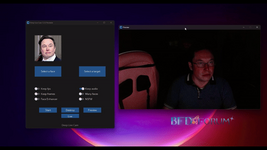
What's up, guys! Today we're going to install Deep Live Cam, a cool thing that lets you swap faces on your webcam or in a video. Yes, now you can put your face on a photo of Jason Statham and feel cool... well, no, you won't.

1740662632096.png

Step 1. Preparing for installation

Before you launch this mega-dragoon, you need to install a few things. If they're missing, everything will go to hell.

1. Install Chocolatey (if you're on Windows)

Run PowerShell as administrator and type:
Code:
Set-ExecutionPolicy Bypass -Scope Process -Force; [System.Net.ServicePointManager]::SecurityProtocol = [System.Net.ServicePointManager]::SecurityProtocol -bor 3072; iex ((New-Object System.Net.WebClient).DownloadString('https://community.chocolatey.org/install.ps1'))

2. Install Python 3.10, Git and FFmpeg:

Code:
choco install python --version=3.10.0 -y
choco install git -y
choco install ffmpeg -y

3. Check the installation:

Code:
python --version
git --version
ffmpeg -version
If there is an error somewhere, catch the bream and check the installation.

4. Install Visual Studio C++ Build Tools 2022 Download and install them from here: https://aka.ms/vs/17/release/vs_BuildTools.exe

If you have NVIDIA GPU, then install CUDA:
Code:
choco install cuda -y
And check with the command:
nvidia-smi
If there is an error, then you broke everything - deal with the drivers.

Step 2. Download Deep Live Cam

Now clone the project:
Code:
git clone https://github.com/hacksider/Deep-Live-Cam.git
cd Deep-Live-Cam
Install all dependencies:
Code:
pip install -r requirements.txt
If you have a GPU, add CUDA support:
Code:
pip install onnxruntime-gpu

Step 3. Download models

Go to Hugging Face and download the files:

Step 4. Check and go to verification

The program opens, select a face and either upload a video or turn on the webcam. Click "Start" and get a decent fake.

Here's what you can do:

Change your face in real time
Insert yourself in any video
Make memes with cats (no, animals are not allowed yet)
Possible errors and solutions

❌ python: command not found → Check if Python is added to PATH.

❌ CUDA is not found → Update NVIDIA drivers and run nvidia-smi.

❌ ModuleNotFoundError: No module named 'something' → Run pip install -r requirements.txt again.

That's it, now you're officially a master of face swapping!
 

Attachments

  • 1740662717882.png
    1740662717882.png
    124.3 KB · Views: 2
  • 1740662732644.png
    1740662732644.png
    124.3 KB · Views: 2
Got one .. but facing issues to use it on android .. could be cool to discuss and upgrade
 
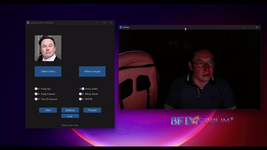
What's up, guys! Today we're going to install Deep Live Cam, a cool thing that lets you swap faces on your webcam or in a video. Yes, now you can put your face on a photo of Jason Statham and feel cool... well, no, you won't.

View attachment 827

Step 1. Preparing for installation

Before you launch this mega-dragoon, you need to install a few things. If they're missing, everything will go to hell.

1. Install Chocolatey (if you're on Windows)

Run PowerShell as administrator and type:
Code:
Set-ExecutionPolicy Bypass -Scope Process -Force; [System.Net.ServicePointManager]::SecurityProtocol = [System.Net.ServicePointManager]::SecurityProtocol -bor 3072; iex ((New-Object System.Net.WebClient).DownloadString('https://community.chocolatey.org/install.ps1'))

2. Install Python 3.10, Git and FFmpeg:

Code:
choco install python --version=3.10.0 -y
choco install git -y
choco install ffmpeg -y

3. Check the installation:

Code:
python --version
git --version
ffmpeg -version
If there is an error somewhere, catch the bream and check the installation.

4. Install Visual Studio C++ Build Tools 2022 Download and install them from here: https://aka.ms/vs/17/release/vs_BuildTools.exe

If you have NVIDIA GPU, then install CUDA:
Code:
choco install cuda -y
And check with the command:
nvidia-smi
If there is an error, then you broke everything - deal with the drivers.

Step 2. Download Deep Live Cam

Now clone the project:
Code:
git clone https://github.com/hacksider/Deep-Live-Cam.git
cd Deep-Live-Cam
Install all dependencies:
Code:
pip install -r requirements.txt
If you have a GPU, add CUDA support:
Code:
pip install onnxruntime-gpu

Step 3. Download models

Go to Hugging Face and download the files:
*** Hidden text: cannot be quoted. ***

Step 4. Check and go to verification

The program opens, select a face and either upload a video or turn on the webcam. Click "Start" and get a decent fake.

Here's what you can do:

Change your face in real time
Insert yourself in any video
Make memes with cats (no, animals are not allowed yet)
Possible errors and solutions

❌ python: command not found → Check if Python is added to PATH.

❌ CUDA is not found → Update NVIDIA drivers and run nvidia-smi.

❌ ModuleNotFoundError: No module named 'something' → Run pip install -r requirements.txt again.

That's it, now you're officially a master of face swapping!
this is very helpful
 
Top Bottom