The place of the consent phishing OAuth attacks in the attack chain
Consent phishing is not a pointtechnique, but a full-fledged attack path. One phishing link unfoldsin a chain covering seven MITRE AT&CK tactics

Here is what is fundamental for theSOC team: the attacker works at the level of the authorization (whichthe application is allowed), and not the authentication (who is theuser). MFA, passkeys, phishing-resistant authenticators - all thisprotects authentication. Authorization, no. According to ObsidianSecurity, after receiving the consent, neither MFA nor password resetdo not recall OAuth tokens - access lives to a clear revoke. Inpractice, it is weeks and months.
The investigation is simple: themonitoring of the sign-in events is not enough. We need to monitorthe consent grants and API-activity - a fundamentally differentdetection layer.
How OAuth Ensony Phishing Works:Attack on Steps
Let’s look at the typical attackflow – as it is implemented with ROADtools and GraphRunner on redteam projects.
Step 1 - registration of theapplication. The attacker registers the OAuth app in its Azure ADtenant. The title is something boring and trusting: “SecurureDocument Viewer”, “IT Helpedsk Portal”. Requested permissionsscopes: Mail.Read, Mail.Send, Files.ReadWrite.All, offline_access.The last one is the scope to persistence: it provides the issuance torefreshken.
Step 2 - forming an OAuth URL.Authorization URL contains: client_id applications, scope with theright permissions, redirect_uri on the attacker-controlled endpoint,login_hint with an email victim (the address is pre-filled - thethreshold of suspicion is below). As the team of Elastic SecurityLabs notes, the parameters are customized - the attacker substitutesthe desired client_id, scope and redirect_uri under a specificoperation.
Step 3 - Delivery. A phishing letterwith a luteux – “Document requires your confirmation” –contains a link. The victim clicks, sees the reallogin.microsoftonline.com. MFA passes, then sees the consent screenwith a request for permission. The entry page is legitimate. There isno fake landing page. That is why standard anti-phishing solutionsare silent.
Step 4 - consent and getting thetoken. The user presses “Accept”. Authorization code flies awayon redirect_uri attacker. With ROADtools, the code is exchanged foraccess token and to refreshken via POST to tokenpoint Microsoft.
Step 5 - post-exploitation. Accesstoken opens Microsoft Graph API: reading mailGET /me/messages),OneDrive files, sending on behalf of the victim. Refresh tokenupdates access without user participation - quietly, in thebackground. GraphRunner will automate this phase: email dumping,keyword search, sharePoint unloading.
According to Verizon DBIR 2025, 68%of leaks are related to the human factor. Consent phishing is in thehabit of pressing “Accepting” on the consent screens – and thisis the regular part of the working day with cloud services. Peopleare used to it.
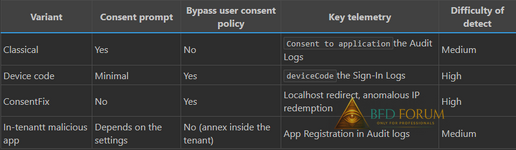
Three options for consent phishingand their detection characteristics
Classical Envy Phishing (IlicitConsent Grant)
The script described above:third-party malware OAuth application, prompt, redirect on theattacker URI. Works against tenants, where the user consent isallowed - and this is a default setting in many organizations.
Applicability: external red team, bugbounty, tents with default consent settings. It is blocked by the “Donot allow user consent” in the Entra ad center. One tick and thevector is closed. But this tick is given to units.
Device code phishing
Exploitation OAuth 2.0 DeviceAuthorization Grant - stream for devices without browser (Smart TV,CLI). The attacker initiates the device code flow for the first-partyapplication Microsoft, receives code and URL, then convinces thevictim to enter the code on the legitimate pagemicrosoft.com/devicelogin.
Publicly, several open-source toolsfor the device code phishing (TakenTactics are the most popular), andthe commercialization of such thucky cells is observed byresearchers. The threshold of entry for attackers is reduced everyyear.
Applicability: It works even when youprohibit the user consent - device code flow uses a pre-consentedfirst-party Microsoft application (Azure CLI, PowerShell). Detect ismore complicated: the user focuses on entering the code and does notanalyze which application is authorized.
ConsentFix: Evolution of Technology
In 2025, researchers (includingVolexity) described a technique crossing the ClickFix socialengineering style with OAuth 2.0, used by the group UTA0352(ConsentFix - author's categorization in this article, an unsuitableterm). The victim is legitimate authenticated for the first-partyapplication (Azure CLI, App ID) 04b07795-8ddb-461a-bbee-02f9e1bf7b46)The browser is redirected to localhost URI with authorization code inthe parameters. The phishing page instructs the victim to copy ordrag URLs with a code - allegedly to "correct the error".Early options required a copy-paste, improved drag-and-drop.
For SOC: ConsentFix does not causeconsent prompt. First-party pre-trusted applications in every EntraID tenant, they don’t need additional consent for basic spaces.User consent restrictions are useless here.
Internal malicious applications(in-tenant malicious OAuth app)
A separate story - in-tenantmalicious OAuth app: the attacker first compromises an account withapplication registration rights, then creates a malicious OAuth appinside the victim's tenant. Such an application looks like aninternal tool - a familiar branding, domain name of the organization.Users trust him more, and the blocking policies of externalapplications do not work.
Applicability: internal pentest,post-compromise persistence, insider threat. Detect: Monitoring AppRegistration in Audit logs.

Detection: telemetry, correlationrules, blind areas
Adjustments to the environment
• Microsoft Entra ID P1/P2 (forfull Sign-in and Audit logs)
• Forwarding logs in SIEM:Microsoft Sentinel, Elastic 8.x+, Splunk via Diagnostic Settings
• Defender for Cloud AppsLicense (for OAuth-politician)
• For Elastic detection rules:version 8.x+ with Azure integration module
Correlation rules for SIEM
KQL request for Microsoft Sentinel -suspicious consent grants:
Code:
AuditLogs
| where OperationName == "Consentto application"
| extend appName =tostring(TargetResources[0].displayName)
| extend userUPN =tostring(InitiatedBy.user.userPrincipalName)
| mv-expand modProp =TargetResources[0].modifiedProperties
| where tostring(modProp.displayName)== "ConsentAction.Permissions"
| extend perms =tostring(modProp.newValue)
| where perms has_any("Mail.Read","Mail.Send","Files.ReadWrite")
| project TimeGenerated, userUPN,appName, perms
KQL for service code flow withabnormal IP:
Code:
SigninLogs
| where AuthenticationProtocol =="deviceCode"
| where ResultType == 0
| where ResourceDisplayName =="Microsoft Graph"
| where IPAddress !in(known_corporate_ips)
| project TimeGenerated,UserPrincipalName, AppDisplayName, IPAddress
Defender for Cloud Apps: built-inOAuth-politics
Defender for Cloud Apps contains anumber of built-in OAuth policy templates (not all included bydefault - the composition depends on the tenant and license):
• Malicious OAuth app sexual -scanning through Microsoft Threat Intelligence
• Suspicious OAuth app filedownload activities - anomalous file downloading activity
• Unusual of credentials to anOAuth app - adding new credentials to the application
• Unusual ISP for an OAuth App- API-challenges from an atypical provider
• Misleading OAuth app name -an application with a name mimicizing the legitimate
• Misleading publisher name forOAuth app - publisher's name, similar to a large vendor
Verification and configuration
 efender for Cloud Apps → Control → Policies → filter "OAuthapp". In practice, in half the tenants I saw, two or three areincluded in the six politicians. The rest are in the default“disabled”.
Blind areas detection-sew
Device code flow creates a minimum ofdistinctive signals - authorization on legitimate Microsoft domains,without fake pages. It looks like a regular login.
First-party apps (Azure CLI, VSCode,PowerShell) are often excluded from the Conditional Access - a blindzone for many configurations. Administrators are afraid to breakDevops-pyplaylines and add exceptions. The attackers know that.
API-activity through OAuth tokensdoes not generate interactive sign-in events - the standard rules ofanomalous logins do not work.
Refresh token allows the attackermonths to update access token without a single alerte, if the initialconsent has not been noticed.
Absence of baseline for OAuth consent- most organizations do not know which applications have consent andwhich are issued. It is difficult to detect an anomaly if there is nonorm.
Detection consent phishing requiresmonitoring the authorization layer, not just the authenticationlayer. For most SOC teams, this means a revision of the detectionstrategy.
Chardening checklist: protectionagainst malware OAuth applications Azure AD
Ready list for the Entra IDadministrator - each item closes a specific vector. You can copy to areport or a ticket.
1. Prohibit User's Enson. Entraadmin center → Enterprise Applications → Consent and permissions→ “Do not allow user consent”. It routes all consent requestsfor the administrator.
2. Include admin consentworkflow. Enterprise Applications → User Settings → Users canrequest admin en service → Enabled. Appoint re-jeopardizers fromthe roles of Global Admin / Cloud App Admin / Application Admin.
3. Delete only service accountswith a confirmed need.
4. Limit first-party apps.Conditional Access Policy for App ID Azure CLI(04b07795-8ddb-461a-bbee-02f9e1bf7b46) and Azure PowerShell(1950a258-227b-4e31-a9cf-717495945fc2): require compliant device.Yes, DevOps will be complaining. But without this, the device codephishing and ConsentFix work out of the box.
5. Enable Token Protection.Conditional Access → Session → Token Protection → Enabled.Teaches access token to the authentication device. Requires Entra IDP1/P2.
6. Activate CAE (ContinuousAccess Evaluation). Review of tokens in near-real-time when changingIP, blocking the account. It works for Exchange Online, SharePoint,Teams.
7. Configure the publisherverification. Allow consent only for verified publishers. ConfigurePermission Classifications for low-risk permissions.
8. Audit of existingOAuth-applications. Enterprise Applications → User Envoy filter.Withdraw the consent for applications with excess scopes. Frequency
nce a quarter. (Spoiler: On the first revision you will find a lotof interesting things.)9. Defender for Cloud Apps. Makesure that all six politicians are included. Configure the alerta onSOC-email.
10. Forwarding logs in SIEM.Azure AD Diagnostic Settings → Audit Logs and Sign-in Logs →Microsoft Sentinel / Elastic / Splunk. Create detection rules (KQLqueries above).
Points 1-2 block the classic consentphishing. Items 3-4 - device code phishing and ConsentFix (both usefirst-party apps). Paragraph 5 - ConsentFix (token binding). Items6-10 - detection and response in case of circumvention of preventivemeasures.
Most SOC teams are confident that MFAand Conditional Access are closing the issue of compromising cloudaccounts. Consent phishing breaks this assumption: the attackerreceives a token operating regardless of all authentication measures.
In my practice - severalred-commissioned teams-projects in fintech and retail - the timebefore the detection of consent-based compromising was from three tosix weeks. During this time, thousands of letters and documents leavethrough the Graph API, the rules of shipment (T1098.002, Persistence)are configured, and if the victim is an administrator who attacks hisroles (T1098.003) and gains control of the tenant.
The regulatory consequences are alsospecific: the leakage of mail with personal data through theOAuth-token is a violation of 152-FZ and potentially GDPR, withnegotiable fines and mandatory notification of the regulator.
The IBM X-Force records an increasein attacks using valid accounting data by 71% year-on-year for 2024.CrowdStrike independently specifies 75% of the incurs with validcredentials - these are different metrics (growth vs share), but bothconfirm one trend. Consent phishing feeds this statistics.
The problem is not technology: TokenProtection and CAE exist. The problem is that the consent settings inmost tenants are in default, the device code flow is not blocked, andthe revision of OAuth applications was last held - never. It’s nota vulnerability, it’s misconfiguration that turns each employeeinto an entry point.