




I'm thinking about starting a series of tutorials that will demonstrate that the development of basic web scrapers is actually very, very simple using C#. The goal of these tutorials is to show the most important parts of the code around which you could develop your own customized scrapers. I'll try to keep it as simple as possible. Anyone with the basic understanding of programming principles and C# should be able to keep up. If you have trouble figuring out some of concepts mentioned here, just use google search and you should be good to go.
I will start with simple Fiverr scraper. Let's begin, shall we.
You first need to add a reference to Newtonsoft json (json framework) to your VS project. You can do that by clicking on "Tools -> NuGet Package Manager" and then to "Manage NuGet Packages for solution", pick the "Online" tab, search for Json.Net and click "install".
There are several things that will be common to almost all of your future scrapers. We will use targeted search in this example, so you need keywords. To keep things simple, in the example we will use only one keyword.
Now we need to get seed url for our scraper. The interesting thing about Fiverr is that it doesn't use classic pagination. If we do a gig search, all of the results will be shown in one page with so called "infinite" scroll. Don't be alarmed, we solve this problem in the same way we do with classic pagination. Open your browsers console. Click on network tab. When you scroll down to the end of the webpage, new results should appear. You can see that the Fiverr sent a request in order to load more results. Here's the screenshot.
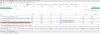
This will be our ticket in. We will use this approach for most of our web scrapers. You can open this url in new browser tab. You will see a bunch of JSON objects. This is the response from the server for our request. We need to convert those JSON objects to C# objects that we can use in our application. In most other websites, response would be in form of html. We will come back to this latter.
So, we now have our url. As you can see there are keyword and page parameters.
Code:
string searchQuery = "seo";
int pageNumber = 1;
string url = "https://www.fiverr.com/gigs/gigs_as_json?host=search&type=single_query&query_string=" + searchQuery + "&search_filter=rating&category_id=99912&limit=48&use_single_query=false&page=" + pageNumber + "&instart_disable_injection=true";
CookieContainer cookieJar = new CookieContainer();
RootObject responseObjects = new RootObject();
HttpWebRequest req = WebRequest.Create(url) as HttpWebRequest;
req.UserAgent = "Mozilla/5.0 (Windows NT 6.1; WOW64) AppleWebKit/535.2 (KHTML, like Gecko) Chrome/15.0.874.121 Safari/535.2";
req.CookieContainer = cookieJar;
HttpWebResponse response = (HttpWebResponse)req.GetResponse();
Stream receiveStream = response.GetResponseStream();
string responseString;
using (var decompress = new GZipStream(receiveStream, CompressionMode.Decompress))
using (var sr = new StreamReader(decompress))
{
responseString = sr.ReadToEnd();
}
responseObjects = (RootObject)Newtonsoft.Json.JsonConvert.DeserializeObject(responseString, typeof(RootObject));
In order to maintain cookie session, we need to store response cookies for the next request, that's why we need a cookie container. We should also set user agent attribute of our request object. This way, the receiving end will think that the page is being accessed by web browser. Now, all we need to do is to catch the response as string and deserialize it to C# objects. But first we first need the equivalent c# classes. We can get them very easily by using an online tool called json2csharp. You just need to input a request url we use, and json2csharp will create appropriate C# classes that we need to put in our project.
Here is the example of classes that you need put in your project:
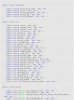
Of course, you could write your own c# classes that correspond to those from Fiverr json result, but you will probably waste too much time doing that.
With this done, we have a core of a Fiverr scraper. You can test your code now, responseObjects variable should contain the first 48 Fiverr gig results for our search keyword.
In order to use this code in the real life application, you should wrap it up in the method. Implement multi-threading, proxy support, multiple keyword search and some UI and you got yourself a fully functional Fiverr scrapper.
To sum up all of the steps:
- Add references to Newtonsoft
- Copy the code
- Go to json2csharp and paste url, and then add the resulting classes to your project
Whenever Fiverr folks change something on their web app, there is a possibility that our code will also demand some minor changes. That's the curse of the web scraping, you never know when someone will break your code with UI redesign
If you have any questions about this code, or you think something should be clarified, please feel free to comment.
I hope I will find the time to produce a series of similar tutorials about web scraping and bots.
Also, if you have problem with your scraper, or you need a new one, if I find the time, I will help you.
Cheers
I will start with simple Fiverr scraper. Let's begin, shall we.
You first need to add a reference to Newtonsoft json (json framework) to your VS project. You can do that by clicking on "Tools -> NuGet Package Manager" and then to "Manage NuGet Packages for solution", pick the "Online" tab, search for Json.Net and click "install".
There are several things that will be common to almost all of your future scrapers. We will use targeted search in this example, so you need keywords. To keep things simple, in the example we will use only one keyword.
Now we need to get seed url for our scraper. The interesting thing about Fiverr is that it doesn't use classic pagination. If we do a gig search, all of the results will be shown in one page with so called "infinite" scroll. Don't be alarmed, we solve this problem in the same way we do with classic pagination. Open your browsers console. Click on network tab. When you scroll down to the end of the webpage, new results should appear. You can see that the Fiverr sent a request in order to load more results. Here's the screenshot.
This will be our ticket in. We will use this approach for most of our web scrapers. You can open this url in new browser tab. You will see a bunch of JSON objects. This is the response from the server for our request. We need to convert those JSON objects to C# objects that we can use in our application. In most other websites, response would be in form of html. We will come back to this latter.
So, we now have our url. As you can see there are keyword and page parameters.
Code:
string searchQuery = "seo";
int pageNumber = 1;
string url = "https://www.fiverr.com/gigs/gigs_as_json?host=search&type=single_query&query_string=" + searchQuery + "&search_filter=rating&category_id=99912&limit=48&use_single_query=false&page=" + pageNumber + "&instart_disable_injection=true";
CookieContainer cookieJar = new CookieContainer();
RootObject responseObjects = new RootObject();
HttpWebRequest req = WebRequest.Create(url) as HttpWebRequest;
req.UserAgent = "Mozilla/5.0 (Windows NT 6.1; WOW64) AppleWebKit/535.2 (KHTML, like Gecko) Chrome/15.0.874.121 Safari/535.2";
req.CookieContainer = cookieJar;
HttpWebResponse response = (HttpWebResponse)req.GetResponse();
Stream receiveStream = response.GetResponseStream();
string responseString;
using (var decompress = new GZipStream(receiveStream, CompressionMode.Decompress))
using (var sr = new StreamReader(decompress))
{
responseString = sr.ReadToEnd();
}
responseObjects = (RootObject)Newtonsoft.Json.JsonConvert.DeserializeObject(responseString, typeof(RootObject));
In order to maintain cookie session, we need to store response cookies for the next request, that's why we need a cookie container. We should also set user agent attribute of our request object. This way, the receiving end will think that the page is being accessed by web browser. Now, all we need to do is to catch the response as string and deserialize it to C# objects. But first we first need the equivalent c# classes. We can get them very easily by using an online tool called json2csharp. You just need to input a request url we use, and json2csharp will create appropriate C# classes that we need to put in our project.
Here is the example of classes that you need put in your project:
Of course, you could write your own c# classes that correspond to those from Fiverr json result, but you will probably waste too much time doing that.
With this done, we have a core of a Fiverr scraper. You can test your code now, responseObjects variable should contain the first 48 Fiverr gig results for our search keyword.
In order to use this code in the real life application, you should wrap it up in the method. Implement multi-threading, proxy support, multiple keyword search and some UI and you got yourself a fully functional Fiverr scrapper.
To sum up all of the steps:
- Add references to Newtonsoft
- Copy the code
- Go to json2csharp and paste url, and then add the resulting classes to your project
Whenever Fiverr folks change something on their web app, there is a possibility that our code will also demand some minor changes. That's the curse of the web scraping, you never know when someone will break your code with UI redesign
If you have any questions about this code, or you think something should be clarified, please feel free to comment.
I hope I will find the time to produce a series of similar tutorials about web scraping and bots.
Also, if you have problem with your scraper, or you need a new one, if I find the time, I will help you.
Cheers