Most of the banks requires OTP code verification when linking through plaid but beneath are some secret banks that links through plaid without OTP and allows buying of crypto through Coinbase even when name there isn’t matching that of the coinbase
For todays Tutorial I will be using "First Tech Federal Credit Union Bank". You all can also get yourselves any of the above banks to load your own Coinbase by buying btc via ACH or linking log to your
1.Once you login on Coinbase, On the portfolio Dashboard you will see these 9 arranged dots, just click on it.

2. On this page, click on Profile & Settings

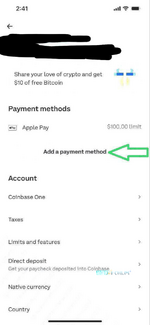
3. This will be the next page after stage 2. Navigate to the Add a Payment Method option as seen above

4. Coinbase is having many Payment Options which you can choose in terms of purchasing crypto from them. However our main focus is on how to buy BTC with Banklog without the name on log matching that of our coinbase. Proceed by tapping on Bank Account as your Payment Option

5.The previous page will redirect you to Plaid. Just click on Continue

6.Now at this section you will be asked to select your bank…. You can choose to link with Online Access or Manually but since our banks doesn’t require any OTP code verification just go ahead and link it with online access.

7.Search the bank and link your Bank Log with the online access and buy BTC for same day withdrawal. To do this, just type the bank name on the space provided above and when your bank appears then you just click on it

8.Login with username and password of the hacked bank log you bought

9. Now all you have to do is wait for the bank to be connected to plaid
10. Most of the banks requires OTP code verification before you get to this stage but Since our aboved bank logs doesn’t require any otp code verification you will be taken to this page straight awayAll you have to do is select the checkings account from which you want to buy your crypto from.

11. Boom our "First Tech Federal CU" has been linked to coinbase successfully
Getting other banks logs aside what I posted above will require otp and name verification.

12. Once you login back to your coinbase payment options you will see the linked account there
13. Now to begin with the Crypto [BTC] Purchasing, just click on Buy or the [+] Sign on your dashboard

14. You will be shown all the Crypto Currencies that exist. Just choose your preferred Crypto currency, that’s the one you want to Purchase. For me I want to buy BTC so I chose BTC

Also check out our list of PLAID :FIRST TECH FEDERAL CREDIT UNION BANK
M&T
HUNTINGTON
For todays Tutorial I will be using "First Tech Federal Credit Union Bank". You all can also get yourselves any of the above banks to load your own Coinbase by buying btc via ACH or linking log to your
1.Once you login on Coinbase, On the portfolio Dashboard you will see these 9 arranged dots, just click on it.
2. On this page, click on Profile & Settings
3. This will be the next page after stage 2. Navigate to the Add a Payment Method option as seen above
4. Coinbase is having many Payment Options which you can choose in terms of purchasing crypto from them. However our main focus is on how to buy BTC with Banklog without the name on log matching that of our coinbase. Proceed by tapping on Bank Account as your Payment Option
5.The previous page will redirect you to Plaid. Just click on Continue
6.Now at this section you will be asked to select your bank…. You can choose to link with Online Access or Manually but since our banks doesn’t require any OTP code verification just go ahead and link it with online access.
7.Search the bank and link your Bank Log with the online access and buy BTC for same day withdrawal. To do this, just type the bank name on the space provided above and when your bank appears then you just click on it
8.Login with username and password of the hacked bank log you bought
9. Now all you have to do is wait for the bank to be connected to plaid
10. Most of the banks requires OTP code verification before you get to this stage but Since our aboved bank logs doesn’t require any otp code verification you will be taken to this page straight awayAll you have to do is select the checkings account from which you want to buy your crypto from.
11. Boom
our "First Tech Federal CU" has been linked to coinbase successfullyGetting other banks logs aside what I posted above will require otp and name verification.
12. Once you login back to your coinbase payment options you will see the linked account there
13. Now to begin with the Crypto [BTC] Purchasing, just click on Buy or the [+] Sign on your dashboard
14. You will be shown all the Crypto Currencies that exist. Just choose your preferred Crypto currency, that’s the one you want to Purchase. For me I want to buy BTC so I chose BTC