





Welcome back, my aspiring cyberwarriors!
Bluetooth is the most underappreciated attack vector into all your devices. Nearly all our devices have a bluetooth adapter and connection that is vulnerable to attack. This includes our cellphones, laptops, Smart Home devices, ICS devices and our ubiquitous bluetooth speakers and headsets. If the attacker can gain access to our Bluetooth, they can listen into our conversations, inject commands, and even take control of our device.
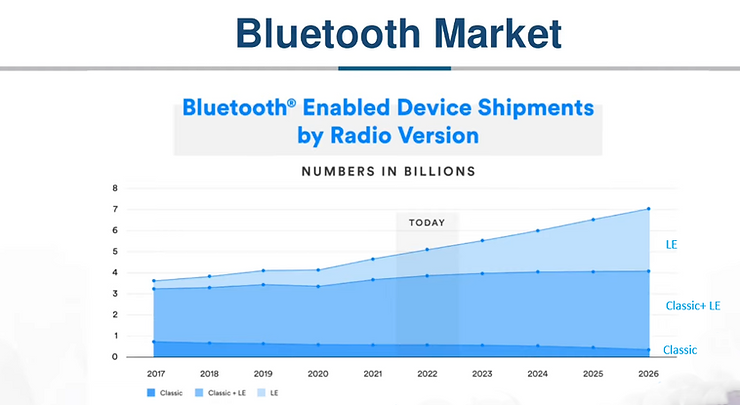
As you can see in the graphic below, the number of Bluetooth enabled devices now exceeds the number of people on our planet!

Beginning with Bluetooth 4.0 (we are now in Bluetooth 6.0), Bluetooth introduced a low-energy version of bluetooth. This new protocol is designed for lightweight devices without a lot of battery-life and do not need the download speeds of Bluetooth Classic. This is the fastest area of growth in Bluetooth. Many devices now come equipped with both Bluetooth Classic and Bluetooth Smart or Low-Energy (often referred to as BLE). In the graph below, you can see that devices shipping with just Bluetooth Classic dropping rapidly and those with just BLE is growing the fastest. The bulk of new devices have both but I will predict that in a few years, Bluetooth Classic will be discontinued. As a result, we should focus our energy and attention of BLE.
In recent years, there have been a proliferation of new tools for recon and to hack Bluetooth devices. In this series, we will attempt to demonstrate many of them, but before do, let’s take a look at a tool that has been around for quite some time, Bettercap.
Most of you are familiar with Bettercap as a MiTM tool but has a multitude of applications. One of the least used and understood is BLE reconnaissance and data (attribute) manipulation.
Let’s take a look at it now!
Step 1: Download and install bettercap
The first step, of course, is to download and install bettercap. Bettercap is in the Kali repository, so this step is rather simple.kali > sudo apt install bettercap

Step 2: Start Bettercap
When you installed bettercap, the binary was placed in a directory in your $PATH variable on your system, so you only need to enter sudo followed by bettercap to start the application.
kali > sudo bettercap

To see bettercap’s help screen, simply enter help

When you scroll down, you can see a list of all the modules. At the outset, only the events.stream module is running.

In our case here, we will be using the ble.recon module. To see the help screen for this module, simply preface help before the ble.recon module name.
bettercap > help ble.recon

Here you can see the various commands of this module.
Now, let’s start this module
bettercap > ble.recon on

When the module starts running, it will begin to detect all the BLE devices in your vicinity.
Let’s select one of those devices and see whether we can get addition information about it. Notice that there is a device named “Suzy’s Speaker”. To get more information about Suzy’s Speaker, we simply use the ble.enum command followed the MAC address of the device.
bettercap > ble.enum <MAC Address>

As you can see above, when bettercap connects to the device, it can enumerate or list all of the characteristics (attributes) of the device.
Step 4: Writing to the Device
In some cases, such as social engineering, we may want to change the name of the device. In some cases, we can change the characteristics of the device using the ble.write command. To do so, we will need the MAC Address of the device, the UUID of the characteristics (each characteristic on a ble device has a unique UUID) and the information to be written to the device in hexadecimal.
The syntax looks like this:
bettercap > ble.write <MAC Address> <UUID> <Name in HEX>
To convert your ASCII text into hexadecimal, there are many online tools and here is a link to one below.
https://neapay.com/online-tools/hex-to-ascii-converter.html
In this case, I want to rename the device from Suzy’s Speaker to FBI, after the federal law enforcement agency in the US. This will likely give Suzy quite a start if you sees that she is connected to the FBI via Bluetooth.
The command should look like this.

As you can see in the screenshot below, the device has been renamed “FBI”. Be careful Suzy!

When we initiate a new BLE scan, we can see the device has been renamed “FBI”.

Summary
Bluetooth and Bluetooth LE are part of digital landscape with devices throughout our homes and offices. This protocol, unfortunately, has been found to have numerous vulnerabilities that can enable the attacker to listen to your calls or inject commands into your device without your knowledge. The first step, of course, is to find the devices and Bettercap is one of many tools that can help us find them. In addition, in some devices we can actually change some of the fields such as its name. In this way, the device might become a part of social engineering attack on the device.

