




Addressing and data transmission in the network
As we learned from previous articles, there are various data transmission channels, such as electrical wires, fiber optic cables, and radio waves. But in order to unite digital devices into a single network, one common condition is needed. This condition is a protocol, which implies a set of rules for interaction between network devices. The protocol includes one device addressing another by name, a handshake, exchanging information in the form of data transmission, and breaking the connection.
Today, the main network model for data transmission is actually TCP/IP. This model defines the basic set of rules for high-quality data transmission from the sender to the recipient.
The TCP/IP protocol stack consists of four levels: network interfaces, network, transport, and application. I don't think it makes sense to analyze this stack in detail within the framework of this article (those interested can read about it in textbooks). We'll just give a schematic drawing.
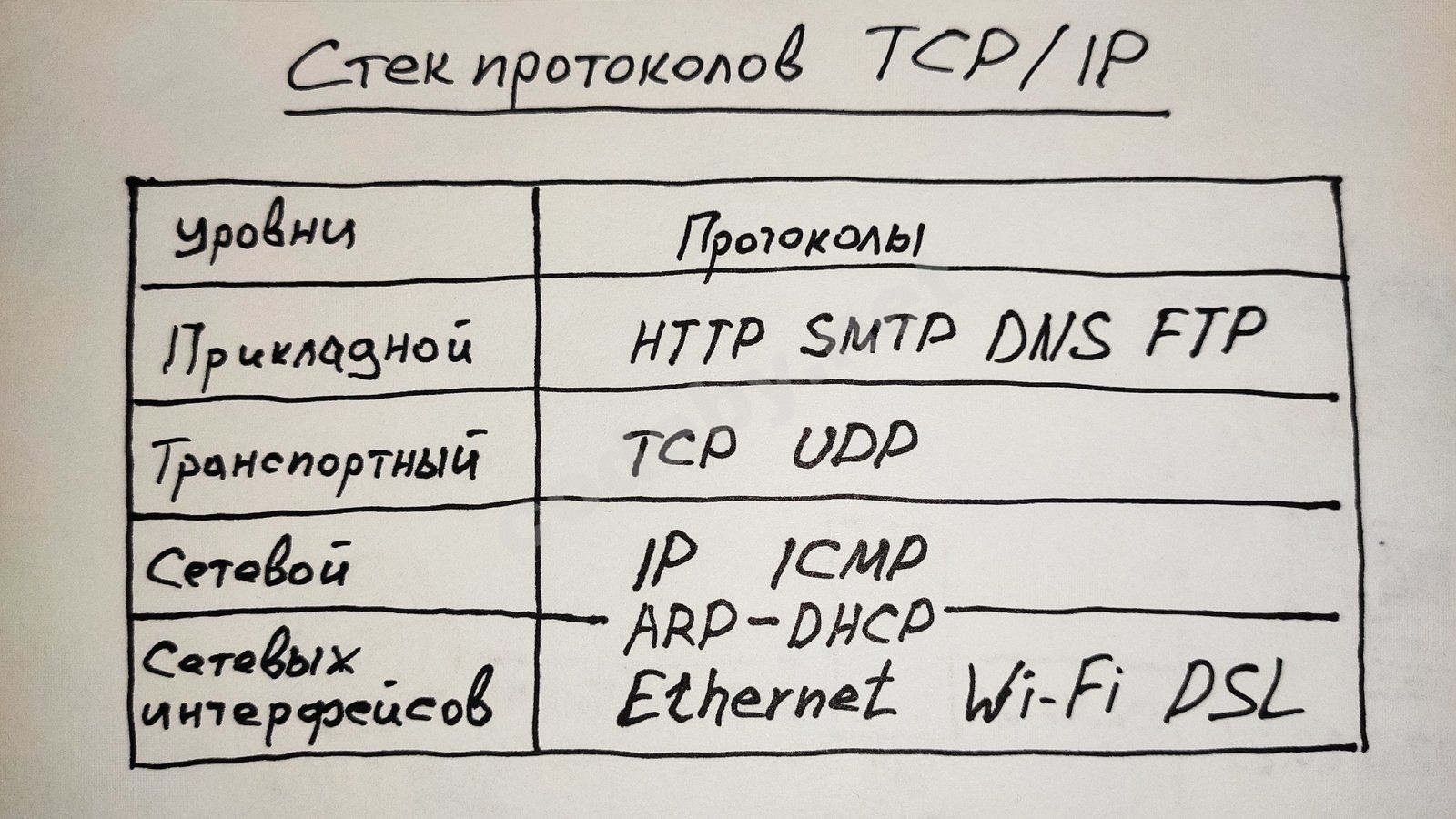
To understand the basic principle of data transmission in a computer network, let's look at two protocols:
- TCP (Transmission Control Protocol) - data transmission control protocol. Responsible for establishing a connection between the sender and the recipient and guarantees the integrity and safety of transmitted packets.
- IP stands for Internet Protocol, or - the protocol of internetwork interaction. This protocol provides data transfer in the network without establishing a connection, unification of networks built on different principles, quality of service, and construction of a route from the sender to the recipient .
For clarity, let's compare the TCP and IP protocols with a driver and a forwarder. Together they will deliver the cargo to the specified address safe and sound.

If the driver (IP protocol) goes alone, he will simply lose the cargo along the way.

If the forwarder (TCP protocol) gets behind the wheel and transports his cargo without a driver, he will deliver it safe and sound, but to a completely different address, and most likely will not even be able to move.

When building computer networks, two types of addresses are used - local and global. Local addresses include MAC addresses - in Ethernet networks and IMEI (International Mobile Equipment Identity) - in GSM networks. Global addresses include IP addresses, used to unite local networks built on different channel layer technologies into the global Internet.
It is no secret that in the modern world, every device connected to the global network has its own IP address. An IP address is a unique address of a device in a network built on the basis of the TCP/IP protocol stack, and is used to uniquely identify computers in a composite network. In order to correctly identify the sender and recipient of data, IP addressing was invented (similar to how a parcel is delivered by the postal service from one postal address to another, accurately determining the country, city, street name and house number of the recipient).
There are two versions of IP addresses, IPv4 and IPv6. The main difference is that IPv4 is 4 bytes long, while IPv6 is 16 bytes long. There are also a number of other differences. For the purposes of this article, we will look at IP addresses version 4.
As already mentioned, the length of an IPv4 address is 4 bytes or 32 bits. As you know, bits are written as zeros and ones. For convenience, IP addresses are usually written in decimal form, as four separate values in the range from 0 to 255, separated by a dot and called octets (eight binary digits).
11011110101010111100000100011001 – in binary form (32 values),
222.171.193.25 – in decimal form.
Each decimal value understandable to humans has a corresponding binary interpretation for constructing machine code:
222 - 11011110 ,
171 - 10101011 ,
193 - 11000001 ,
25 - 00011001 .
It is important to distinguish between internal and external IP addresses.
The construction of a global network is carried out on the basis of the unification of smaller subnets, characterized by the same senior part of internal IP addresses.
222.171.193.1
222.171.193.2
222.171.193.3
…
222.171.193.254
The IP address structure consists of two parts – the subnet number and the host number. The host in this case is any network device that has its own IP address. If we consider the IP address 222.171.193.2 , the subnet number here will be 222.171.193.0 , and the host number will be 0.0.0.2 . In other words, we can say that the IP address 222.171.193.2 belongs to the network device with the conventional number 2.
Mask reminded.
Like the IP address, the subnet mask consists of 4 octets and is 32 bits long. The subnet mask is usually written as 255.255.255.0 . In the case of the address 222.171.193.2 , this means that the value 222.171.193.0 (or the first 3 octets) is the subnet number, and 0.0.0.2 (the last octet) is the host number. This value can also be written as a prefix 222.171.193.2 /24 , which will be equivalent to the entry IP address 222.171.193.2 , subnet mask 255.255.255.0 . In the case of writing with a prefix, it is implied that the first 24 bits of the address refer to the subnet number.
However, the first three octets do not always determine the subnet number, and the last one – the host number. Quite often, when constructing larger subnets, in practice there is such a phenomenon when the third octet in the construction of the IP address is conditionally divided into two parts, the first of which refers to the subnet number, and the second – to the host number. Such a mask is called a variable-length mask.
If the subnet mask has the prefix /20, for example 222.171.193.2 /20 , this means that the first 20 of the 32 bits allocated to us refer to the subnet number in this case, and the remaining 12 bits refer to the host number. In this case, the subnet mask will be 255.255.240.0 .
To determine the subnet number, the AND operator is used . If you recall your school computer science course – 1 AND 1 equals 1 , 1 AND 0 equals 0 , 0 AND 1 equals 0 , 0 AND 0 equals 0 .
11111111 11111111 11110000 00000000 - Mask sub-remember
AND
11011110 10101011 11000001 00000010 - IP address
equals
11011110 10101011 11000000 00000000 - Subnet number
We get the subnet number 222.171.192.0 and the host number 0.0.1.2 .
Broadcast and group addressing are used to deliver data packets to several devices at once. Such addressing is used within one subnet.
It should be noted that for developing and testing network applications, it is sometimes necessary to run them on a local computer, for this purpose the so-called loopback 127.0.0.0 /8 is used . In the case of working with a loopback, data does not go to the network, but returns to the host machine.
For example, to develop a website in the PHP programming language with a MySQL database in not so distant times, due to the fact that Internet traffic was quite expensive, a local server called Denwer was installed on the computer. To launch the website being developed in your browser, you had to go to localhost by typing the IP address 127.0.0.1 in the address bar .
On a global scale, the distribution of IP addresses is handled by the international non-profit organization ICANN (Internet Corporation for Assigned Names and Numbers). ICANN distributes ranges of IP addresses between regional registrars assigned to specific territories of the globe.
For the creation of local networks, special ranges of IP addresses are reserved that are not used in the external network. These addresses within the boundaries of their subnet are assigned by the administrators of these subnets or routers. According to RFC 1918 and RFC 6598, the following ranges of private IP addresses are recommended for the construction of local networks:
10.0.0.0 /8 ,
100.64.0.0 /10 ,
172.16.0.0 /12 ,
192.168.0.0 /16 .
However, this condition is only advisory in nature and is not mandatory.
To connect a local subnet to the global Internet, the NAT (Network Address Translation) technology is used. With this technology, passing through the router, the IP address of the local subnet is replaced by the global IP address assigned to us by our Internet provider. The introduction of NAT technology was a consequence of the shortage of IPv4 addresses.
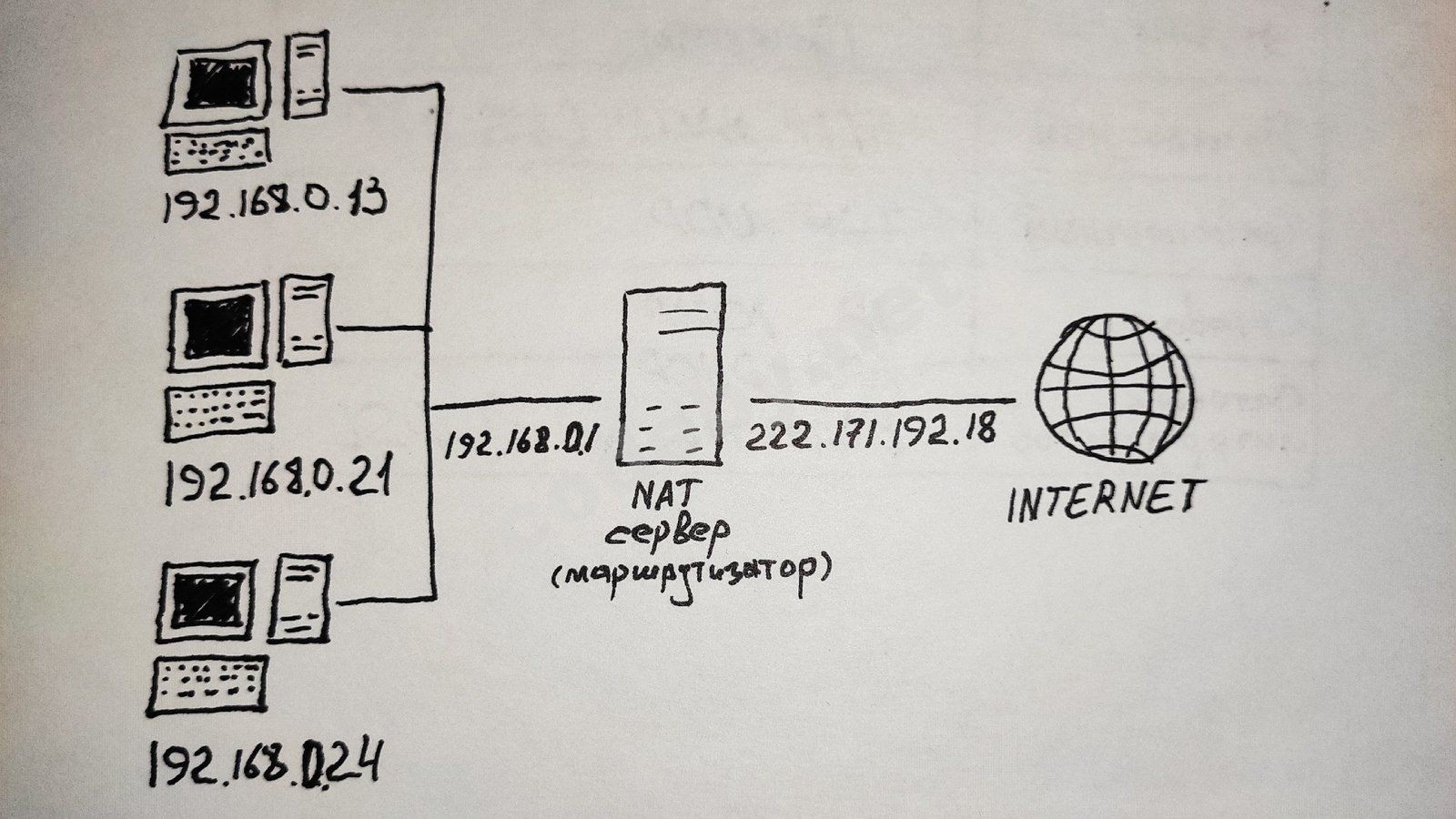
The transition to IPv6 makes the use of NAT technology unnecessary, which on the one hand can be a security hole for network devices, but on the other hand, networks with IPv6 addresses are not subject to network scanning.
To find out the local IP address of your device and the subnet mask, you can enter the ipconfig command in the Windows command line; in Linux, use the ifconfig command.
Based on the above, in the vastness of the global network, all devices included in your local network are identified by the IP address assigned to you by the provider, by which the competent authorities can easily calculate the local network and the device itself from which certain illegal actions were committed. A device in the network can be identified by the unique MAC address assigned to it by the manufacturer.
This procedure for identifying us online is not always acceptable even for completely respectable law-abiding citizens, since not every person is ready to make their private life public property. After all, the resources you visit can easily determine your interests and preferences by your IP address, creating a kind of digital profile about you, which is actually happening now. So are there really no ways to hide your real IP address? As they say, there is always a way out.
A little practice: Using a Proxy server to change your IP address.
Perhaps the simplest and most publicly available way to hide your IP address is to use a Proxy server. Of course, there are many other more complex and more reliable tools for ensuring your anonymity on the vastness of the global network.
So, let's imagine that we have a task - to register in a Mexican social network. However, only IP addresses in the Mexican range are allowed for registration. In order to find a Mexican Proxy server, go to any search engine and enter "proxy" in it. As a result of the search query, we get a lot of different sites providing Proxy and VPN services. Go to any of them and look for a Mexican Proxy server there. In this case, the type that will suit us is https.
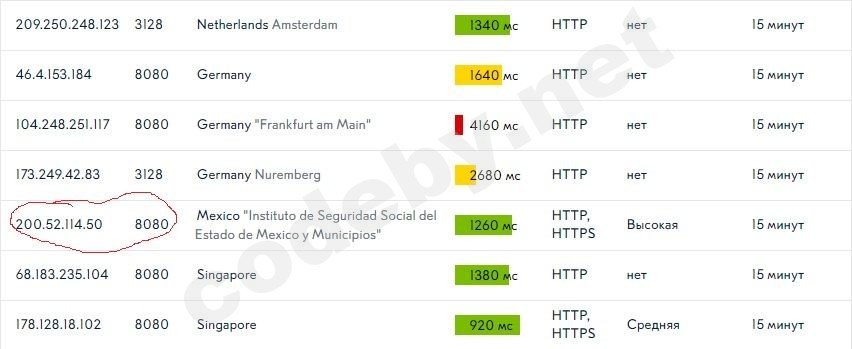
We need the IP address and Port of the selected Proxy server.
Open the browser (in my case it is Mozilla Firefox) and go to the network settings Preferences / Network Settings. Then select the Manual proxy configuration item, insert the corresponding data into the HTTP Proxy and Port fields and click OK.
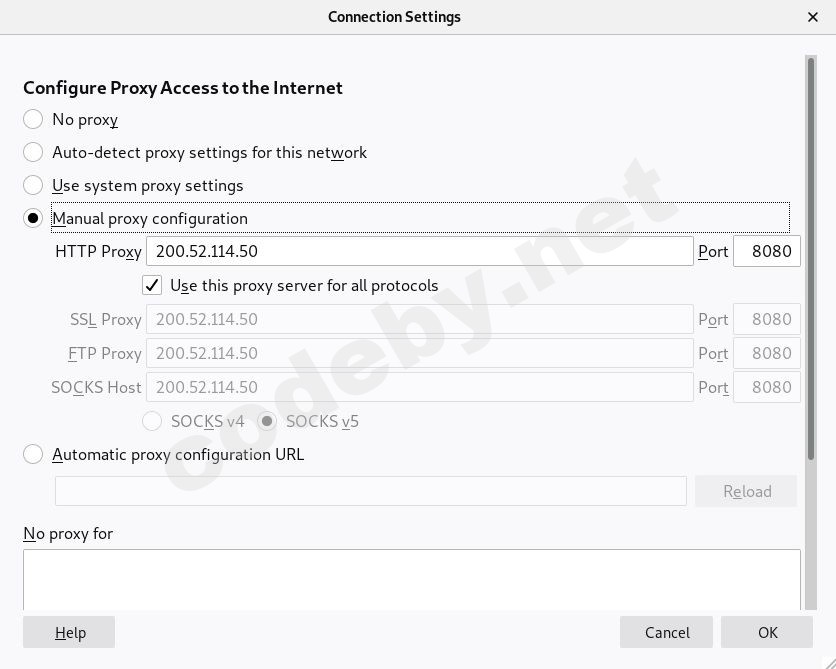
To make sure that the Proxy server we have chosen is actually working, go to the whoer.net website.
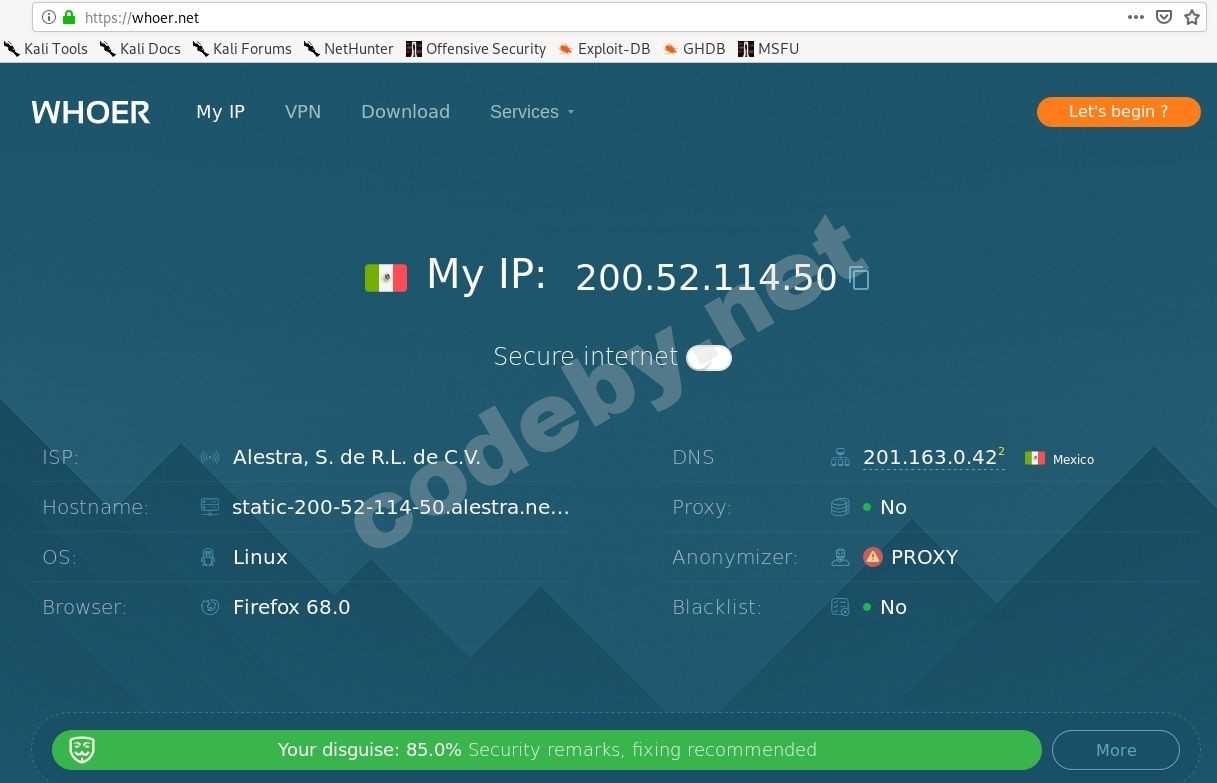
We see that our data has been successfully replaced and we can register on the Mexican site without any problems. However, our ISP sees that we are using a Proxy server.
Let's sum it up. Each device is identified in the network by its unique data, namely by IP and MAC address. But if absolutely necessary, any data can be hidden by replacing them with other values.
This article does not call for illegal or antisocial actions. Remember that everything secret becomes clear.
In order to consolidate the information received, let's do some homework.
1. Calculate the subnet number for the address 105.113.107.29 /23 ;
2. Find the USA proxy server, enter it into your browser's network settings, go to whoer.net and take a screenshot of the American IP address.
As we learned from previous articles, there are various data transmission channels, such as electrical wires, fiber optic cables, and radio waves. But in order to unite digital devices into a single network, one common condition is needed. This condition is a protocol, which implies a set of rules for interaction between network devices. The protocol includes one device addressing another by name, a handshake, exchanging information in the form of data transmission, and breaking the connection.
Today, the main network model for data transmission is actually TCP/IP. This model defines the basic set of rules for high-quality data transmission from the sender to the recipient.
The TCP/IP protocol stack consists of four levels: network interfaces, network, transport, and application. I don't think it makes sense to analyze this stack in detail within the framework of this article (those interested can read about it in textbooks). We'll just give a schematic drawing.
To understand the basic principle of data transmission in a computer network, let's look at two protocols:
- TCP (Transmission Control Protocol) - data transmission control protocol. Responsible for establishing a connection between the sender and the recipient and guarantees the integrity and safety of transmitted packets.
- IP stands for Internet Protocol, or - the protocol of internetwork interaction. This protocol provides data transfer in the network without establishing a connection, unification of networks built on different principles, quality of service, and construction of a route from the sender to the recipient .
For clarity, let's compare the TCP and IP protocols with a driver and a forwarder. Together they will deliver the cargo to the specified address safe and sound.
If the driver (IP protocol) goes alone, he will simply lose the cargo along the way.
If the forwarder (TCP protocol) gets behind the wheel and transports his cargo without a driver, he will deliver it safe and sound, but to a completely different address, and most likely will not even be able to move.
When building computer networks, two types of addresses are used - local and global. Local addresses include MAC addresses - in Ethernet networks and IMEI (International Mobile Equipment Identity) - in GSM networks. Global addresses include IP addresses, used to unite local networks built on different channel layer technologies into the global Internet.
It is no secret that in the modern world, every device connected to the global network has its own IP address. An IP address is a unique address of a device in a network built on the basis of the TCP/IP protocol stack, and is used to uniquely identify computers in a composite network. In order to correctly identify the sender and recipient of data, IP addressing was invented (similar to how a parcel is delivered by the postal service from one postal address to another, accurately determining the country, city, street name and house number of the recipient).
There are two versions of IP addresses, IPv4 and IPv6. The main difference is that IPv4 is 4 bytes long, while IPv6 is 16 bytes long. There are also a number of other differences. For the purposes of this article, we will look at IP addresses version 4.
As already mentioned, the length of an IPv4 address is 4 bytes or 32 bits. As you know, bits are written as zeros and ones. For convenience, IP addresses are usually written in decimal form, as four separate values in the range from 0 to 255, separated by a dot and called octets (eight binary digits).
11011110101010111100000100011001 – in binary form (32 values),
222.171.193.25 – in decimal form.
Each decimal value understandable to humans has a corresponding binary interpretation for constructing machine code:
222 - 11011110 ,
171 - 10101011 ,
193 - 11000001 ,
25 - 00011001 .
It is important to distinguish between internal and external IP addresses.
The construction of a global network is carried out on the basis of the unification of smaller subnets, characterized by the same senior part of internal IP addresses.
222.171.193.1
222.171.193.2
222.171.193.3
…
222.171.193.254
The IP address structure consists of two parts – the subnet number and the host number. The host in this case is any network device that has its own IP address. If we consider the IP address 222.171.193.2 , the subnet number here will be 222.171.193.0 , and the host number will be 0.0.0.2 . In other words, we can say that the IP address 222.171.193.2 belongs to the network device with the conventional number 2.
Mask reminded.
Like the IP address, the subnet mask consists of 4 octets and is 32 bits long. The subnet mask is usually written as 255.255.255.0 . In the case of the address 222.171.193.2 , this means that the value 222.171.193.0 (or the first 3 octets) is the subnet number, and 0.0.0.2 (the last octet) is the host number. This value can also be written as a prefix 222.171.193.2 /24 , which will be equivalent to the entry IP address 222.171.193.2 , subnet mask 255.255.255.0 . In the case of writing with a prefix, it is implied that the first 24 bits of the address refer to the subnet number.
However, the first three octets do not always determine the subnet number, and the last one – the host number. Quite often, when constructing larger subnets, in practice there is such a phenomenon when the third octet in the construction of the IP address is conditionally divided into two parts, the first of which refers to the subnet number, and the second – to the host number. Such a mask is called a variable-length mask.
If the subnet mask has the prefix /20, for example 222.171.193.2 /20 , this means that the first 20 of the 32 bits allocated to us refer to the subnet number in this case, and the remaining 12 bits refer to the host number. In this case, the subnet mask will be 255.255.240.0 .
To determine the subnet number, the AND operator is used . If you recall your school computer science course – 1 AND 1 equals 1 , 1 AND 0 equals 0 , 0 AND 1 equals 0 , 0 AND 0 equals 0 .
11111111 11111111 11110000 00000000 - Mask sub-remember
AND
11011110 10101011 11000001 00000010 - IP address
equals
11011110 10101011 11000000 00000000 - Subnet number
We get the subnet number 222.171.192.0 and the host number 0.0.1.2 .
Broadcast and group addressing are used to deliver data packets to several devices at once. Such addressing is used within one subnet.
It should be noted that for developing and testing network applications, it is sometimes necessary to run them on a local computer, for this purpose the so-called loopback 127.0.0.0 /8 is used . In the case of working with a loopback, data does not go to the network, but returns to the host machine.
For example, to develop a website in the PHP programming language with a MySQL database in not so distant times, due to the fact that Internet traffic was quite expensive, a local server called Denwer was installed on the computer. To launch the website being developed in your browser, you had to go to localhost by typing the IP address 127.0.0.1 in the address bar .
On a global scale, the distribution of IP addresses is handled by the international non-profit organization ICANN (Internet Corporation for Assigned Names and Numbers). ICANN distributes ranges of IP addresses between regional registrars assigned to specific territories of the globe.
For the creation of local networks, special ranges of IP addresses are reserved that are not used in the external network. These addresses within the boundaries of their subnet are assigned by the administrators of these subnets or routers. According to RFC 1918 and RFC 6598, the following ranges of private IP addresses are recommended for the construction of local networks:
10.0.0.0 /8 ,
100.64.0.0 /10 ,
172.16.0.0 /12 ,
192.168.0.0 /16 .
However, this condition is only advisory in nature and is not mandatory.
To connect a local subnet to the global Internet, the NAT (Network Address Translation) technology is used. With this technology, passing through the router, the IP address of the local subnet is replaced by the global IP address assigned to us by our Internet provider. The introduction of NAT technology was a consequence of the shortage of IPv4 addresses.
The transition to IPv6 makes the use of NAT technology unnecessary, which on the one hand can be a security hole for network devices, but on the other hand, networks with IPv6 addresses are not subject to network scanning.
To find out the local IP address of your device and the subnet mask, you can enter the ipconfig command in the Windows command line; in Linux, use the ifconfig command.
Based on the above, in the vastness of the global network, all devices included in your local network are identified by the IP address assigned to you by the provider, by which the competent authorities can easily calculate the local network and the device itself from which certain illegal actions were committed. A device in the network can be identified by the unique MAC address assigned to it by the manufacturer.
This procedure for identifying us online is not always acceptable even for completely respectable law-abiding citizens, since not every person is ready to make their private life public property. After all, the resources you visit can easily determine your interests and preferences by your IP address, creating a kind of digital profile about you, which is actually happening now. So are there really no ways to hide your real IP address? As they say, there is always a way out.
A little practice: Using a Proxy server to change your IP address.
Perhaps the simplest and most publicly available way to hide your IP address is to use a Proxy server. Of course, there are many other more complex and more reliable tools for ensuring your anonymity on the vastness of the global network.
So, let's imagine that we have a task - to register in a Mexican social network. However, only IP addresses in the Mexican range are allowed for registration. In order to find a Mexican Proxy server, go to any search engine and enter "proxy" in it. As a result of the search query, we get a lot of different sites providing Proxy and VPN services. Go to any of them and look for a Mexican Proxy server there. In this case, the type that will suit us is https.
We need the IP address and Port of the selected Proxy server.
Open the browser (in my case it is Mozilla Firefox) and go to the network settings Preferences / Network Settings. Then select the Manual proxy configuration item, insert the corresponding data into the HTTP Proxy and Port fields and click OK.
To make sure that the Proxy server we have chosen is actually working, go to the whoer.net website.
We see that our data has been successfully replaced and we can register on the Mexican site without any problems. However, our ISP sees that we are using a Proxy server.
Let's sum it up. Each device is identified in the network by its unique data, namely by IP and MAC address. But if absolutely necessary, any data can be hidden by replacing them with other values.
This article does not call for illegal or antisocial actions. Remember that everything secret becomes clear.
In order to consolidate the information received, let's do some homework.
1. Calculate the subnet number for the address 105.113.107.29 /23 ;
2. Find the USA proxy server, enter it into your browser's network settings, go to whoer.net and take a screenshot of the American IP address.


